Join us at GITEX 2025! Discover our solutions at Hall 4, Booth H-30 Schedule a Meeting Today.
Automate Marketing Initiatives with Salesforce Marketing Cloud Learn More
Join us at GITEX 2024! Discover our solutions at Hall 4, Booth H-30 Book your live demo today.
Zehntech Odoo App

POS Stock

Real-Time Stock Visibility on Your Odoo POS Screen — Never Oversell Again. Display live product quantities directly on Point of Sale product tiles. Block out-of-stock sales, highlight low-stock items, and give cashiers instant inventory confidence — all without leaving the POS interface.

Compatible with Odoo 16, 17, 18 & 19
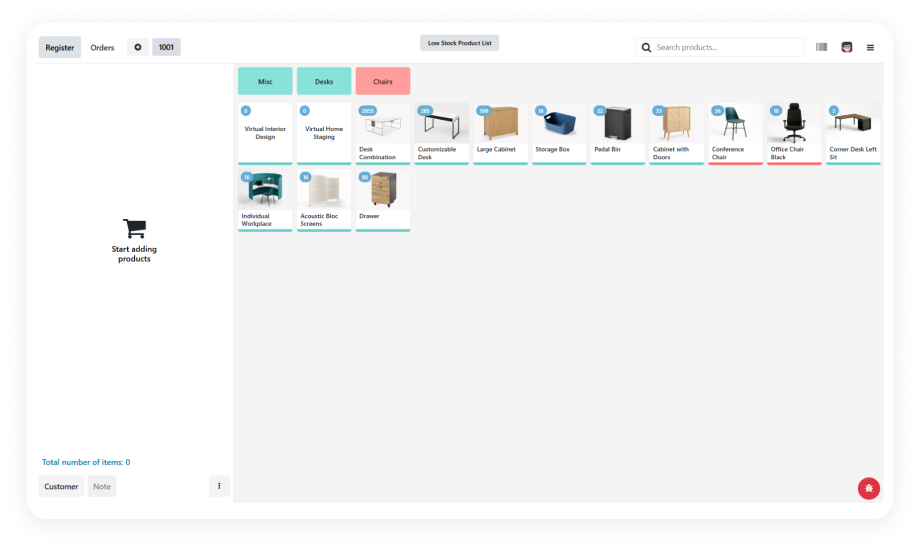
Real-Time Stock on Every Product Tile
Low-Stock Threshold Alerts
Out-of-Stock Sale Blocking
PDF & CSV Low-Stock Reports
$14.93
V19, 18, 17
POS Stock — Real-time inventory visibility on Odoo Point of Sale product tiles

What Does POS Stock Do?

POS Stock for Odoo brings real-time inventory quantities directly into the Point of Sale interface. Cashiers see live stock counts on every product tile, receive visual low-stock alerts, and are blocked from selling unavailable items — eliminating overselling and customer disappointment at the counter. Your cashiers sell with confidence. Your store managers spot low-stock situations before they become stockouts.

Real-time stock on product tiles
On-hand or available quantity modes
Low-stock threshold alerts
Out-of-stock sale blocking
PDF & CSV low-stock reports

Blind Selling at the POS Counter Costs You Sales and Trust

Without POS Stock
With POS Stock
No stock visibility at POS — cashiers see no quantity data
Live counts on every product tile, visible at the moment of sale
Low-stock discovered only after stockout occurs
Visual threshold alerts before items run out
Sales proceed on unavailable products — overselling and refunds
Automatic blocking with clear alert messages at checkout
No choice of quantity mode
Choose on-hand or available quantity to match your fulfillment workflow
Zero-stock products displayed alongside available items
Optionally hidden from the product grid entirely
Low-stock reporting requires backend inventory access
One-click PDF & CSV export from POS context
Cashier uncertain — relies on memory or stockroom calls
Informed — sees real data before every sale
Risk of "sorry, unavailable" after checkout begins
Smooth transactions with only sellable items shown

Key Features of POS Stock

1

Real-Time Stock Display on Product Tiles

Live inventory quantities appear directly on each product card in the POS interface. Cashiers see exactly how many units are available without navigating away from the sales screen or consulting another system.

Why it matters: Cashiers make informed decisions instantly. No tab-switching, no calling the stockroom, no guessing — just accurate counts visible at the moment of sale.

2

Dual Quantity Display Modes

Choose between displaying on-hand quantity (physical stock in the warehouse) or available quantity (on-hand minus reserved/committed stock). Configure the mode that matches your fulfillment workflow.

Why it matters: The right mode prevents promise-what-you-can't-deliver scenarios for both dedicated retail stock and shared warehouse operations.

3

Configurable Low-Stock Threshold Alerts

Set minimum stock thresholds per product or globally. When inventory drops below the configured level, the product tile is visually highlighted — giving cashiers and managers an instant heads-up before stockout occurs.

Why it matters: Proactive awareness beats reactive discovery. Staff can alert purchasing, suggest alternatives, or prioritize restocking before the shelf is empty and sales are lost.

4

Out-of-Stock Sale Blocking with Alert Messages

When a product hits zero stock, the module blocks the sale and displays a clear alert message. This prevents negative inventory, avoids fulfillment failures, and stops orders that can't be completed.

Why it matters: A single oversold order costs more than the sale itself — refund processing, customer service time, reputation damage. Blocking at the source eliminates the entire chain.

5

Hide Zero-Stock Products from POS Interface

Optionally remove out-of-stock items from the POS product grid entirely. Cashiers only see sellable products, reducing visual clutter and eliminating the chance of accidentally selecting unavailable items.

Why it matters: A cleaner interface means faster service. Cashiers don't waste time scrolling past products they can't sell.

6

Low-Stock Reports in PDF & CSV

Generate centralized reports listing all products below their configured low-stock threshold. Export in PDF for quick review or CSV for further analysis in spreadsheets or purchasing systems.

Why it matters: Store managers and procurement teams need actionable data, not dashboard exploration. One-click exportable reports accelerate reorder decisions.

Who Gets The Most Out Of This Module

Role
Primary Use Case
Key Outcome
Retail Store Manager
Monitor real-time inventory levels across all POS products from one screen
Proactive restocking decisions before products hit zero availability
POS Cashier
See available stock counts on product tiles before processing a sale
Confident selling without oversell errors or customer disappointment
Warehouse Manager
Receive low-stock alerts triggered by POS-level thresholds
Faster replenishment cycles driven by front-line demand signals
Multi-Store Operations Director
Configure stock display rules and thresholds across multiple store locations
Consistent inventory visibility and stock control policies chain-wide
Procurement Officer
Export low-stock CSV reports to trigger purchase orders
Data-driven reorder decisions without manual stock-level checking
Customer Service Lead
Prevent out-of-stock sales that generate refund requests and complaints
Reduced post-sale issues and higher customer satisfaction scores

Supported Odoo Versions & User Guides

Choose your Odoo version and explore interactive documentation

User guide not available for Odoo 16 — documentation included with purchase.

POS Stock vs. Standard Odoo POS

Capability
With POS Stock
Standard Odoo POS
Stock Visibility at POS
✔ Live counts on every product tile
None — cashiers see no quantity data
Low-Stock Awareness
✔ Visual threshold alerts before items run out
Discovered only after stockout occurs
Out-of-Stock Prevention
✔ Automatic blocking with alert messages
Sales proceed on unavailable products
Quantity Mode
✔ Choose on-hand or available quantity
Not applicable
Zero-Stock Products
✔ Optionally hidden from the product grid
Displayed alongside available items
Low-Stock Reporting
✔ One-click PDF & CSV export from POS context
Requires backend inventory access
Cashier Confidence
✔ Informed — sees real data before every sale
Uncertain — relies on memory or stockroom calls
Customer Experience
✔ Smooth transactions, only sellable items shown
Risk of "sorry, unavailable" after checkout begins

How to Get Started

No development environment. No custom code. No extra hardware required.

01

Install the Module

Purchase POS Stock from the Odoo App Store. Install it on your Odoo instance (Online, Odoo.sh, or On-Premise). The module automatically integrates with your existing Point of Sale, Inventory, and Sales modules.

02

Configure Stock Display Settings

Navigate to the POS configuration panel. Choose your preferred quantity display mode (on-hand vs. available). Set low-stock threshold values. Enable or disable zero-stock product hiding based on your store workflow.

03

Open POS and Verify

Launch your Point of Sale session. Product tiles now display real-time stock quantities. Confirm that low-stock items show visual highlights and that out-of-stock products trigger blocking alerts per your configuration.

04

Monitor and Export Reports

Use the built-in low-stock reporting feature to generate PDF or CSV exports on demand. Share reports with procurement and warehouse teams to keep restocking aligned with actual POS-level demand patterns.

Technical Details & Compatibility

Parameter
Odoo Versions
Dependencies
License
Deployment
Lines of Code
Multi-Company
Languages
Technical Name
Developer
Support
Details
16.0 · 17.0 · 18.0 · 19.0
Point of Sale (point_of_sale) · Inventory (stock) · Sales (sale_management) · Discuss (mail) · Invoicing (account)
OPL-1 (Odoo Proprietary License)
Odoo Online · Odoo.sh · On-Premise
1,994
Supported
Follows Odoo's standard translation framework
zehntech_pos_stock_info
Zehntech Technologies Inc.
FAQ

Frequently Asked Questions

The module supports both modes. You choose which quantity type to display in the POS configuration settings. On-hand quantity shows total physical stock in your warehouse. Available quantity subtracts reserved and committed stock from the on-hand count.
Yes. Low-stock thresholds can be configured to flag items when they drop below a specific quantity level. High-velocity products can have higher thresholds to trigger earlier replenishment alerts. Visual highlighting on the POS screen makes it immediately obvious which products need attention.
The module blocks the sale and displays a clear alert message explaining that the product is unavailable. This prevents negative inventory, eliminates fulfillment failures, and avoids the cost of processing refunds. Optionally, you can hide out-of-stock products entirely so they never appear on the POS screen.
POS Stock integrates with Odoo's inventory module and respects warehouse and location assignments configured for each POS session. Stock quantities displayed reflect the specific warehouse or stock location tied to that Point of Sale terminal. Multi-company environments are also supported with independent configurations per company.
POS Stock is a one-time purchase at $14.93. There are no recurring fees, no monthly charges, and no subscription required. Lifetime updates are included with your purchase for all supported Odoo versions (16, 17, 18, 19).

One-Time Purchase.
No Subscription.
No Recurring Fees.

Get POS Stock for Odoo today and give every cashier real-time inventory visibility directly on the Point of Sale screen. $14.93 — Lifetime Access | All Supported Versions | Free Updates.

Zehntech Odoo experts


          You have successfully subscribed to the newsletter

          There was an error while trying to send your request. Please try again.

          Zehntech will use the information you provide on this form to be in touch with you and to provide updates and marketing.