Join us at GITEX 2025! Discover our solutions at Hall 4, Booth H-30 Schedule a Meeting Today.
Automate Marketing Initiatives with Salesforce Marketing Cloud Learn More
Join us at GITEX 2024! Discover our solutions at Hall 4, Booth H-30 Book your live demo today.
Zehntech Odoo App

POS Restaurant Addon

Toppings, Kitchen Tickets & Smart Suggestions in One Module. Upgrade your Odoo Point of Sale with advanced restaurant capabilities — customizable toppings management, Kitchen Order Tickets (KOT), a real-time Kitchen Display System (KDS), and intelligent product suggestions — all configured per terminal for multi-location flexibility.

Works with Odoo 16, 17, 18 & 19
Group-Based Topping Management
Real-Time Kitchen Display System (KDS)
Auto Kitchen Order Tickets (KOT)
Per-Terminal Feature Configuration
$98.57
V19, 18
POS Restaurant Addon — Toppings, KOT, KDS and smart suggestions for Odoo POS

What Does POS Restaurant Addon Do?

POS Restaurant Addon transforms your standard Odoo POS into a full-service restaurant management system with topping customization, kitchen automation, and upselling intelligence. Define topping categories and let them auto-appear when specific products are added to cart, generate kitchen tickets automatically, manage a real-time digital order queue, and surface intelligent complementary product suggestions — all within Odoo.

Group-Based Topping Management
Auto-Popup Topping Selection
Kitchen Order Tickets (KOT)
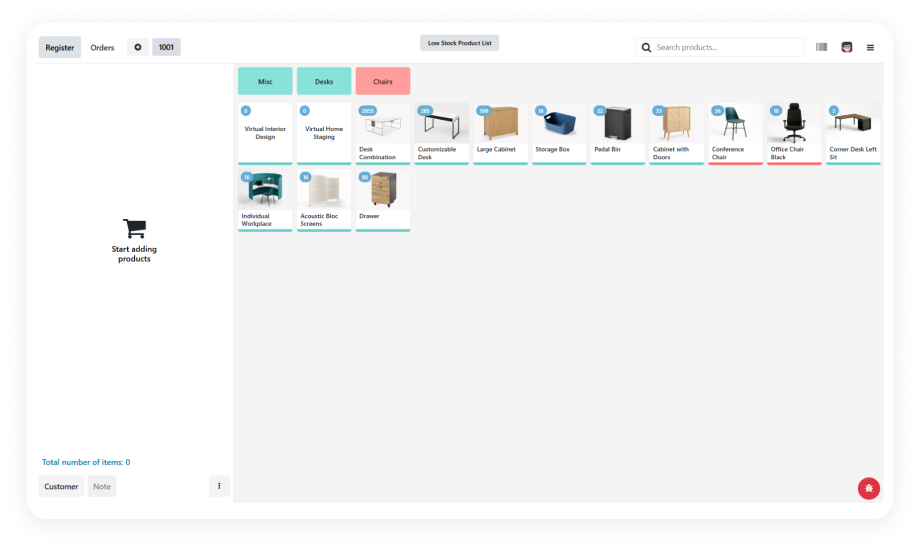
Real-Time Kitchen Display System (KDS)
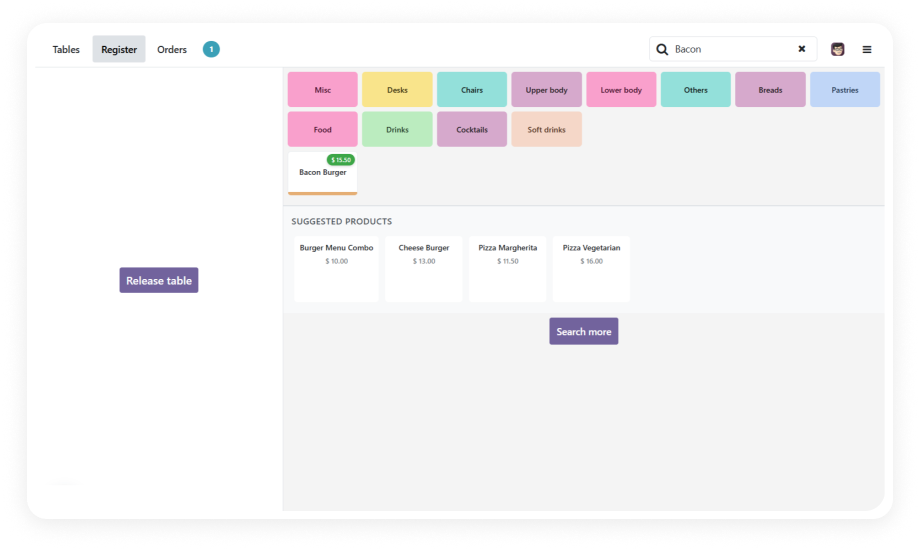
Intelligent Product Suggestions

From Standard POS to Full Restaurant Workflow — The Problem & Solution

Without This Module
With POS Restaurant Addon
Topping selection via manual notes or verbal communication
Auto-popup group-based selection ensures complete orders every time
Kitchen communication via paper slips or shouted orders
Auto-printed KOT with product details, toppings, and special instructions
No order queue visibility — kitchen works blind
Real-time KDS digital board with in-progress and ready status
Upselling relies entirely on staff memory
System-prompted smart suggestions for complementary items
Variant selection requires browsing full product catalog
Instant popup with attribute choices — size, crust type, flavor
Same configuration forced on every terminal
Per-terminal feature toggles for multi-location flexibility
Order accuracy error-prone at scale
Structured, validated orders every time — no missed modifiers
Weeks of staff training required
Minutes — the system guides the workflow automatically

Key Features of POS Restaurant Addon

1

Group-Based Topping Management

Organize toppings into logical groups (Sauces, Proteins, Vegetables, Extras) and assign them to specific products. When a cashier adds a configured product to the cart, the relevant topping groups auto-popup for quick selection.

Why it matters: Eliminates manual topping communication, reduces kitchen errors, and ensures consistent order accuracy across all shifts and staff.

2

Auto-Popup Topping Selection

Configured products automatically trigger a topping selection dialog the moment they are added to the order line. Staff cannot accidentally skip the customization step.

Why it matters: Guarantees complete order capture every single time, preventing costly remakes and customer complaints from missing modifiers.

3

Multiple Toppings on the Same Product

Add the same menu item multiple times with entirely different topping combinations in a single order. Each instance maintains its own modifier set independently.

Why it matters: Handles real-world scenarios like a table ordering three pizzas with different toppings without confusing the kitchen or the billing system.

4

Kitchen Order Tickets (KOT) — Auto-Print

Automatically generate and print Kitchen Order Tickets when an order is placed or updated. Each ticket includes product name, quantity, selected toppings, and any special notes.

Why it matters: Bridges front-of-house and kitchen instantly, cutting order-to-preparation time and removing verbal miscommunication from the workflow.

5

Kitchen Display System (KDS) — Real-Time Digital Queue

Replace paper tickets with a live digital order board. Kitchen staff see orders appear in real time, mark items as in-progress or ready, and clear completed tickets from the queue.

Why it matters: Gives kitchen managers full visibility into order load, preparation status, and throughput — enabling faster service and better resource allocation.

6

Intelligent Product Suggestions

Display smart complementary product recommendations during order entry. The system surfaces high-margin add-ons (drinks, desserts, sides) based on product configuration.

Why it matters: Increases average order value by prompting natural upsell opportunities without requiring staff memorization or sales training.

7

Variant Selector Popup

When a product has multiple attributes (size, flavor, preparation style), a clean popup appears allowing quick variant selection without navigating away from the order screen.

Why it matters: Speeds up order entry for configurable products, reducing queue times during peak hours and improving customer experience.

8

Per-Terminal Feature Configuration

Enable or disable toppings, KOT, KDS, and suggestions independently on each POS terminal. Different locations or counter types can run different feature sets.

Why it matters: Multi-location restaurants can tailor each terminal to its specific role — counter service, drive-through, or dine-in — without separate module installations.

Who Benefits from POS Restaurant Addon?

Role
Primary Use Case
Key Outcome
Restaurant Owner
Full kitchen-to-counter automation
Faster table turns, higher revenue per order
Cashier / Server
Auto-popup topping selection during order entry
Zero missed modifiers, faster checkout
Kitchen Manager
Real-time KDS order queue monitoring
Balanced workload, fewer bottlenecks
Line Cook
Clear KOT tickets with complete topping details
Accurate preparation, zero verbal relay
Multi-Location Manager
Per-terminal feature configuration
Consistent brand standards with local flexibility
QSR / Fast-Food Operator
Variant popup + smart suggestions at counter
Higher AOV with minimal staff training
Franchise Operations Lead
Standardized topping groups across outlets
Uniform menu customization, easier onboarding

Supported Odoo Versions & Documentation

Choose your Odoo version and explore interactive documentation

User Guide not available for Odoo 16 — documentation included with purchase.

POS Restaurant Addon vs. Manual Workarounds

Capability
With POS Restaurant Addon
Without This Module
Topping Selection
✔ Auto-popup group-based selection
Manual notes / verbal communication
Kitchen Communication
✔ Auto-printed KOT with full details
Paper slips or shouted orders
Order Queue Visibility
✔ Real-time KDS digital board
None — kitchen works blind
Upselling
✔ System-prompted smart suggestions
Relies on staff memory
Variant Selection
✔ Instant popup with attribute choices
Browse full catalog manually
Multi-Terminal Control
✔ Per-terminal feature toggles
Same config everywhere
Order Accuracy
✔ Structured, validated every time
Error-prone at scale
Staff Training Time
✔ Minutes — system guides the workflow
Weeks of memorization

How to Set Up POS Restaurant Addon

No development environment. No custom code. Setup takes under 15 minutes.

01

Install & Activate

Purchase and install the module from the Odoo App Store. Navigate to Apps, search for "POS Restaurant Addon," and click Install. The module auto-resolves all dependencies.

02

Configure Topping Groups

Go to POS settings and create your topping groups (Sauces, Proteins, Extras). Assign individual topping items to each group, set pricing if applicable, and link groups to the relevant menu products.

03

Enable KOT & KDS Per Terminal

Open each POS terminal configuration. Toggle Kitchen Order Tickets (KOT) for auto-printing, enable the Kitchen Display System (KDS), and activate smart product suggestions as needed.

04

Test & Go Live

Run a test order through each configured terminal. Verify topping popups trigger correctly, KOT prints with complete details, and KDS displays orders in real time. Adjust as needed, then go live.

Technical Specifications & Compatibility

Parameter
Odoo Versions
Dependencies
License
Deployment
Codebase Size
Developer
Multi-Company
Languages
Support
Details
16.0 · 17.0 · 18.0 · 19.0
Point of Sale · Restaurant (pos_restaurant) · Discuss (mail) · Inventory (stock) · Invoicing (account)
OPL-1 (Odoo Proprietary License)
Odoo Online · Odoo.sh · On-Premise
5,458 lines
Zehntech Technologies Inc.
Supported
Follows Odoo's native i18n framework
FAQ

Frequently Asked Questions

Yes. Every major feature — toppings, KOT, KDS, and suggestions — can be toggled on or off per terminal. You are not required to use all features simultaneously.
Absolutely. The module is compatible with Odoo Online, Odoo.sh, and on-premise deployments. No server-level access is required for installation or configuration.
KOT generates a printable paper ticket for each order sent to the kitchen. KDS replaces paper entirely with a real-time digital screen where kitchen staff can track, update, and clear orders. Many restaurants use both for redundancy.
Yes. Each order line maintains its own independent topping set. A customer can order three burgers with entirely different modifier combinations, and each will print separately on the KOT.
No. Suggestions appear as a non-blocking panel alongside the order screen. Staff can tap to add a suggested item or ignore it entirely — the workflow continues uninterrupted either way.

One-Time Purchase.
No Subscription.
No Recurring Fees.

Invest $98.57 once and own the module forever. Free updates within your licensed Odoo version. Deploy on Odoo Online, Odoo.sh, or your own server.

Zehntech Odoo experts


          You have successfully subscribed to the newsletter

          There was an error while trying to send your request. Please try again.

          Zehntech will use the information you provide on this form to be in touch with you and to provide updates and marketing.