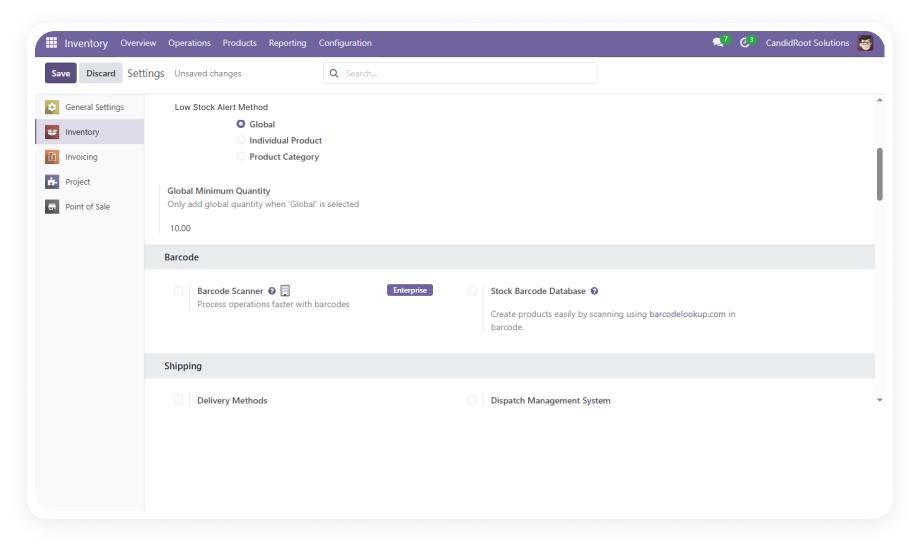
Configure stock alert thresholds at three levels — global (all products), per-category (product groups), and per-product (highest priority override). The system uses priority-based logic to determine which threshold applies.
Why it matters: businesses with diverse product catalogs can set appropriate reorder points for each segment without managing hundreds of individual settings.
Alert status updates automatically whenever inventory quantities change — through sales, transfers, manufacturing, adjustments, or POS transactions. No manual trigger or scheduled job required.
Why it matters: teams always see current stock status, eliminating the gap between an inventory change and alert notification that causes missed reorder windows.
Products with quantities below their alert threshold are visually highlighted in the product tree (list) view. Staff can instantly distinguish low stock items from healthy inventory without opening individual records.
Why it matters: warehouse managers scanning product lists can identify restocking needs at a glance during daily operations.
The same visual alert indicator extends to kanban product views, providing low stock visibility in card-based layouts that many inventory teams prefer for daily management.
Why it matters: teams using kanban workflows for inventory management get immediate visual cues without switching to list view.
Low stock products display an alert tag directly in the Odoo Point of Sale interface. Retail staff see the warning while browsing products during sales transactions.
Why it matters: counter staff can inform customers about limited availability before completing a sale, reducing order cancellations and customer disappointment.
A dedicated administration panel provides a single location to configure alert methods, set global thresholds, and manage notification preferences across the entire system.
Why it matters: administrators do not need to navigate multiple menus or product records to set up or modify the alert system — reducing configuration time and setup errors.
Assign alert thresholds at the product category level. All products within that category inherit the threshold unless a per-product override exists.
Why it matters: categories with similar demand patterns can be managed with a single setting rather than configuring each product individually.
Set specific alert quantities on individual products that take precedence over both category and global settings. Ideal for high-value, fast-moving, or critical items.
Why it matters: critical products can have tighter thresholds that trigger earlier replenishment independent of their category defaults.
Configure multiple users to receive low stock notifications across different departments — inventory, purchasing, sales, and management — from a single configuration panel.
Why it matters: cross-functional visibility ensures the right people act on low stock situations without relying on a single inventory manager to forward alerts.
The entire module configures through Odoo's standard interface with no custom code, no developer intervention, and no technical expertise required. Works out of the box.
Why it matters: non-technical warehouse and operations staff can set up and manage stock alerts independently, without creating IT support tickets.