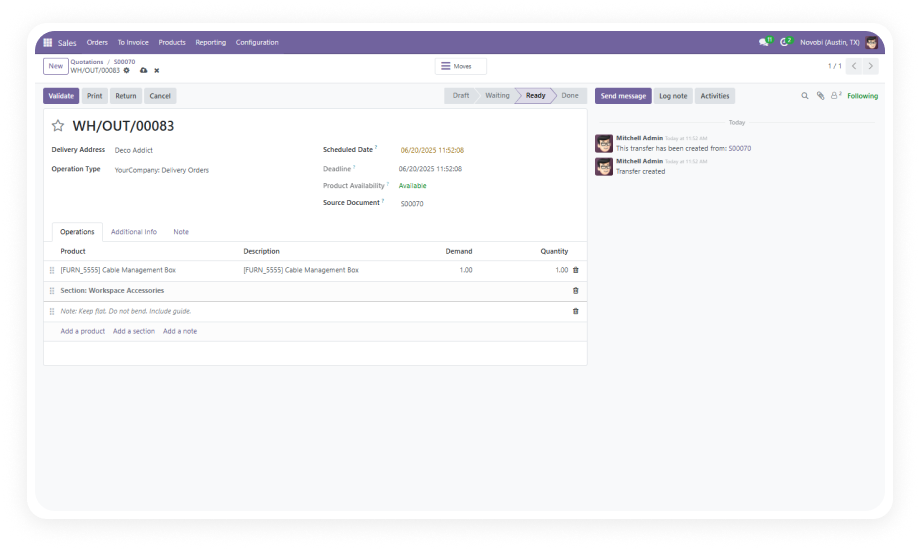
Insert custom section labels between product lines to create logical groupings within a single picking operation. Organize items by department, handling requirement, destination zone, or any category your workflow demands.
Why it matters: Warehouse staff can instantly identify which items belong together, reducing picking errors and improving pack accuracy for complex multi-product shipments.
Add free-text notes anywhere between order lines to communicate handling instructions, special packaging requirements, or delivery-specific comments directly in the picking document.
Why it matters: Critical fulfillment instructions live inside the order itself rather than in separate emails or verbal handoffs, eliminating communication gaps that cause shipping mistakes.
Sections and notes created in sales orders automatically propagate to the corresponding delivery orders, maintaining continuity from order entry through fulfillment without manual re-entry.
Why it matters: Sales teams can document customer-specific requirements once at order time, confident that warehouse staff will see those exact instructions when picking the shipment.
All section headers and notes appear on printed PDF delivery slips, providing structured documentation for drivers, recipients, and internal records.
Why it matters: Customers and delivery personnel receive organized, professional documentation that clearly communicates product groupings and special instructions — reducing delivery disputes and return requests.
Modify or remove sections and notes at any time before order validation. Adjust instructions as shipment details evolve without affecting product line data.
Why it matters: Warehouse managers retain full control over documentation accuracy, updating instructions to reflect real-time changes in stock availability, shipping methods, or customer requests.
Support for unlimited sections and notes within a single delivery order, enabling complex shipment documentation for large or multi-category orders.
Why it matters: Enterprise-scale operations with 50+ line items per delivery can maintain the same organizational clarity as simple orders, scaling documentation to match operational complexity.