Join us at GITEX 2025! Discover our solutions at Hall 4, Booth H-30 Schedule a Meeting Today.
Automate Marketing Initiatives with Salesforce Marketing Cloud Learn More
Join us at GITEX 2024! Discover our solutions at Hall 4, Booth H-30 Book your live demo today.
Zehntech Odoo App

Amount In Words — Auto-Convert Monetary Amounts on Every Financial Document

Stop relying on manual number-to-words entries. Amount In Words for Odoo automatically converts invoice totals, sales order values, and purchase order amounts into spelled-out text — eliminating errors, meeting legal requirements, and keeping your documents audit-ready.

Compatible with Odoo 16, 17, 18 & 19
Community & Enterprise Supported
Works on Invoices, Sales Orders & Purchase Orders
No Custom Development Required
Trusted by 500+ Businesses Across 12+ Countries
FREE
V19, 18, 17, 16
Amount In Words for Odoo — Auto-convert monetary amounts to words on financial documents

What is Amount In Words?

Amount In Words is a lightweight Odoo module that automatically converts numeric monetary values into written text on your financial documents. It eliminates the manual, error-prone process of typing out invoice amounts in words — a requirement for legal compliance, auditing, and professional document standards in many industries and jurisdictions. Instead of maintaining a separate step or relying on accountants to write amounts manually, the module handles conversion automatically every time a document is generated.

Invoice amount auto-conversion
Sales order written totals
Purchase order words display
Per-document enable/disable
Multiple case format support

One module. Compliant, professional financial documents. No manual entry.

How Amount In Words Solves Financial Document Compliance

Problem
Zehntech Amount In Words Solution
Accountants manually type amount-in-words on every invoice — slow, error-prone
Automatic conversion triggers when document total is calculated — zero manual entry
Typos and formatting inconsistencies cause audit failures
Built-in accuracy engine eliminates spelling and formatting errors
No native Odoo feature converts amounts to words on printed documents
Module adds dedicated amount-in-words field to invoices, sales orders, and POs
Teams toggle document formatting inconsistently
Per-document enable/disable checkbox gives explicit control over display
Legal and regulatory standards require written amounts on financial paperwork
Module meets document compliance requirements out of the box
Finance teams using Odoo Community miss advanced document formatting
Full support for both Community and Enterprise across Odoo 16 through 19
Different templates require different casing (uppercase, title case, etc.)
Multiple case format options match corporate document style without custom code
Onboarding new finance staff means teaching manual procedures
Automatic conversion removes training burden — system handles it universally

Everything Your Finance Team Needs for Compliant Financial Documents

1

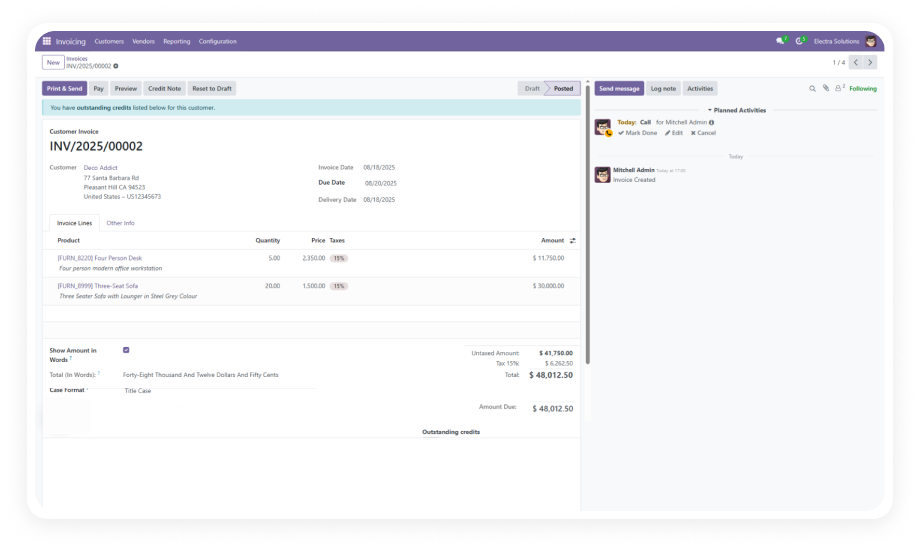
Automatic Amount-to-Words Conversion on Invoices

The module detects the total amount on any Odoo invoice and instantly renders it as written text in the correct field. No manual trigger, no button to press — the conversion is immediate and accurate.

Why it matters: Finance teams processing high invoice volumes eliminate an entire manual step from every document cycle.

2

Amount In Words on Sales Orders

Written amount conversion extends beyond accounting into the sales workflow. Sales orders and quotations display the total in words automatically when the feature is enabled on that document.

Why it matters: Enterprise and B2B sales teams can deliver fully professional, legally formatted quotations without any post-processing.

3

Amount In Words on Purchase Orders

Purchase orders carry the same automatic conversion, ensuring procurement documents meet vendor and audit requirements without manual intervention.

Why it matters: Procurement teams working with vendors that require written amounts on POs no longer face manual entry delays or compliance gaps.

4

Per-Document Enable/Disable Toggle

A "Show Amount in Words" checkbox on each document gives users explicit control. Enable it where required, leave it off where not needed — no global setting forces the display everywhere.

Why it matters: Teams working across multiple jurisdictions or document types can apply the feature selectively without creating a blanket change.

5

Multiple Case Format Support

The module supports different case formatting styles for the written amount — letting you match your corporate document standards or regional compliance requirements without touching code.

Why it matters: Organizations that need uppercase for legal documents and title case for client-facing documents can configure this without custom development.

6

Error Elimination in Financial Documents

By automating the conversion, the module removes the class of errors that comes from manual amount-in-words entry: wrong spelling, missing hyphens, incorrect casing, or misread figures.

Why it matters: A single error on a financial document can delay payment, trigger a rejection, or create a compliance issue — automated conversion prevents all of them.

7

Works Across Odoo Community and Enterprise

Amount In Words is fully supported on both Odoo Community and Enterprise editions, as well as Odoo.sh and on-premise deployments.

Why it matters: Businesses that have not upgraded to Enterprise can still access this critical financial document capability without being forced into a tier change.

8

Lightweight Module — 196 Lines of Code

The module is compact, clean, and introduces no performance overhead. At 196 lines of code, it does one thing precisely: converts amounts to words wherever it is enabled.

Why it matters: Lean modules carry lower risk of conflicts, faster install times, and simpler maintenance — especially in multi-module Odoo environments.

Who Gets The Most Out Of This Module

Role
Primary Use Case
Key Outcome
Accounts Payable / Receivable Manager
Needs every invoice to display written amounts for legal and vendor compliance
Zero manual entry, zero formatting errors on every document
Finance Controller
Responsible for audit-ready document standards across the organization
Consistent, compliant written amounts on all financial records
Procurement Manager
Manages purchase orders requiring written totals for vendor agreements
POs meet vendor requirements automatically — no delays in approval
Sales Manager
Issues quotations and sales orders to enterprise clients with strict formatting requirements
Professional, correctly formatted quotations delivered first time
Odoo Administrator
Needs a simple, low-maintenance module that works across document types
Single install, no configuration overhead, works immediately
CFO / Finance Director
Ensuring regional compliance with financial document regulations requiring written amounts
Legal document standards met at the system level — no process dependencies

Versions & Documentation

Choose your Odoo version and explore interactive documentation

Native Odoo vs Zehntech Amount In Words

Capability
Zehntech Amount In Words
Native Odoo
Auto-convert invoice total to words
Not available
Amount in words on sales orders
Not available
Amount in words on purchase orders
Not available
Per-document enable/disable toggle
Not available
Multiple case format support (uppercase, title case, etc.)
Not available
Automatic conversion — no manual entry required
Not available
Spelling and formatting error elimination
Not available
Works on Odoo Community edition
Not available
Works on Odoo Enterprise edition
Basic (no amount-in-words field)
Odoo.sh compatible
Not applicable
On-premise compatible
Not applicable
Zero configuration overhead
Not available
No custom development required
Requires developer customization

Get Started In Minutes

No development environment. No custom code. No consultant required for standard setup.

01

Download the Module

Get Amount In Words free from the Odoo App Store. The module supports Odoo 16, 17, 18, and 19 on Community, Enterprise, and Odoo.sh. No licensing key, no activation step.

02

Install in Your Odoo Instance

Place the module in your addons directory and update your Odoo instance to register it. Navigate to the Apps menu, search for "Amount In Words," and click Install.

03

Activate on Your Documents

Open any invoice, sales order, or purchase order. You will find the "Show Amount in Words" checkbox on the document. Check it to enable the written amount display.

04

Verify Output and Case Format

Review the generated written amount on your document. If your standards require a specific case format, select the appropriate option. The module handles all conversion logic automatically.

Technical Details & Compatibility

Requirement
Odoo Versions
Editions
Hosting
Dependencies
Third-Party Dependencies
Custom Dev Required
Install Time
Server Restart
Data Migration
Module Conflicts
License
Last Tested
Lines of Code
Support
Details
16.0 · 17.0 · 18.0 · 19.0
Community · Enterprise · Odoo.sh
Odoo Online · On-Premise · Odoo.sh
Invoicing (account) · Purchase (purchase) · Sales (sale_management) · Discuss (mail)
None
No
Under 5 minutes
Not required
Not required
None known
OPL-1
Odoo 19.0 — May 2026
196
Amount In Words — FAQ illustration

Frequently Asked Questions

Yes. Amount In Words is a plug-and-play module with no coding or custom development required. Install it from the Odoo App Store, activate in your instance, and the feature is immediately live on invoices, sales orders, and purchase orders. The entire setup takes under 5 minutes with no developer involvement.
Yes. The module is fully compatible with both Odoo Community and Enterprise editions. It also supports Odoo.sh and on-premise deployments with no edition-specific limitations. All features — including the per-document toggle and case format options — are available on Community.
After installation, a "Show Amount in Words" checkbox appears on invoices, sales orders, and purchase orders. When checked, the module automatically converts the document's total monetary amount into written text using the selected case format. The conversion is instantaneous, accurate, and requires no manual input from the user.
Amount In Words supports Odoo 16.0, 17.0, 18.0, and 19.0. It is compatible with Community, Enterprise, and Odoo.sh hosting across all four versions. Interactive documentation is available for each supported version via the Versions & Documentation section.
Yes. The module includes a per-document enable/disable toggle — a "Show Amount in Words" checkbox on each document. You can enable it on specific invoices or orders without affecting other documents in your system. There is no global mandatory setting — your team retains full control at the document level.

Ready to Eliminate Manual Amount-in-Words Entry from Every Financial Document?

Your team already runs financials through Odoo — Amount In Words adds the missing compliance layer that native Odoo simply does not provide. Every invoice, sales order, and purchase order your team generates will carry a clean, accurate, written amount automatically from the moment you install it.

Includes lifetime updates and 90 days of dedicated technical support.

Zehntech Odoo experts ready to help


          You have successfully subscribed to the newsletter

          There was an error while trying to send your request. Please try again.

          Zehntech will use the information you provide on this form to be in touch with you and to provide updates and marketing.