Server-side captcha protection built natively into Odoo - no third-party services, no privacy trade-offs, no recurring fees.
Captcha for Odoo is a free Odoo module by Zehntech Technologies that adds privacy-friendly, server-side captcha verification directly to your Odoo website forms. Unlike Google reCAPTCHA or hCaptcha, this module generates and validates every challenge entirely within your Odoo environment - meaning no user data ever leaves your server. It works out of the box on Odoo 16 through 19, supports multi-website setups, and gives administrators complete control over captcha type, difficulty, and form-level activation.
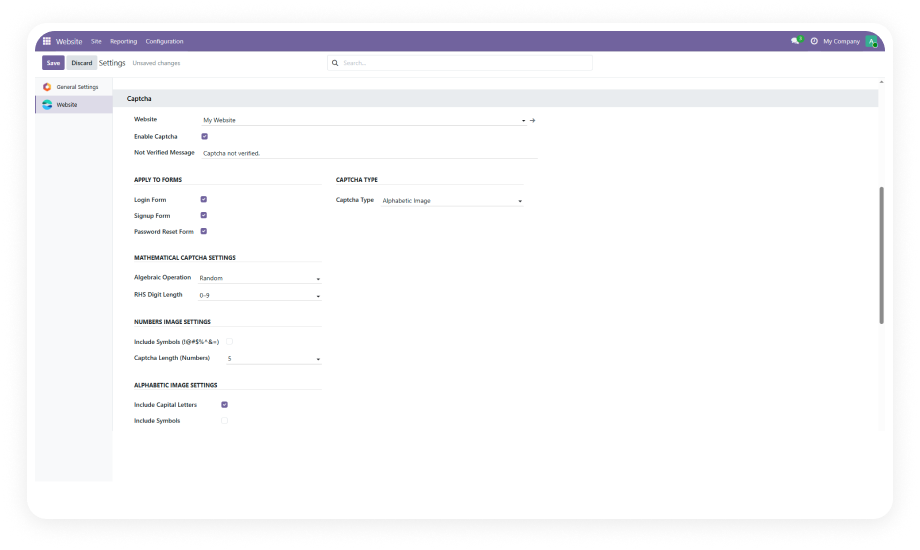
Each website in a multi-website Odoo environment gets its own captcha settings. Enable strict image-based captcha on your public eCommerce site while using a simple math captcha on your internal staff portal.
Choose from Mathematical (arithmetic challenge), Numeric Image (digits rendered as a distorted image), or Alphabetic Image (letters rendered as a distorted image). Each type targets a different threat model.
Activate captcha on the standard Odoo website login form with a single toggle. Every login attempt must pass the captcha challenge before credentials are even checked.
Enable captcha on the website signup / registration form to prevent mass automated account creation. Keeps your customer and contact database clean.
Add a captcha gate to the password reset flow to stop bots from using the forgot-password endpoint for account enumeration and spam.
All captcha image generation and challenge validation occurs entirely within the Odoo server. No API calls are made to Google, Cloudflare, or any external service.
Configure how hard the captcha is to solve - set character or digit length, enable or disable special symbols, and adjust the level of visual distortion.
The settings interface renders a real-time visual preview of the captcha as you adjust parameters. Confirm exactly what users will see before saving.
Configure the error message displayed to users when a captcha challenge fails. Replace generic system text with clear, branded, context-appropriate instructions.
Select your Odoo version to access the relevant setup guide and interactive documentation
No development environment. No custom code. No consultant required for standard setup.
Go to the Odoo App Store, search for "Captcha for Odoo" by Zehntech Technologies, and click Install. Compatible with Odoo Online, Odoo.sh, and On-Premise.
Navigate to Website > Configuration > Settings. If you run multiple websites, use the website selector to choose the site you want to configure.
Choose Mathematical, Numeric Image, or Alphabetic Image. Set challenge length, enable or disable special symbols, and adjust visual distortion level.
Toggle captcha on for Login, Signup, and/or Password Reset forms. Configure the validation failure message. Click Save. Your forms are now protected.
Captcha for Odoo delivers enterprise-grade, privacy-first bot protection across every public-facing form in your Odoo website - without paying for a third-party captcha service, without configuring external APIs, and without compromising your GDPR compliance. One free module, installed in minutes, protecting your site indefinitely.
You have successfully subscribed to the newsletter
There was an error while trying to send your request. Please try again.