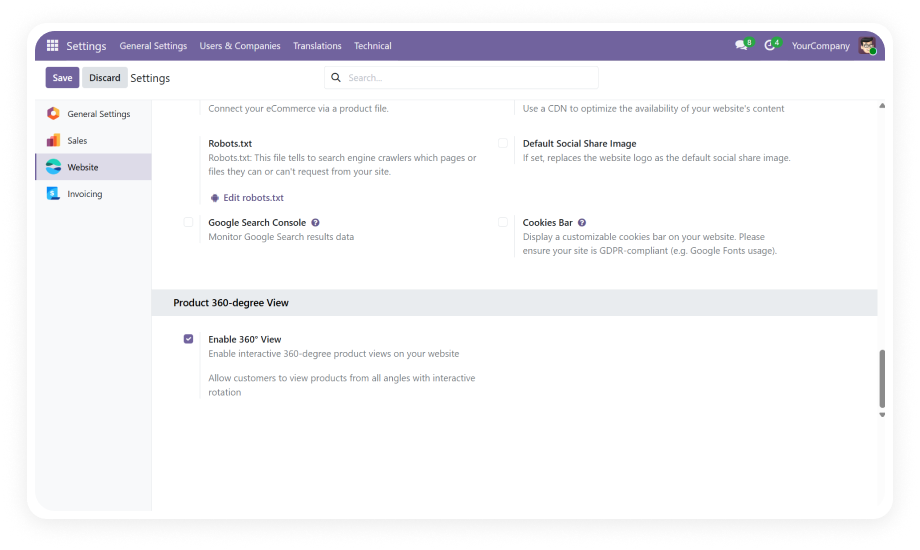
Activate or deactivate the 360° view feature independently for each website in a multi-website Odoo environment. Manage visibility from a centralized configuration panel without touching code.
Why it matters: Multi-brand operators can roll out the feature selectively, testing on one storefront before expanding to others — reducing risk and enabling phased deployment.
A dedicated "360° View" tab on the product form lets you upload, organize, and sequence images specifically for the rotation viewer. Keep 360° assets separate from standard product gallery images.
Why it matters: Clean separation between regular product photos and 360° sequences prevents confusion, simplifies content management, and ensures the rotation viewer always pulls the correct image set.
Manually control the display order of frames with drag-and-drop sequencing. The viewer transitions smoothly between frames, creating a fluid rotation experience regardless of the number of images uploaded.
Why it matters: Precise frame ordering guarantees a smooth, professional rotation — eliminating jarring jumps that would make the feature feel unpolished and damage brand perception.
Customers can interact with the 360° viewer through mouse drag, touch swipe, on-screen navigation buttons, keyboard arrows, and auto-rotation mode. The viewer responds instantly to user input.
Why it matters: Multiple interaction methods ensure accessibility across devices and user preferences — whether a customer uses a mouse on desktop or swipes on a mobile phone, the experience remains intuitive.
Enable automatic rotation so the product spins continuously when a customer lands on the page. This eye-catching motion draws attention to the 360° feature and encourages interaction without requiring user action.
Why it matters: Auto-rotation acts as a visual hook that immediately communicates interactivity — shoppers who might not notice a static "360° View" button are drawn in by the motion.
The 360° viewer adapts fluidly to desktop monitors, tablets, and mobile screens. Touch gestures, viewport scaling, and layout adjustments ensure a consistent experience at every breakpoint.
Why it matters: With over 60% of eCommerce traffic coming from mobile devices, responsive behavior is non-negotiable — a broken mobile experience directly translates to lost revenue.
Images load efficiently without blocking the rest of the page. The module uses optimized loading strategies to ensure product pages remain fast even with 24-36+ high-quality rotation frames.
Why it matters: Page speed directly impacts SEO rankings and conversion rates. Every 100ms delay costs roughly 1% of conversions — optimized loading protects both search visibility and bottom line.
When 360° images are not available for a product, the viewer gracefully falls back to the standard product gallery. No broken placeholders, no empty viewers — just a seamless default experience.
Why it matters: Not every product will have 360° imagery from day one. Smart fallback ensures a professional storefront while you progressively add 360° content across your catalog.
Run multiple Odoo websites with independent 360° view configurations. Each website can have the feature enabled or disabled, with product-level overrides providing granular control.
Why it matters: Businesses operating multiple brands, regions, or B2B/B2C storefronts need per-site control — a one-size-fits-all toggle would force unwanted feature exposure across all properties.
The entire setup — from enabling the feature to uploading images and adjusting settings — happens through Odoo's native backend interface. No developer intervention, no custom code, no terminal commands.
Why it matters: Marketing and merchandising teams can independently manage 360° content without filing IT tickets — accelerating time-to-market for new product launches.