Organize, Showcase, and Sell by Brand on Your Odoo eCommerce Store. Website Product Brand empowers Odoo-powered online stores to organize products under dedicated brand pages with logos, banners, and advanced filtering — giving customers the familiar brand-driven shopping experience they expect.
Website Product Brand is an Odoo eCommerce module that lets store owners create, manage, and display product brands directly on their website. Customers can browse brand-specific pages complete with logos, banners, and curated product listings, or use brand filters to narrow their search results. The module bridges the gap between backend product organization and frontend brand discovery — making it easier for shoppers to find what they trust and for businesses to highlight their brand portfolio.
Products displayed in flat category structures without brand differentiation
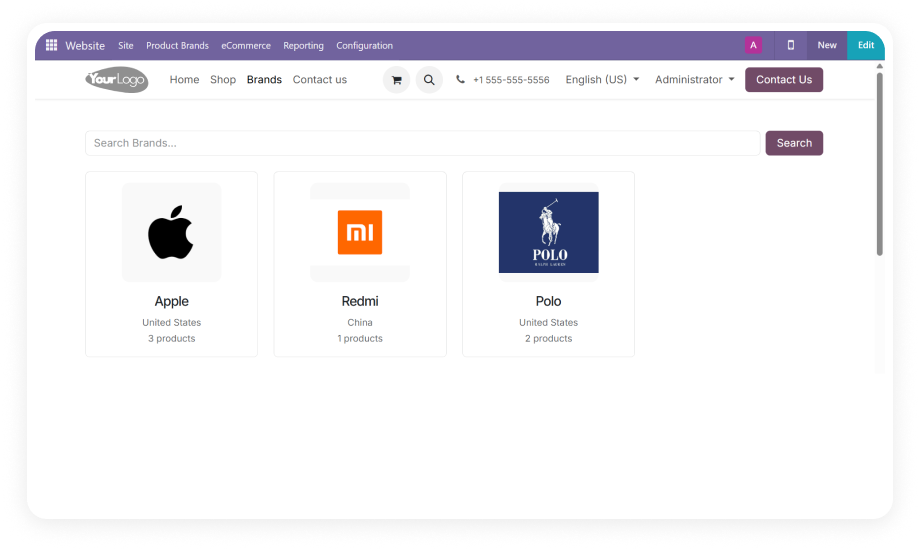
Dedicated brand pages with logos, banners, and product grids
Brand-loyal customers scroll through mixed listings
Brand filters let customers narrow results instantly
No tools to showcase brand partnerships
Multiple card style options to highlight brand portfolio
Brand stories cannot be told on the storefront
Brand descriptions and country of origin on each page
Custom development required for brand features
Install and configure in minutes — no code needed
Key Features
1
Dedicated Brand Pages with Logos and Banners
Create individual landing pages for each brand featuring custom logos, banner images, brand descriptions, and country of origin. Each brand page automatically lists all associated products.
Why it matters: Customers can discover and shop by the brands they trust.
2
Backend Brand Management Console
Manage your entire brand portfolio from a centralized backend interface. Define brand names, upload logos, write descriptions, specify countries of origin, and configure display settings.
Why it matters: Full control over brand presentation without touching code.
3
Multi-Product Brand Mapping
Link multiple products to a single brand with streamlined backend tools. Bulk assignment capabilities ensure efficient catalog organization even with thousands of SKUs.
Why it matters: Large catalogs stay organized without manual effort.
4
Single and Multi-Brand Filtering
Enable customers to refine their shopping experience using brand filters on the shop page. Support for both single-brand and multi-brand selection ensures flexible product discovery.
Why it matters: Shoppers find products faster with familiar filtering.
5
Multiple Card Style Options
Choose from pre-designed card layouts for displaying brands attractively throughout your website. Different visual styles allow brands to be presented in ways that match your store theme.
Why it matters: Professional brand presentation without custom CSS.
6
Publish and Visibility Controls
Control which brands are visible on the storefront with publish/unpublish toggles. Manage brand visibility without deleting brand data, enabling seasonal promotions or phased brand launches.
Why it matters: Flexible brand management for campaigns and promotions.
Who Benefits from Website Product Brand?
Role
Primary Use Case
Key Outcome
eCommerce Manager
Organize product catalog by brand for improved customer navigation
Higher conversion rates through familiar brand-based shopping
Marketing Manager
Create brand landing pages for promotional campaigns
Improved brand storytelling and SEO visibility
Store Owner (Multi-Brand)
Showcase brand partnerships and vendor portfolios
Increased brand authority and customer trust
Catalog Manager
Bulk-assign products to brands from backend
Faster catalog organization with fewer errors
Customer (Brand-Loyal)
Filter and browse products by preferred brands
Reduced time-to-purchase and higher satisfaction
SEO Specialist
Leverage brand pages as keyword-rich landing pages
Better organic search rankings for branded queries
Versions & Documentation
Choose your Odoo version and explore interactive documentation
✔ Dedicated pages with logos, banners, and product grids
Not available natively
Brand Filtering
✔ Native single and multi-brand filters on shop page
Manual workarounds with attributes
Brand Logos & Banners
✔ Upload and manage from backend — no code needed
Custom development required
Product-to-Brand Mapping
✔ Streamlined backend mapping with bulk tools
Not supported
Card Style Layouts
✔ Pre-designed card layouts with multiple options
Manual CSS customization
Publish/Unpublish Controls
✔ Toggle visibility without deleting brand data
N/A
Country of Origin
✔ Configurable field per brand
Not available
SEO-Friendly Brand URLs
✔ Auto-generated brand landing pages
Not available
Maintenance Effort
✔ Low (fully configurable from backend)
High (custom code required)
Time to Implement
✔ Install and configure in minutes
Weeks of development
How to Install and Configure
Get started with Website Product Brand in four simple steps.
01
Install the Module
Download Website Product Brand from the Odoo App Store. Place the module in your Odoo addons directory, update your app list, and install through the Apps menu. Compatible with Odoo Online, Odoo.sh, and On-Premise.
02
Create and Configure Brands
Navigate to the brand management section in the Website configuration menu. Create brands by defining names, uploading logos, adding descriptions, specifying country of origin, and choosing card style preferences.
03
Map Products to Brands
Assign products to their respective brands using the backend tools. Each product can be linked to a brand, and each brand page will automatically display all associated products. Use bulk assignment for efficient catalog setup.
04
Publish and Customize Display
Toggle brand visibility to publish them on your storefront. Preview how brand pages, brand filters, and card styles appear to customers. Fine-tune display settings until the brand experience matches your marketing goals.
Yes. Website Product Brand supports both single-brand and multi-brand filtering on the storefront shop page. Customers can select one or multiple brands simultaneously to narrow product results. Brand filters work alongside existing Odoo shop filters such as categories and price ranges.
The module supports all three deployment types: Odoo Online, Odoo.sh, and On-Premise installations. Installation steps vary slightly by deployment method, but functionality is identical across all environments. No additional server configuration is needed beyond standard Odoo module installation.
Yes. The module includes multiple pre-designed card style options for displaying brands. You can choose the layout that best matches your store theme without writing custom CSS. Brand cards display logos, names, and can link directly to dedicated brand pages.
There is no hard limit on the number of brands you can create or products you can assign. The module handles large catalogs with hundreds of brands and thousands of product mappings efficiently. Performance scales with your Odoo server resources, following standard Odoo capacity guidelines.
Yes. Each brand page generates a unique, indexable URL that search engines can crawl and rank. Brand pages include structured content — logos, descriptions, and product listings — that enriches SEO signals. Branded search queries (e.g., "Brand X products") can land directly on your brand pages, capturing high-intent traffic.
One-Time Purchase. No Subscription. No Recurring Fees.
Transform your Odoo eCommerce store from a generic product catalog into a brand-centric shopping destination. Website Product Brand gives you everything you need — dedicated brand pages, advanced filtering, professional card layouts, and full backend control.