Join us at GITEX 2025! Discover our solutions at Hall 4, Booth H-30 Schedule a Meeting Today.
Automate Marketing Initiatives with Salesforce Marketing Cloud Learn More
Join us at GITEX 2024! Discover our solutions at Hall 4, Booth H-30 Book your live demo today.
Zehntech Odoo App

Website Email Verification

Verify Every Customer Email on Your Odoo Website — Block Fake Signups, Protect Checkout, and Build a Trusted User Base. Stop fraudulent registrations and ensure every customer on your Odoo-powered website is a real, verified person with automated email confirmation.

Compatible with Odoo 16, 17, 18 & 19
Community & Enterprise Supported
Blocks Fake Signups & Checkout Fraud
Zero Manual Intervention Required
Trusted by 500+ Businesses Across 12+ Countries
$9.96
V19, 18
Website Email Verification for Odoo — Block fake signups and protect checkout

What Is Website Email Verification for Odoo?

Website Email Verification is an Odoo module that adds a mandatory email confirmation step to your website's registration process. When a new user signs up, the system automatically sends a verification email containing a secure, time-limited link. The user must click that link to confirm ownership of the email address before they can access checkout, place orders, or interact with restricted website features. This eliminates fake accounts, reduces spam registrations, and ensures your customer database contains only authentic, contactable email addresses.

Block bot and fake account registrations
Protect checkout from unverified users
Build a clean, verified email marketing list
Reduce chargebacks from fraudulent orders
Automate trust validation with zero manual effort

How Website Email Verification Solves Fake Signup Challenges

Problem
Zehntech Solution
Fake signups pollute your database
Mandatory email confirmation blocks phantom accounts
Bots create bulk registrations
Secure token verification stops automated abuse
Fraudulent orders from unverified emails
Checkout restricted until email is confirmed
Marketing emails bounce constantly
Only authentic, accessible emails enter your database
No visibility into account authenticity
Backend verification status tracking per user
Generic system verification emails
Fully customizable branded email templates
Manual customer verification workload
Fully automated — zero manual intervention required
Settings scattered across Odoo modules
Centralized admin control in Website Settings

Key Features of Website Email Verification

1

Automated Verification Email on Signup

The system dispatches a verification email immediately upon user registration, requiring zero manual intervention from your team. The email contains a secure, unique link that confirms email ownership with a single click.

Why it matters: Eliminates the operational burden of manually verifying customers while ensuring every new account is tied to a real, accessible email address from the very first interaction.

2

Checkout Restriction for Unverified Users

Unverified users are automatically blocked from accessing the checkout process. They receive a clear prompt to complete email verification before proceeding with any purchase.

Why it matters: Prevents fraudulent orders at the most critical conversion point, protecting your revenue and reducing chargebacks from fake accounts attempting to complete transactions.

3

Configurable Token Validity Period

Administrators can set custom expiration timeframes for verification tokens, controlling how long users have to confirm their email address before the link becomes invalid.

Why it matters: Balances security with user convenience — short validity windows increase protection against link sharing, while longer windows accommodate users who may not check email immediately.

4

Backend Verification Status Tracking

A dedicated status indicator in the backend displays each user's verification state, letting your team instantly see who has confirmed their email and who has not.

Why it matters: Gives your sales and support teams immediate visibility into account authenticity, enabling them to prioritize engagement with verified customers and follow up on pending verifications.

5

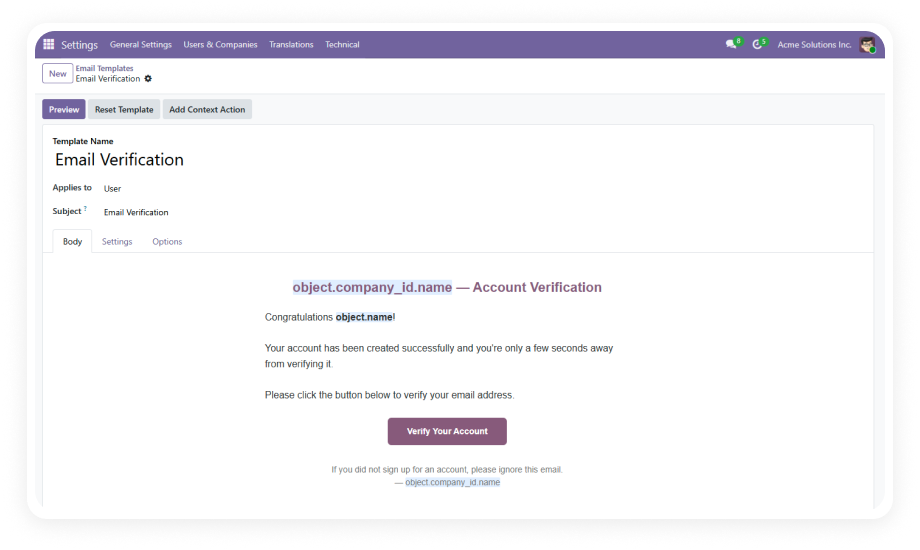
Customizable Email Templates

Leverage Odoo's built-in email template system to design verification emails that match your brand identity, messaging tone, and visual standards.

Why it matters: Maintains brand consistency throughout the verification experience, increasing user trust and click-through rates on verification links compared to generic system emails.

6

Admin Configuration via Website Settings

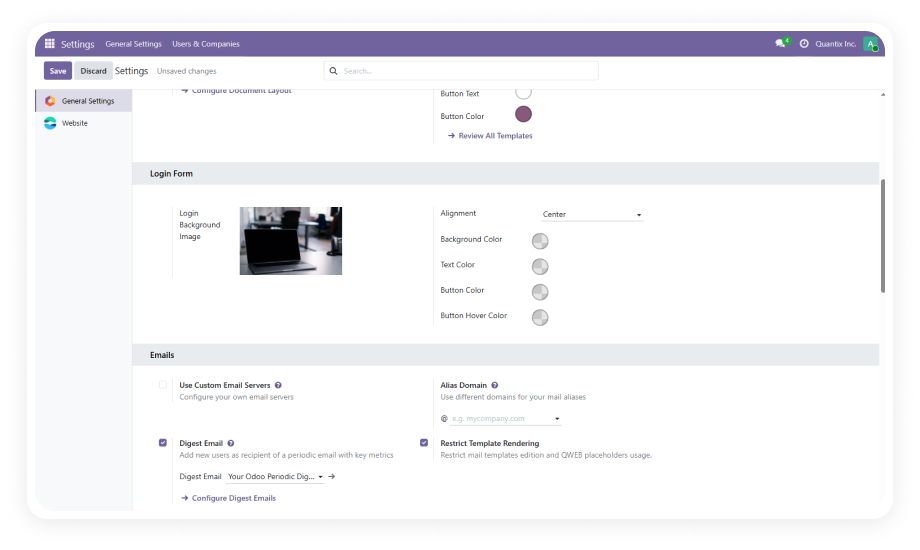
All module settings — including enabling/disabling verification, token duration, template selection, and restriction behavior — are accessible from a centralized panel within Website Settings.

Why it matters: Reduces configuration complexity by consolidating all controls in one familiar location, allowing non-technical administrators to manage verification behavior without developer assistance.

7

Multi-Version Compatibility

The module is maintained across Odoo versions 16, 17, 18, and 19, ensuring your verification system works regardless of which Odoo release you are running.

Why it matters: Protects your investment across Odoo upgrades — you will not need to find a replacement module or rebuild verification logic when migrating to a newer version.

8

Secure Token Generation

Each verification link contains a cryptographically secure token unique to the individual registration event, preventing token guessing, reuse, or manipulation by unauthorized parties.

Why it matters: Ensures that only the actual email address owner can complete verification, closing attack vectors that could allow bad actors to verify accounts they do not control.

Who Benefits from Website Email Verification?

Role
Primary Use Case
Key Outcome
eCommerce Store Owner
Prevent fake account registrations from placing orders
Reduced chargebacks and fraudulent transactions
Marketing Manager
Build a verified email list for campaigns
Higher deliverability rates and lower bounce rates
Customer Support Lead
Identify legitimate customers vs. spam accounts
Faster resolution times with authentic user data
IT Administrator
Enforce email authenticity across the website
Cleaner database with no phantom accounts
Operations Manager
Reduce manual order verification workload
Automated trust validation without human review
Finance Controller
Minimize payment fraud and disputed charges
Lower financial losses from illegitimate orders
âš   Not the right fit for: Internal Odoo portals with no public-facing registration, or stores using third-party identity providers that already enforce email verification at the IdP level.

Versions & Documentation

Choose your Odoo version and explore interactive documentation

Documentation coming soon for Odoo 16.

Documentation coming soon for Odoo 17.

User Documentation

User Documentation

Website Email Verification vs. Without This Module

Capability
Zehntech Module
Without This Module
Automated Verification on Signup
✔ Immediate on registration
Not available
Checkout Restriction for Unverified Users
✔ Automatic block until confirmed
Not available
Configurable Token Expiration
✔ Customizable validity window
N/A
Backend Verification Status Tracking
✔ Per-user status in backend
Manual / spreadsheet only
Customizable Email Templates
✔ Full Odoo template system
N/A
Centralized Admin Settings Panel
✔ Inside Website Settings
N/A
Secure Token Generation
✔ Cryptographically unique per signup
N/A
Zero Manual Intervention Required
✔ Fully automated
Manual effort required
Multi-Version Odoo Support (16–19)
✔ All supported versions
N/A
One-Time Purchase (No Subscription)
✔ Yes
N/A

How to Set Up Website Email Verification in Odoo

No custom development required. Setup takes under 10 minutes from installation to live protection.

01

Install the Module

Purchase and download Website Email Verification from the Odoo App Store. Navigate to your Odoo Apps menu, upload the module, and click Install. Dependencies — Website, eCommerce, Auth Signup, Mail, and Invoicing — resolve automatically.

02

Configure SMTP Settings

Ensure your outgoing mail server is properly configured in Odoo under Settings > Technical > Email > Outgoing Mail Servers. A functioning SMTP server is required for verification emails to be delivered.

03

Enable and Configure Verification

Navigate to Settings > Website > Email Verification Settings. Enable verification, set your token validity duration, select or customize your email template, and define checkout restriction behavior for unverified users.

04

Test and Go Live

Create a test account on your website frontend to confirm the verification email arrives, the secure link works, and unverified users are blocked from checkout. The system is now live and protecting every new registration.

Technical Details & Compatibility

Requirement
Technical Name
Odoo Versions
Editions
Hosting
Dependencies
Code Size
Custom Dev Required
Install Time
Data Migration
License
Author
Support
Details
zehntech_website_email_verification
16.0 · 17.0 · 18.0 · 19.0
Community · Enterprise · Odoo.sh
Odoo Online · On-Premise · Odoo.sh
Website, Website Sale, Auth Signup, Mail, Account
~1,522 lines
No
Under 10 minutes
Not required
OPL-1
Zehntech Technologies Inc.
Website Email Verification — Frequently Asked Questions

Frequently Asked Questions

Yes. The module integrates directly into Odoo's native auth_signup flow. No custom registration forms or third-party authentication systems are required. The verification step is added seamlessly after the standard signup process completes, so users experience a natural registration flow with the added verification step.
The verification link expires and becomes inactive after the configured timeframe. The user can request a new verification email from their account page. Unverified accounts remain restricted from checkout and protected areas. Administrators can manually verify users from the backend if needed.
Yes. The module leverages Odoo's built-in email template system for full customization. You can modify the subject line, body text, button styling, and branding elements. Templates support dynamic placeholders for user name, company info, and verification links. Multiple templates can be created and switched between from the settings panel.
No. The module operates asynchronously — verification emails are queued and sent in the background. No additional page-load overhead is introduced on the frontend. The checkout restriction check is a lightweight database query that adds negligible latency. Performance impact is virtually zero for standard Odoo hosting configurations.
Yes. Website Email Verification is fully compatible with other Zehntech website modules. It can work alongside Captcha for Odoo to provide dual-layer registration protection — captcha blocks bots, while email verification confirms real email ownership. The module follows Odoo's standard architecture and does not conflict with properly built third-party modules.

One-Time Purchase.
No Subscription.
No Recurring Fees.

Invest $9.96 once and secure your website registration process permanently across Odoo 16, 17, 18, and 19. Includes lifetime updates and dedicated technical support.

Zehntech Odoo experts ready to help


          You have successfully subscribed to the newsletter

          There was an error while trying to send your request. Please try again.

          Zehntech will use the information you provide on this form to be in touch with you and to provide updates and marketing.