Automate Marketing Initiatives with Salesforce Marketing Cloud Learn More
Zehntech Odoo App

Google Map Locator

Bring Real-Time Google Maps Address Intelligence Into Odoo. Transform how your team enters and manages addresses across Odoo. Type an address, see it on a live map instantly, and let the system auto-fill country, state, city, and postal code — eliminating manual entry errors and saving time on every record.

Compatible with Odoo 16
Community & Enterprise Supported
Works with CRM, Contacts & Calendar
No Custom Development Required
Trusted by 500+ Businesses Across 12+ Countries
FREE
V16
Google Map Locator — Real-time address autocomplete and map visualization in Odoo

What is Google Map Locator?

Google Map Locator is an Odoo module that integrates Google Maps directly into your address input workflow. It replaces manual, error-prone address entry with an intelligent system that provides real-time autocomplete suggestions, displays the selected location on an embedded map, and automatically populates geographic fields like country, state, city, and postal code. The module works natively within CRM, Contacts, and Calendar — three of the most address-dependent areas of any Odoo instance.

Google Maps autocomplete
Embedded map visualization
Auto-fill address components
Secure API key management
Multi-module integration

How Google Map Locator Solves Address Data Challenges in Odoo

Problem
Zehntech Google Map Locator Solution
Address entry is entirely manual, leading to typos and inconsistent formatting
Autocomplete suggestions from Google Maps ensure every address is accurate and uniformly structured
Users must separately fill in country, state, city, and postal code for every record
All geographic fields are auto-populated the moment a location is selected
There is no visual confirmation that an address is correct before saving
An embedded map displays the exact pinpointed location for immediate verification
Teams spend excessive time looking up address details externally
Real-time location lookup happens directly inside Odoo without switching applications
CRM, Contacts, and Calendar each require separate address handling
The module integrates across all three modules with a single, consistent interface
Storing and managing Google API credentials is a security concern
API key management is built in, with secure storage accessible only to authorized modules
Incomplete address data creates downstream issues in shipping and communication
Precise geolocation data ensures complete, validated addresses from the first input
Adding map functionality typically requires custom development
This module delivers full Google Maps integration without any coding or external configuration

Complete Google Maps Address Integration for Your Odoo Environment

1

Secure API Key Management

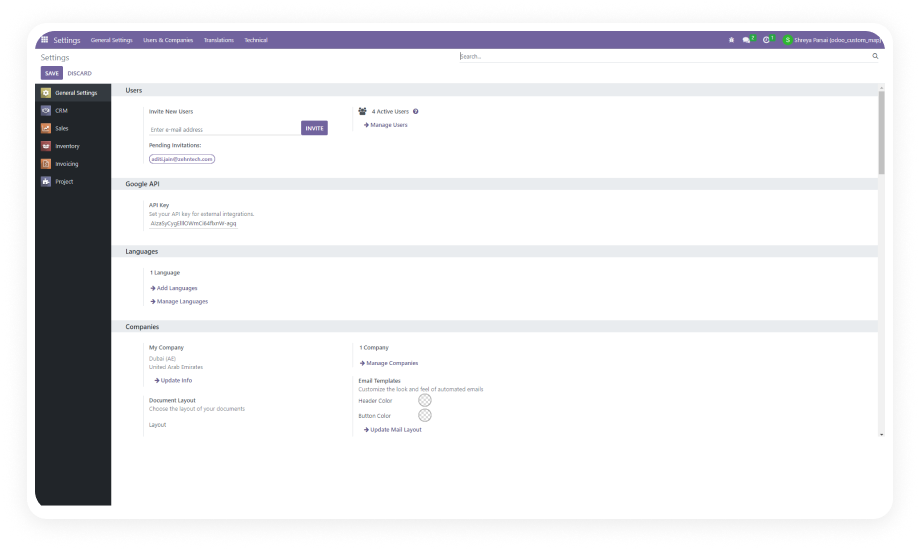
Configure your Google Maps API key directly within Odoo settings, where it is stored securely and made accessible only to authorized modules. The system includes safeguards against API usage limit violations.

Why it matters: Centralized, protected credential storage means administrators maintain full control over API access without exposing keys in code or configuration files.

2

Quick Location Lookup with Autocomplete

As users begin typing an address, the module delivers rapid suggestions powered by Google Maps autocomplete. Address matches appear instantly, allowing users to select the correct location in a single click.

Why it matters: Address entry that previously required full manual input now takes seconds, dramatically reducing per-record data entry time across CRM, Contacts, and Calendar.

3

Real-Time Location Fetching

The moment a user types or selects an address, the system queries Google Maps API and retrieves current geolocation data in real time. There is no delay between input and map response.

Why it matters: Real-time feedback ensures users always see the most current location data, and they never have to leave Odoo to verify an address externally.

4

Precise Location Pinpointing on Embedded Map

Every searched address is displayed on an interactive embedded map with a pin marker at the exact location. This visual layer provides immediate confirmation that the correct address has been entered.

Why it matters: Visual verification prevents silent addressing errors — users can see at a glance whether the pin matches their intended location before saving the record.

5

Automatic Field Population

When an address is selected, the module automatically extracts and populates the corresponding country, state, city, and postal code fields. No manual input is required for these components.

Why it matters: Auto-population eliminates incomplete records and ensures every address entry follows a consistent, structured format — improving data quality across all downstream processes.

Who Gets The Most Out Of This Module

Role
Primary Use Case
Key Outcome
Sales Representative
Enter prospect and client addresses in CRM with autocomplete assistance
Faster lead qualification with accurate, complete address data on every opportunity
Customer Support Agent
Look up and verify customer contact addresses in real time
Reduced address-related delivery and communication errors
Office Administrator
Manage company and partner contact records with validated addresses
Consistent, structured address data across the entire contact database
Event Coordinator
Set accurate meeting and event locations in Calendar
Visual map confirmation ensures teams arrive at the correct venue
Operations Manager
Ensure all logistics-related addresses are precise and validated
Fewer shipping errors and returns due to incorrect address information
Data Quality Analyst
Audit and standardize address records across Odoo modules
Uniform address formatting with zero manual cleanup required

Versions & Documentation

Choose your Odoo version and explore interactive documentation

Native Odoo vs Zehntech Google Map Locator

Capability
Zehntech Google Map Locator
Native Odoo
Google Maps address autocomplete
Not available
Embedded interactive map display
Not available
Automatic country, state, city, postal code population
Not available
Real-time geolocation data fetching
Not available
Precise pin-marker location visualization
Not available
Secure API key management in settings
Not available
CRM module address integration
Manual entry only
Contacts module address integration
Manual entry only
Calendar module location support
Manual entry only
No-code admin configuration
Not available
Odoo Community edition support
Basic (no map features)
Odoo Enterprise edition support
Basic (no map features)

Get Started In Minutes

No development environment. No custom code. No consultant required for standard setup.

01

Install from the Odoo App Store

Search for odoo_google_map_locator_v16 in your Odoo Apps menu and click Install. Compatible with Odoo 16 on both Community and Enterprise editions. No server restart needed.

02

Obtain a Google Maps API Key

If you do not already have one, create a Google Maps API key through the Google Cloud Console. Enable the Maps JavaScript API and Places API for your project.

03

Configure the API Key in Odoo

Navigate to Odoo Settings and enter your Google Maps API key in the designated configuration field. The key is stored securely and is accessible only to authorized modules.

04

Use Address Fields Across Modules

Open any CRM lead, Contact record, or Calendar event. Begin typing an address, select from autocomplete suggestions, verify the pin on the embedded map, and confirm all fields are populated.

Technical Details & Compatibility

Requirement
Odoo Versions
Editions
Hosting
Dependencies
Third-Party Dependencies
Custom Dev Required
Install Time
Server Restart
Data Migration
Module Conflicts
License
Last Tested
Lines of Code
Support
Details
16.0
Community · Enterprise · Odoo.sh
Odoo Online · On-Premise · Odoo.sh
CRM · Contacts · Calendar · Discuss (mail)
Google Maps API key (user-provided)
No
Under 10 minutes
Not required
Not required
None known
OPL-1
Odoo 16.0 — May 2026
468
Google Map Locator — FAQ illustration

Frequently Asked Questions

Yes — the module installs directly from the Odoo App Store with no coding required. Configuration involves entering your Google Maps API key in Odoo settings. Standard setup is completed in under 10 minutes by any Odoo administrator.
Yes — the module is fully compatible with both Odoo Community and Enterprise editions. It supports all three hosting environments: Odoo Online, Odoo.sh, and On-Premise. Version 16 is supported with full functionality.
As a user types an address, the module queries Google Maps in real time and presents matching suggestions. Selecting a suggestion populates country, state, city, and postal code fields automatically. The selected location is displayed on an embedded map with a precise pin marker for visual confirmation.
Google Map Locator supports Odoo 16. Both Community and Enterprise editions are fully compatible. The module works on Odoo Online, Odoo.sh, and On-Premise hosting environments.
Yes — a valid Google Maps API key is required for the module to function. The key is obtained through the Google Cloud Console and entered in Odoo settings. The module stores the key securely and includes safeguards to help manage API usage limits.

Ready to Bring Google Maps Intelligence Into Every Odoo Address Field?

Your team already works with addresses across CRM, Contacts, and Calendar every day — Google Map Locator transforms that workflow from manual, error-prone text entry into an intelligent, map-verified process. In under 10 minutes, every address field in your Odoo instance gains autocomplete, visual confirmation, and automatic field population.

Zehntech Odoo experts ready to help


          You have successfully subscribed to the newsletter

          There was an error while trying to send your request. Please try again.

          Zehntech will use the information you provide on this form to be in touch with you and to provide updates and marketing.