Join us at GITEX 2025! Discover our solutions at Hall 4, Booth H-30 Schedule a Meeting Today.
Automate Marketing Initiatives with Salesforce Marketing Cloud Learn More
Join us at GITEX 2024! Discover our solutions at Hall 4, Booth H-30 Book your live demo today.
Zehntech Odoo App

Login Page Customizer for Odoo

Brand Your Odoo Login Page — Custom Background, Colors & Layout in Minutes. Transform the default Odoo login screen into a polished, on-brand experience without writing a single line of code.

Upload custom background images directly from settings
Position login form left, center, or right
Full color control: text, buttons, hover states, form background
Built-in password strength enforcement
Works across Odoo 16, 17, 18, and 19
FREE
V19, 18, 17, 16
Login Page Customizer for Odoo — Branded login screen with custom background

What is Login Page Customizer for Odoo?

Login Page Customizer is a free Odoo module by Zehntech Technologies that gives administrators full visual control over the Odoo login interface — no theme editing, no template files, no developer involvement. Through a simple settings panel, you upload background images, position the login form, adjust brand colors across every UI element, and enforce strong password requirements — all in one place.

Upload and display branded background images
Align the login form to left, center, or right
Customize text, button, and hover colors
Enforce password complexity rules
Zero coding required

How Login Page Customizer Solves the Default Login Problem

Problem
Zehntech Solution
Default login page looks generic and unbranded
Upload custom background images that reflect your corporate identity
Login form is fixed in a single position with no layout flexibility
Choose left, center, or right alignment for the form container
Changing button or text colors requires editing SCSS or template files
Set text, button, hover, and form background colors from a visual settings panel
No password strength rules on standard login/signup flow
Enforce minimum 8 characters with mixed case, digits, and special characters
Every Odoo instance login looks the same to users and clients
Distinct visual branding differentiates your instance from competitors
Theme-based customizations break on version upgrades
Lightweight module with minimal dependencies survives upgrades cleanly
Developers needed for any visual change to the login screen
Non-technical administrators configure everything without code
Weak passwords create security vulnerabilities
Password strength enforcement raises the security baseline for all users

Everything Included in Login Page Customizer

1

Custom Background Images

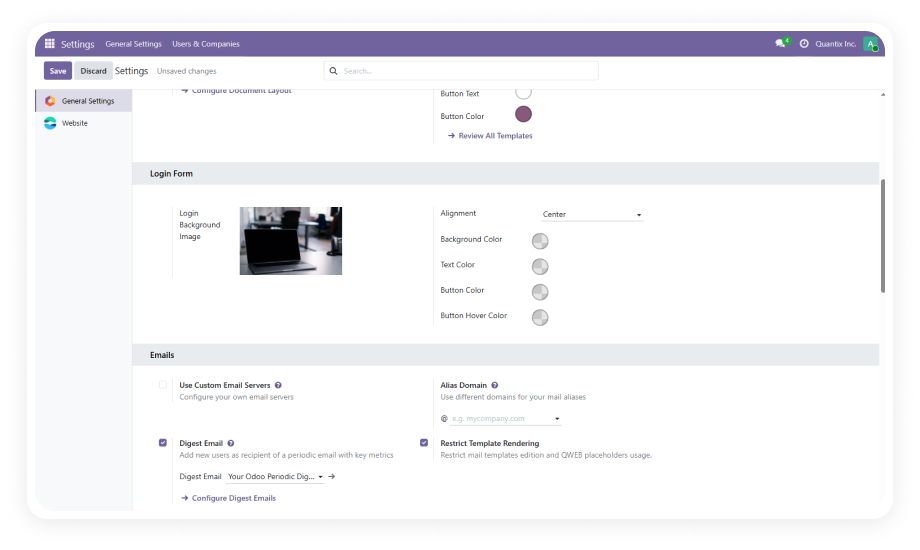
Upload any image directly through the Login Form settings and apply it as the full-page background behind the login form.

Why it matters: a branded visual backdrop instantly communicates organizational identity and professionalism.

2

Form Alignment Control

Position the login form container to the left, center, or right of the page to complement your chosen background image.

Why it matters: visual composition directly affects perceived quality; a well-placed form creates a cohesive experience.

3

Text Color Customization

Set the color of all text elements on the login form — labels, input text, links, and headings — to match your brand palette.

Why it matters: consistent typography color ensures readability and reinforces brand guidelines.

4

Button Color Customization

Define the primary button color used for the login/submit action. Align it precisely with your brand's accent color.

Why it matters: the login button is the most-clicked element; matching it maintains visual consistency.

5

Button Hover Color

Configure the color state that appears when users hover over the login button for clear interactive feedback.

Why it matters: intentional hover states improve usability by signaling the button is interactive.

6

Form Background Color

Set the background color of the login form container independently from the page background for optimal contrast.

Why it matters: proper contrast ensures accessibility and readability against complex backgrounds.

7

Password Strength Enforcement

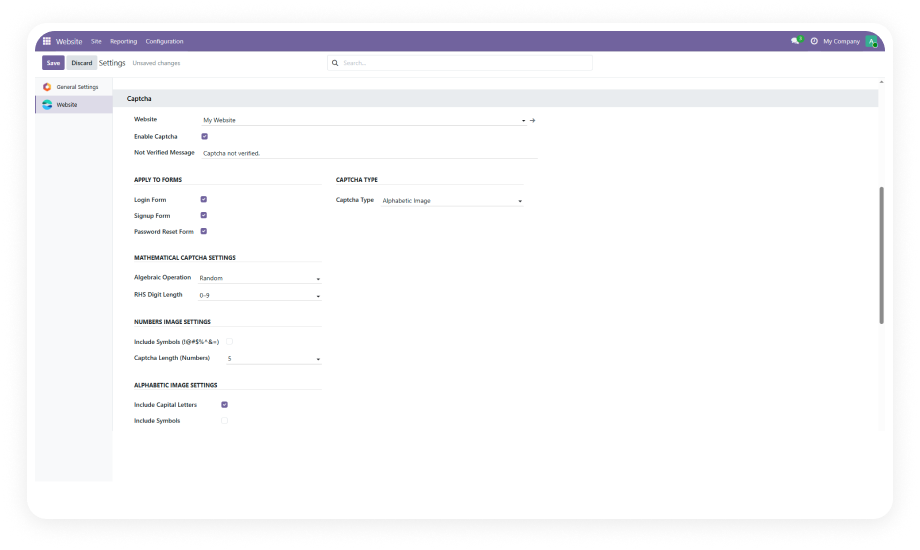
Activate built-in validation requiring at least 8 characters including uppercase, lowercase, digits, and special characters.

Why it matters: eliminates weak passwords across your user base, reducing credential-attack surface.

8

No-Code Configuration

Every setting is managed through the Odoo backend UI. No template editing, no SCSS overrides, no developer intervention.

Why it matters: empowers non-technical staff to maintain branding without support tickets.

Who Gets The Most Out Of This Module

Role
Primary Use Case
Key Outcome
Odoo System Administrator
Brand the login page and enforce password rules without developer assistance
Professional first impression with stronger security — configured in minutes
Marketing / Brand Manager
Align the Odoo login screen with corporate visual identity guidelines
Every user touchpoint — including login — reflects brand standards
SaaS Product Owner
Differentiate client-facing product login from generic Odoo
Customers see a branded product experience, not a white-label ERP
Multi-Brand Operator
Apply distinct login branding per Odoo instance for separate business units
Users immediately identify which organization they are accessing
IT Security Officer
Enforce password complexity requirements across all user accounts
Reduced credential-attack surface without additional security modules
Odoo Consultant / Integrator
Deliver polished, branded Odoo deployments to clients quickly
Higher perceived implementation quality with minimal development effort

Versions & Documentation

Select your Odoo version to access the relevant setup guide

Documentation coming soon for Odoo 16
Documentation coming soon for Odoo 17

Native Odoo vs Zehntech Login Page Customizer

Capability
Zehntech Login Page Customizer
Native Odoo
Custom background image on login page
Yes — upload from settings
No — plain white/gray default
Login form alignment (left / center / right)
Yes — configurable positioning
No — fixed center only
Text color customization
Yes — full control from settings
No — requires SCSS editing
Button color customization
Yes — primary and hover states
No — requires SCSS editing
Form background color
Yes — independent of page background
No — requires template override
Password strength enforcement
Yes — uppercase, lowercase, digits, special chars
No — basic length only
Configuration method
Visual backend settings — no code
Template and SCSS file edits
Developer required for changes
No
Yes
Survives Odoo version upgrades cleanly
Yes — lightweight module architecture
N/A (custom code often breaks)
Cost
FREE
N/A

Get Started In Minutes

No development environment. No custom code. No consultant required for standard setup.

01

Download and Install

Go to the Odoo App Store, search for "Login Page Customizer" by Zehntech Technologies, and click Install. Compatible with Odoo Online, Odoo.sh, and On-Premise.

02

Open Login Form Settings

In your Odoo backend, navigate to the Login Form settings panel. All visual and security customization options are centralized here.

03

Upload Background and Set Form Position

Upload your branded background image — any standard web image format works. Then select your preferred form alignment: left, center, or right.

04

Configure Colors and Save

Set your text color, button color, button hover color, and form background color. Enable password strength enforcement. Click Save.

Technical Details & Compatibility

Requirement
Module Technical Name
Supported Odoo Versions
Latest Version
Deployment Compatibility
Module Dependencies
License
Lines of Code
Category
Third-Party Integrations
External API Keys
Developer
Support Contact
Details
advance_login_form
16.0 · 17.0 · 18.0 · 19.0
19.0
Odoo Online · Odoo.sh · On-Premise
Website (website) · Discuss (mail)
OPL-1
404
Website & UX
None
None
Zehntech Technologies Inc.
Login Page Customizer — FAQ illustration

Frequently Asked Questions

Yes. Login Page Customizer provides a visual settings interface in the Odoo backend where you upload background images, choose form alignment, and pick brand colors. No template editing, SCSS overrides, or developer involvement required. Non-technical administrators can make changes and see results immediately.
Yes. The module is compatible with all three deployment types. It supports Odoo versions 16, 17, 18, and 19 across all deployment environments. Installation is the same standard process regardless of hosting method.
Passwords must be at least 8 characters long. They must contain at least one uppercase letter, one lowercase letter, one digit, and one special character. This enforcement applies during signup and password change flows, raising the security baseline for all users.
Yes. The Form Alignment Control feature offers three options: left, center, or right. This lets you compose the login form alongside your background image for optimal visual balance. The setting is changed with a single selection in the settings panel.
Yes. The module is completely free to download and use from the Odoo App Store. There are no subscription fees, no usage limits, no premium upgrade tiers, and no hidden costs. You receive the full feature set — background images, alignment, colors, and password enforcement — at zero cost.

Free to Download.
Free to Use.
No Hidden Costs.

Login Page Customizer gives you complete visual control over the first screen every user sees — custom backgrounds, precise form positioning, brand-matched colors, and password strength enforcement — all configured in minutes without writing code.

Zehntech Odoo experts ready to help


          You have successfully subscribed to the newsletter

          There was an error while trying to send your request. Please try again.

          Zehntech will use the information you provide on this form to be in touch with you and to provide updates and marketing.