Automate Marketing Initiatives with Salesforce Marketing Cloud Learn More
Zehntech Odoo App

Organized Documents: Tags & Auto Numbering

Smart Document Management with Numbering, Tagging & Access Control for Odoo. Organize, tag, and auto-number every document across your Odoo environment with centralized directory management, intelligent tagging, role-based access control, and duplicate prevention.

Compatible with Odoo 16, 17, 18 & 19
Odoo Online, Odoo.sh & On Premise
Links to CRM, Sales, Purchase, Invoicing & More
Dual-Layer Tagging System
Role-Based Access Control
$99.56
V19, 18, 17, 16
Organized Documents: Tags & Auto Numbering — Document management interface

Who Is This For?

Organized Documents: Tags & Auto Numbering transforms Odoo into a structured document management system. Create model-linked directories with automatic numbering sequences, apply dual-layer tagging, enforce role-based access, and share documents via email — all without leaving Odoo.

Operations teams drowning in unstructured documents
Finance departments needing auto-numbered invoices
Project managers requiring role-based access
Procurement teams tracking vendor contracts
Compliance officers enforcing document governance

The Problem: Document Chaos Across Odoo Modules

Problem
Zehntech Solution
Unstructured documents scattered across modules
Centralized directories linked to Odoo models
No automatic document numbering
Sequential auto-numbering with custom prefixes
Basic labels only for organization
Dual-layer tagging (Directory + Document tags)
No time-based filtering
Year/Quarter/Month/Week/Day grouping
Duplicate directories cause confusion
Automatic duplicate prevention
Manual download and email attachment
Direct email sharing from interface
Basic user group permissions
Granular Document Manager/Officer roles
Per-module document attachments
Cross-module organization system

Key Features

1

Directory & Tag Configuration

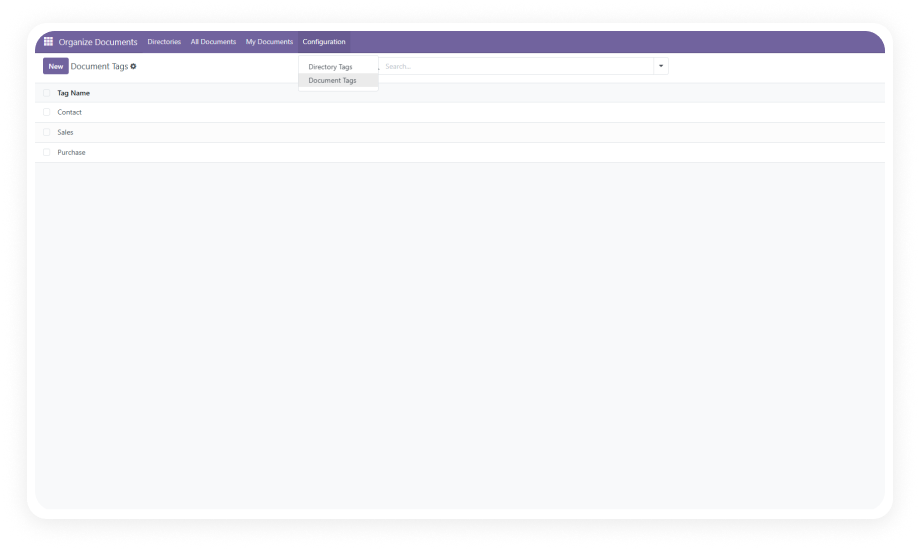
Separate management of Directory Tags (folder categories like "Invoices," "Contracts," "HR") and Document Tags (file labels like "Vendor," "Approved," "Draft") for multi-dimensional organization.

Why it matters: Dual-layer tagging lets teams filter and locate documents from two angles — eliminating the single-folder limitation that causes filing confusion.

2

Document Directory Management

Create directories linked directly to Odoo models (CRM, Sales, Purchase, Invoicing, Calendar, Contacts) with customizable access permissions and automatic numbering sequences.

Why it matters: Model-linked directories ensure every document is contextually associated with the right business process.

3

Automatic Document Numbering

Each directory generates sequential, auto-incremented document numbers following your defined naming conventions and prefix patterns.

Why it matters: Consistent numbering eliminates manual reference tracking, prevents duplicates, and creates an audit-ready document trail.

4

Time-Based Directory Grouping

Filter and organize directories by Year, Quarter, Month, Week, or Day based on creation date for improved navigation and period-based retrieval.

Why it matters: Financial teams closing monthly books or auditors reviewing quarterly records can instantly access the exact time window they need.

5

Duplicate Directory Prevention

The system automatically blocks duplicate directories for the same Odoo model, maintaining data consistency and preventing fragmentation.

Why it matters: Duplicate directories cause confusion, split search results, and create version control nightmares. Automated prevention keeps your system clean.

6

Email Document Sharing

Send document attachments directly via email with auto-populated subject lines and recipients — all from within the document management interface.

Why it matters: Sharing documents without downloading, switching apps, and re-uploading saves minutes per transaction.

7

Role-Based Access Control

Assign Document Manager or Document Officer roles with granular permissions controlling who can create, edit, view, or delete documents and directories.

Why it matters: Sensitive contracts, HR records, and financial documents require restricted access without IT intervention for every permission change.

Real-World Use Cases

Department
How They Use It
Key Outcome
Finance & Accounting
Auto-number invoices, receipts, and payment vouchers into time-grouped directories. Month-end closing becomes a matter of filtering by period rather than searching through scattered attachments.
Faster month-end closing; every financial document audit-ready in its designated directory
Sales & CRM
Link proposals, contracts, and client correspondence to CRM leads and opportunities. Sales reps find every document associated with a deal in one structured directory.
No lost deal documents; every client file traceable from first contact to signed contract
Procurement & Vendor Management
Organize purchase orders, vendor contracts, and delivery receipts with directory tags like "Active Vendor" or "Pending Approval." Prevent duplicate PO directories across departments.
Eliminated duplicate vendor directories; PO retrieval during audits takes seconds, not minutes
Human Resources
Manage employee documents — offer letters, performance reviews, compliance certificates — with role-based access ensuring only HR managers view sensitive records.
Sensitive employee records protected with role-based access; compliance documents always current and organised
Legal & Compliance
Tag contracts by status (Draft, Under Review, Executed) and auto-number for audit trails. Time-based grouping supports regulatory reporting windows.
Audit-ready document trails; regulatory reporting windows met without searching scattered file locations

Versions & Documentation

Choose your Odoo version and explore interactive documentation

Documentation coming soon for Odoo 18.

Why Choose Organized Documents: Tags & Auto Numbering?

Feature
Zehntech Module
Native Odoo
Structured Directories Linked to Models
Full support across CRM, Sales, Purchase, Invoicing, Calendar, Contacts
Limited
Automatic Document Numbering
Sequential auto-numbering with custom prefixes
Not available
Dual-Layer Tagging
Separate Directory Tags and Document Tags
Basic labels only
Time-Based Grouping
Full period-based filtering (Year/Quarter/Month/Week/Day)
Not available
Duplicate Directory Prevention
Automatic blocking of duplicate model directories
Not available
Role-Based Access
Granular Document Manager and Document Officer roles
Basic user groups
Email Sharing from Interface
Direct email with auto-populated fields
Manual download & attach
Cross-Module Document Organization
Centralized system spanning all linked modules
Per-module attachments

How to Get Started

Install, configure, and organize — your document management system is ready in minutes.

01

Install the Module

Purchase and download from the Odoo App Store. Install via Apps menu. The module automatically configures dependencies including CRM, Purchase, Sales, Calendar, Contacts, Discuss, and Invoicing.

02

Configure Directory Tags & Document Tags

Navigate to Document Management configuration. Create Directory Tags (folder categories like "Finance," "HR," "Legal") and Document Tags (file labels like "Approved," "Pending," "Confidential").

03

Set Up Directories & Access Roles

Create directories linked to your active Odoo models. Define numbering sequences and prefixes. Assign users as Document Managers or Document Officers based on responsibilities.

04

Organize, Tag & Share

Upload documents into structured directories, apply tags for multi-dimensional filtering, use time-based grouping for navigation, and share via built-in email functionality.

Technical Details & Compatibility

Requirement
Odoo Versions
Deployment
Dependencies
License
Languages
Technical Name
Codebase
Developer
Support
Details
16.0 · 17.0 · 18.0 · 19.0
Odoo Online · Odoo.sh · On Premise
CRM, Purchase, Sales (sale_management), Calendar, Contacts, Discuss (mail), Invoicing (account)
OPL-1 (Odoo Proprietary License)
Multi-language supported
zehntech_document_management_system
Lightweight (599 lines of code)
Zehntech Technologies Inc.
Organized Documents — FAQ illustration

Frequently Asked Questions

Organized Documents: Tags & Auto Numbering supports all deployment types: Odoo Online, Odoo.sh, and On Premise installations. No server-level configuration is required for cloud deployments.
The module ships with native support for CRM, Sales, Purchase, Calendar, Contacts, Discuss, and Invoicing. For custom module integration, Zehntech's support team can assist with extending directory links to your specific business modules.
The system prevents identical model-directory combinations to avoid fragmentation. You can differentiate directories using unique tags and naming conventions, ensuring each department maintains its own organized structure without true duplicates.
There is no artificial limit imposed by the module. Document and directory capacity is governed by your Odoo server resources and storage allocation, making it suitable for businesses of any size.
Existing Odoo attachments remain intact. The module adds a structured layer on top of your current system. You can gradually migrate existing documents into the new directory structure at your own pace without disrupting ongoing operations.

One-Time Purchase.
No Subscription.
No Recurring Fees.

Get Organized Documents: Tags & Auto Numbering for just $99.56 — a single investment that delivers permanent document management capabilities across your entire Odoo environment.

Zehntech Odoo experts ready to help


          You have successfully subscribed to the newsletter

          There was an error while trying to send your request. Please try again.

          Zehntech will use the information you provide on this form to be in touch with you and to provide updates and marketing.