Automate Marketing Initiatives with Salesforce Marketing Cloud Learn More
Zehntech Odoo App

Product Catalog Generator — Create Professional PDF & Excel Catalogs Directly from Odoo

Generate polished, brand-consistent product catalogs in minutes using your existing Odoo product data. Choose from five design templates, export to PDF or Excel, support multiple currencies and languages, and email catalogs directly to customers — all without leaving Odoo.

Compatible with Odoo 19, 18, 17 & 16
Community & Enterprise Supported
5 Customizable Design Templates
PDF & Excel Export
Multi-Currency & Multi-Language
Built-In Email Delivery
$49.78
V19, 18, 17, 16
Product Catalog Generator — Generate professional PDF and Excel catalogs from Odoo

What is Product Catalog Generator?

Product Catalog Generator is an Odoo module that transforms your product database into professionally designed catalogs ready for print or digital distribution. Instead of manually building catalogs in external tools like InDesign, Canva, or Word, you generate them in a few clicks from the products and categories already in your Odoo system — with live pricing, multi-currency support, and consistent branding applied automatically.

Generate by products or categories
5 design templates
PDF & Excel export
Multi-currency & multi-language
Email delivery from Odoo

How Product Catalog Generator Eliminates Manual Catalog Creation in Odoo

Problem
Zehntech Product Catalog Generator Solution
Creating product catalogs requires exporting data to external design tools
Generate catalogs directly from Odoo product data without any external tools
Catalog pricing becomes outdated as soon as prices change
Catalogs pull live pricing from your Odoo pricelists at generation time
International customers need catalogs in different currencies and languages
Multi-currency and multi-language support generates localized catalogs per audience
Sales teams wait days for marketing to produce updated catalogs
Any user can generate a catalog in minutes from the product list
Maintaining brand consistency across multiple catalog versions is difficult
Five predefined templates with default cover and closing pages ensure consistent branding
Emailing catalogs requires downloading, attaching, and sending manually
Built-in email templates deliver catalogs directly to customers from within Odoo
Different product lines need different catalog presentations
Generate catalogs by specific products or entire categories with customizable detail visibility
No audit trail of which catalogs were created, when, and for whom
Comprehensive activity tracking logs every catalog creation and modification
Image quality varies when catalogs are assembled manually
Configurable image sizing (small, medium, large) ensures consistent visual presentation
Excel-based product lists lack professional formatting
Excel export maintains structured data while PDF export provides polished visual output

Complete Product Catalog Creation and Distribution from Odoo

1

Quick Catalog Generation by Products or Categories

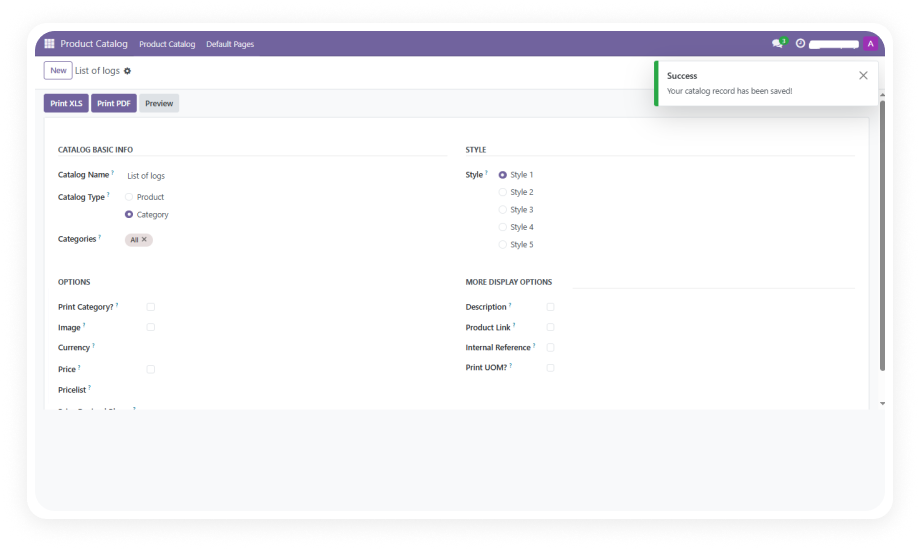
Create catalogs in a few clicks by selecting specific products from your database or choosing entire product categories. The module pulls all relevant data — images, descriptions, pricing, references — directly from your Odoo product records.

Why it matters: catalog creation drops from hours of manual design work to minutes of selecting and generating, with zero data re-entry required.

2

Five Customizable Design Templates

Choose from five predefined design styles, each adaptable to match your brand requirements. Templates control layout, spacing, and visual hierarchy to produce professional results without graphic design expertise.

Why it matters: your team gets design-quality output without needing design tools or designers — every catalog looks polished regardless of who creates it.

3

Configurable Image Sizing

Control how product images appear in your catalogs with three size options: small, medium, or large. Image sizing applies consistently across all products in a catalog generation run.

Why it matters: different catalog purposes demand different visual emphasis — a quick reference pricelist needs small images while a showcase catalog benefits from large product photography.

4

Product Detail Visibility Controls

Toggle which product information appears in your catalog: price, description, internal reference, and unit of measure. Customize the content depth per catalog based on the intended audience.

Why it matters: a catalog for end customers might show prices and descriptions, while an internal reference catalog needs SKUs and UOM — the same module serves both needs.

5

PDF and Excel Export

Generate catalogs in PDF format for professional distribution or Excel format for data-centric use cases. PDF output is print-ready with consistent formatting, while Excel exports preserve structured product data for further manipulation.

Why it matters: sales teams get print-ready brochures for client meetings, and operations teams get structured data exports from the same system.

6

Multi-Currency Support

Generate catalogs showing pricing in any currency configured in your Odoo system. Apply different pricelists to produce catalogs with region-specific pricing without duplicating products.

Why it matters: international businesses serve each market with locally priced catalogs without maintaining separate product databases or pricing sheets.

7

Multiple Pricelist Support

Apply any of your configured Odoo pricelists when generating catalogs. Different customer segments, regions, or distribution channels can each receive catalogs reflecting their specific pricing agreements.

Why it matters: a single product set produces distinct catalogs for wholesale, retail, VIP, or regional pricing — all from one generation workflow.

8

Multi-Language Catalog Generation

Create catalogs in any language configured in your Odoo instance. Product names, descriptions, and catalog elements render in the selected language for localized distribution.

Why it matters: businesses operating in multilingual markets produce native-language catalogs without translating and reformatting content in external tools.

9

Built-In Email Delivery

Send generated catalogs directly to customers using pre-configured email templates. The entire workflow — generation, preview, and delivery — stays inside Odoo without downloading and re-attaching files.

Why it matters: catalog distribution becomes a single workflow instead of a multi-step process involving downloads, email clients, and manual file management.

10

Default Cover and Closing Pages

Set reusable cover and closing pages that apply automatically to every generated catalog. Maintain consistent front and back matter — company branding, contact information, terms, and disclaimers — across all catalogs.

Why it matters: brand consistency is enforced by default rather than depending on individual users remembering to add the correct pages.

11

Preview Before Finalization

Review catalogs before committing to final generation. The preview function lets you verify layout, content accuracy, and visual presentation before producing the final PDF or Excel output.

Why it matters: catching errors before distribution saves time, avoids embarrassing mistakes, and prevents the need to regenerate and redistribute corrected catalogs.

12

Activity Tracking and Audit Log

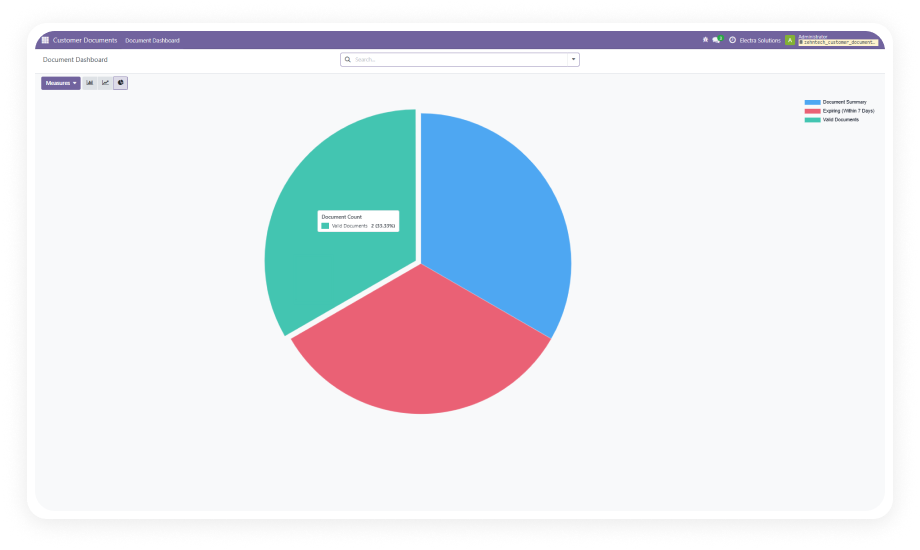
Every catalog creation, modification, and distribution is logged with timestamps and user attribution. The activity log provides a complete history of catalog operations.

Why it matters: management has visibility into catalog activity — who created what, when, and which version was sent to which customer — supporting accountability and compliance.

Who Gets the Most Out of This Module

Role
Primary Use Case
Key Outcome
Sales Manager
Generate customer-specific catalogs with tailored pricing before client meetings
Professional materials ready in minutes instead of requesting from marketing
Marketing Team
Produce seasonal product catalogs with consistent branding across all channels
One-click catalog generation eliminates repetitive design work in external tools
Export Manager
Create multilingual, multi-currency catalogs for international distributors
Each market receives a natively priced and translated catalog from a single Odoo instance
eCommerce Manager
Build category-specific product brochures for digital distribution
Downloadable catalogs complement the online store with offline-ready materials
Wholesale Distributor
Generate pricelist-specific catalogs for different reseller tiers
Each distribution partner receives catalogs reflecting their agreed pricing
Procurement Officer
Share product catalogs with internal teams for sourcing decisions
Standardized product reference documents generated from current inventory data
Trade Show Coordinator
Produce print-ready catalogs for events and exhibitions
Professional printed catalogs generated on-demand without designer involvement
Customer Service Rep
Email product catalogs directly to customers who request information
Instant catalog delivery from within the customer communication workflow

Versions & Documentation

Choose your Odoo version and explore interactive documentation

Native Odoo vs Zehntech Product Catalog Generator

Capability
Zehntech Product Catalog Generator
Native Odoo
Generate product catalogs from product data
✔ Five templates, PDF & Excel
Not available
Multiple design template options
✔ Five predefined styles
Not available
PDF export for print-ready catalogs
✔ Available
Not available
Excel export for data-centric use
✔ Available
Basic product export only
Multi-currency catalog pricing
✔ Any configured currency
Single currency display
Multiple pricelist support
✔ Generate per pricelist
Not available
Multi-language generation
✔ Any configured language
Not available
Configurable image sizing
✔ Small, medium, large
Not available
Product detail visibility controls
✔ Price, description, ref, UOM
Not available
Built-in email delivery
✔ Pre-configured templates
Manual attach and send
Default cover and closing pages
✔ Reusable brand pages
Not available
Preview before generation
✔ Available
Not available
Generate by category
✔ Available
Not available
Activity tracking and audit log
✔ Full history
Not available

Get Started In Minutes

No development environment. No custom code. No consultant required for standard setup.

01

Install from the Odoo App Store

Search for zehntech_product_catalog_generator in your Odoo Apps menu and click Install. Compatible with Odoo 16, 17, 18, and 19. Requires Sales, eCommerce, Discuss, Invoicing, and Website modules.

02

Configure Default Catalog Settings

Set up default cover and closing pages for branding consistency. Configure preferred image sizing, product detail visibility options, and assign your default pricelist and currency.

03

Select Products and Generate Catalogs

Create a new catalog by selecting specific products or entire product categories. Choose one of five design templates, set your currency and language, then preview and generate in PDF or Excel format.

04

Distribute to Customers

Send catalogs directly to customers using built-in email templates, or download the generated files for manual distribution. Every action is logged in the activity tracker.

Technical Details & Compatibility

Requirement
Odoo Versions
Editions
Hosting
Dependencies
Third-Party Dependencies
Custom Dev Required
Install Time
Server Restart
Data Migration
Module Conflicts
License
Last Tested
Lines of Code
Support
Details
16.0 · 17.0 · 18.0 · 19.0
Community · Enterprise · Odoo.sh
Odoo Online · On-Premise · Odoo.sh
Sales (sale_management) · eCommerce (website_sale) · Discuss (mail) · Invoicing (account) · Website (website)
None
No
Under 15 minutes
Not required
Not required
None known
OPL-1
Odoo 19.0 — May 2026
1,473
Product Catalog Generator FAQ illustration

Frequently Asked Questions

Yes — the module supports full multi-language and multi-currency catalog generation. Select any language configured in your Odoo instance to produce localized catalogs. Apply any configured currency and pricelist to generate region-specific pricing without duplicating product records.
The module generates catalogs in both PDF and Excel formats. PDF output is print-ready with professional formatting, ideal for client distribution and trade shows. Excel output preserves structured product data for internal teams who need to manipulate or import catalog information.
Five predefined design templates are included out of the box. Each template is adaptable to match your brand requirements through the module's configuration options. You control image sizing (small, medium, large), product detail visibility, and default cover and closing pages for consistent branding.
The module supports Odoo versions 16, 17, 18, and 19. Both Community and Enterprise editions are fully compatible. Deployment is supported on Odoo Online, Odoo.sh, and On-Premise hosting environments.
Yes — the module includes built-in email templates for direct catalog delivery to customers. The entire workflow — selection, generation, preview, and email delivery — happens inside Odoo. No need to download catalogs and re-attach them in a separate email client.

One-Time Purchase.
No Subscription.
No Recurring Fees.

Your product data already lives in Odoo — Product Catalog Generator turns it into polished, distributable catalogs in minutes. Five templates, PDF and Excel output, multi-currency and multi-language support, and built-in email delivery — all for a one-time investment of $49.78.

Get started with Product Catalog Generator


          You have successfully subscribed to the newsletter

          There was an error while trying to send your request. Please try again.

          Zehntech will use the information you provide on this form to be in touch with you and to provide updates and marketing.