Automate Marketing Initiatives with Salesforce Marketing Cloud Learn More
Zehntech Odoo App

Product Label Builder — Design & Print Custom Barcode Labels in Odoo

Design professional product labels with barcodes, prices, and dynamic product fields using a visual template builder. Configure sections, set formatting, preview layouts, and print in bulk — all from within Odoo without any custom development.

Compatible with Odoo 16, 17, 18 & 19
Visual label designer — no coding required
Community & Enterprise Supported
No Custom Development Required
Trusted by 500+ Businesses Across 12+ Countries
$149.34
V19, 18, 17, 16
Product Label Builder — Visual barcode label designer for Odoo

What is Product Label Builder?

Product Label Builder is a visual Odoo module that lets you design, configure, and print custom product labels with barcodes, prices, and any product field — directly from your Odoo instance. It replaces the manual, code-dependent label creation process with a configurable template system where you control every detail of layout, formatting, and content.

Visual template builder
Barcode generation
Dynamic product fields
Bulk printing
Pricelist pricing
Skip positions

How Product Label Builder Solves Odoo Label Printing Limitations

Problem
Zehntech Product Label Builder Solution
Native Odoo label printing offers minimal customization with fixed layouts
Visual template builder with full control over sections, fields, fonts, colors, and placement
Adding barcodes requires developer intervention and QWeb template editing
Built-in barcode generation with multiple barcode styles configurable through the UI
No way to preview label output before printing, wasting paper and time
Real-time label preview shows exactly how labels will appear before any print run
Printing on partially used sheets wastes entire sheets or requires manual alignment
Skip position functionality lets you start printing at any position on an existing sheet
Product prices on labels do not reflect pricelist-specific values
Pricelist integration ensures labels display the correct price for the selected pricelist
Bulk label printing for multiple products with different quantities requires workarounds
Native bulk printing with per-product quantity settings generates all labels in one run
Label formatting is locked — no control over dimensions, fonts, borders, or backgrounds
Section-level formatting with granular control over width, height, alignment, borders, fonts, and colors
Template reuse requires duplicating and manually editing code-based templates
Reusable label templates saved and applied across products and print runs instantly

Design Any Label. For Any Product. Exactly How You Need It.

1

Visual Label Template Designer

Create custom label templates through a section-based visual interface. Add multiple sections to a label, define their layout, and arrange product fields, barcodes, and text elements without writing code.

Why it matters: business users design labels independently, eliminating the development queue and reducing time-to-print from days to minutes.

2

Barcode Generation & Placement

Generate barcodes directly on labels with support for multiple barcode styles. Place barcodes precisely within label sections and configure their size and positioning through the template settings.

Why it matters: every product label includes a scannable barcode for inventory tracking, POS scanning, and logistics without separate barcode printing software.

3

Dynamic Product Field Integration

Pull any product field — name, internal reference, price, weight, description, category, or custom fields — directly onto labels. Fields populate dynamically from live product data at print time.

Why it matters: labels always display current, accurate product information without manual data entry or outdated static text.

4

Pricelist-Based Pricing Accuracy

Labels display prices that respect Odoo pricelist rules, ensuring the correct price appears based on the selected pricelist. Switch between pricelists for different label runs — retail, wholesale, promotional.

Why it matters: retail operations maintain pricing accuracy across stores, promotions, and customer segments without manually adjusting prices on each label batch.

5

Bulk Label Printing

Select multiple products and define individual quantities for each, then generate all labels in a single print operation. Handle large label runs efficiently across product catalogs of any size.

Why it matters: warehouse relabeling, new product launches, and seasonal pricing updates affecting hundreds of SKUs are completed in one operation instead of product-by-product.

6

Skip Position Functionality

Specify starting positions on a label sheet to skip already-used positions. Print only on remaining blank positions of a partially consumed label sheet.

Why it matters: eliminates sheet waste when printing small batches, ensuring every position on expensive label stock is used before moving to a new sheet.

7

Configurable Page & Section Dimensions

Define label page size, margins, padding, section width, section height, and inter-label spacing. Match any physical label stock your organization uses — from small price tags to full shipping labels.

Why it matters: the module adapts to your label stock rather than forcing you to buy specific formats, supporting any printer and any label sheet dimension.

8

Section Formatting & Styling

Customize each label section independently with font type, font size, font color, background color, border style, border width, and text alignment. Create visually distinct zones within a single label.

Why it matters: professional-looking labels with clear visual hierarchy — bold product names, highlighted prices, and separated barcode zones — achieved without graphic design tools.

9

Real-Time Label Preview

Preview the complete label layout with actual product data before printing. See exactly how text, barcodes, and formatting will appear on the physical label.

Why it matters: the preview-first approach eliminates wasted print runs caused by layout errors, misaligned fields, or truncated text — saving time and label stock.

10

Reusable Template Library

Save configured label templates and apply them across different product selections and print runs. Maintain a library of templates for different use cases — shelf labels, shipping tags, inventory stickers, promotional price cards.

Why it matters: consistent label output across your organization with zero reconfiguration effort, and new team members produce correctly formatted labels immediately using existing templates.

Who Gets The Most Out Of This Module

Role
Primary Use Case
Key Outcome
Retail Store Manager
Generate shelf price labels with barcodes and pricelist-accurate pricing for all store products
Correctly priced, scannable shelf labels printed in bulk whenever prices update — no manual effort
Warehouse Supervisor
Print inventory identification labels with product names, internal references, and barcodes for bin locations
Every warehouse item labeled for fast identification and barcode-based picking operations
Logistics Coordinator
Create shipping labels with product details, barcodes, and destination information for outbound orders
Standardized shipping labels generated directly from Odoo without switching to separate label software
Procurement Officer
Print receiving labels for incoming goods with purchase order references and product barcodes
Incoming inventory labeled on arrival for immediate identification and putaway processing
Production Manager
Generate work-in-progress labels for manufactured items with lot numbers and production details
Manufacturing floor items tracked visually with labels matching production order data
E-commerce Operations Lead
Bulk print product labels with barcodes and prices for new product catalog additions
Hundreds of new SKU labels produced in a single print run during product onboarding
Quality Control Inspector
Print inspection labels with product specifications, batch numbers, and QC status fields
Physical products carry inspection-ready labels linking them to quality records in Odoo

Versions & Documentation

Choose your Odoo version and explore interactive documentation

User Guide — Overview

User Guide — Advanced Configuration

Native Odoo vs Zehntech Product Label Builder

Capability
Zehntech Product Label Builder
Native Odoo
Visual label template designer — no code required
✔ Available
Not available
Multiple barcode styles with configurable placement
✔ Multiple styles
Basic — single fixed format
Dynamic product field integration on labels
✔ Any product field
Limited to predefined fields
Pricelist-based pricing on labels
✔ Full pricelist support
Not available
Bulk printing with per-product quantity settings
✔ Full bulk printing
Basic — limited control
Skip position for partially used sheets
✔ Available
Not available
Section-level formatting (fonts, colors, borders)
✔ Granular control
Not available
Configurable page dimensions and margins
✔ Any label stock
Fixed formats only
Real-time label preview before printing
✔ Available
Not available
Reusable template library
✔ Unlimited templates
Not available
Custom label sizes for any label stock
✔ Fully configurable
Requires development
Non-technical interface for business users
✔ No developer needed
Requires developer for customization

Get Started In Minutes

No development environment. No custom code. No consultant required for standard setup.

01

Purchase & Install

Purchase from the Odoo App Store for Odoo 16, 17, 18, or 19. Navigate to your Apps menu, search for the module, and click Install. Dependencies confirm automatically — no server restart required.

02

Configure Default Label Settings

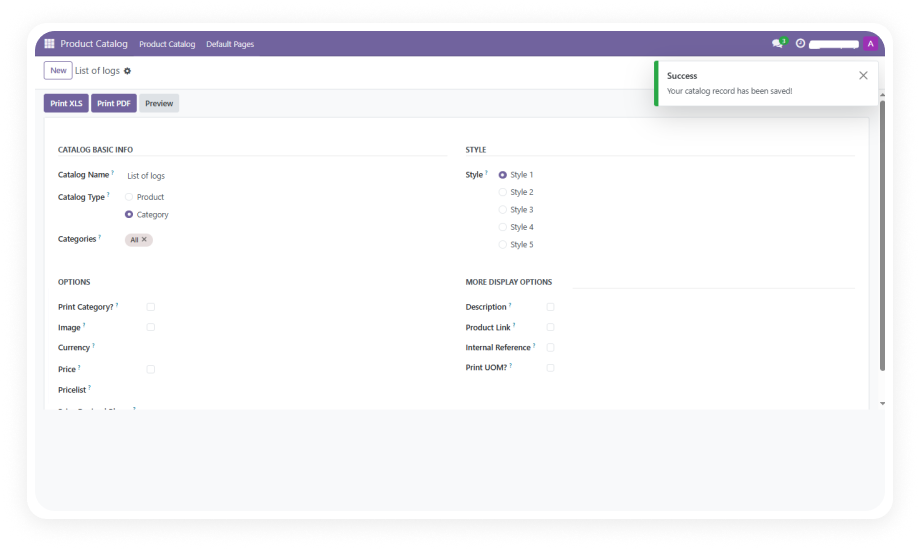
Open the Product Labels Configuration menu. Set default template preferences, choose your barcode style, define standard page dimensions and margins, and configure print layout defaults for consistency across your organization.

03

Design Your First Template

Create a new label template. Add sections, select product fields, place barcodes, set dimensions and alignment, and apply formatting. Use the real-time preview to verify the layout with actual product data before printing.

04

Select your products, choose the template, set per-product quantities, configure skip positions if needed, and print. Labels generate with live product data including pricelist-accurate pricing and encoded barcodes — ready for immediate application.

Technical Details & Compatibility

Requirement
Odoo Versions
Editions
Hosting
Dependencies
Third-Party Dependencies
Custom Dev Required
Install Time
Server Restart
Data Migration
Module Conflicts
License
Last Tested
Lines of Code
Support
Details
16.0 · 17.0 · 18.0 · 19.0
Community · Enterprise · Odoo.sh
Odoo Online · On-Premise · Odoo.sh
Inventory (stock) · Manufacturing (mrp) · Purchase · Sales (sale_management) · Invoicing (account) · Maintenance · Repairs (repair) · Discuss (mail)
None
No
Under 5 minutes
Not required
Not required
None known
OPL-1
Odoo 19.0 — May 2026
2,874
Product Label Builder — Frequently Asked Questions

Frequently Asked Questions

Yes. Product Label Builder provides a visual template designer where you add sections, place barcodes in your preferred style, add product fields like name, price, SKU, and weight, and control the exact layout. Barcode generation is built in — you select the barcode style and position it within your label template through the configuration interface. No QWeb editing, Python code, or developer involvement is required at any point in the label design process.
Yes. The module supports bulk printing where you select multiple products, define individual quantities for each product, and generate all labels in a single print run. Skip position functionality also lets you start printing at a specific position on a partially used label sheet, eliminating waste. Label runs of any size — from a handful to thousands — are handled through the same streamlined interface.
Yes. Product Label Builder integrates with Odoo's pricelist system so the price displayed on each label reflects the correct pricelist-based value. This means retail labels, wholesale tags, and promotional stickers all show accurate pricing based on your configured pricelists. Switching between pricelists for different label runs is a simple selection during the print configuration step.
Product Label Builder supports Odoo 16.0, 17.0, 18.0, and 19.0. All hosting types are supported: Odoo Online, Odoo.sh, and On-Premise deployments. The module is compatible with both Community and Enterprise editions across all supported versions.
No. The module is designed for business users — warehouse staff, retail managers, logistics coordinators, and operations teams. You design labels through a visual section-based interface: add sections, select fields, configure barcodes, adjust formatting, set dimensions, and preview results in real time. No Python, XML, QWeb, or developer knowledge is required. Templates are reusable and shareable across your organization.

Ready to Print Professional Product Labels Directly from Odoo?

Get started with Product Label Builder


          You have successfully subscribed to the newsletter

          There was an error while trying to send your request. Please try again.

          Zehntech will use the information you provide on this form to be in touch with you and to provide updates and marketing.