Join us at GITEX 2025! Discover our solutions at Hall 4, Booth H-30 Schedule a Meeting Today.
Automate Marketing Initiatives with Salesforce Marketing Cloud Learn More
Join us at GITEX 2024! Discover our solutions at Hall 4, Booth H-30 Book your live demo today.
Zehntech Odoo App

Customer Overdue Statements — Automate Payment Tracking and Statement Delivery in Odoo

Stop chasing overdue invoices manually. Generate customer and vendor overdue statements automatically, send bulk email reminders on schedule, export aging analysis reports, and give partners direct portal access to their account status — all from inside Odoo.

Compatible with Odoo 19, 18, 17 & 16
Community & Enterprise Supported
Automated Scheduling via Cron Jobs
PDF & Excel Export with Aging Analysis
Trusted by Businesses Across 12+ Countries
$49.78
V19, 18
Customer Overdue Statements for Odoo — Automate payment tracking and statement delivery

What is Customer Overdue Statements?

Customer Overdue Statements is an Odoo module that automates the generation and delivery of due and overdue payment statements for both customers and vendors. It replaces the tedious manual process of tracking outstanding invoices, compiling reports, and sending individual reminders — consolidating everything into a single, automated workflow inside Odoo.

Customer & vendor statements
Aging analysis reports
Bulk email reminders
Automated scheduling
Partner portal access

How Customer Overdue Statements Solves Odoo Collections Gaps

Problem
Zehntech Customer Overdue Statements Solution
Manually tracking which invoices are overdue across hundreds of customers
Automated due and overdue payment tracking generates statements without manual review
Sending individual payment reminders one customer at a time
Bulk email functionality sends overdue reminders to multiple partners simultaneously
No scheduled automation for recurring statement delivery
Cron job scheduling automates statement generation and email delivery on defined intervals
Customers calling accounts receivable to ask about their balance
Portal access lets customers view and download their statements independently
Generating aging reports requires exporting data and building spreadsheets
Built-in aging analysis with PDF and Excel export delivers structured reports instantly
No preview of what customers will receive before sending
Email wizard with preview functionality lets you review statements before bulk delivery
Vendor statements are handled separately from customer statements
Unified interface manages both customer (AR) and vendor (AP) overdue statements
Finding specific overdue accounts among thousands of partners is time-consuming
Advanced filters and grouping capabilities let you isolate accounts by aging, amount, or partner attributes
Standard Odoo invoicing shows individual invoice status but not consolidated overdue position
Invoice outstanding reports aggregate all overdue amounts per partner into a single statement view

Complete Overdue Statement Automation for Odoo Finance Teams

1

Automated Customer & Vendor Statements

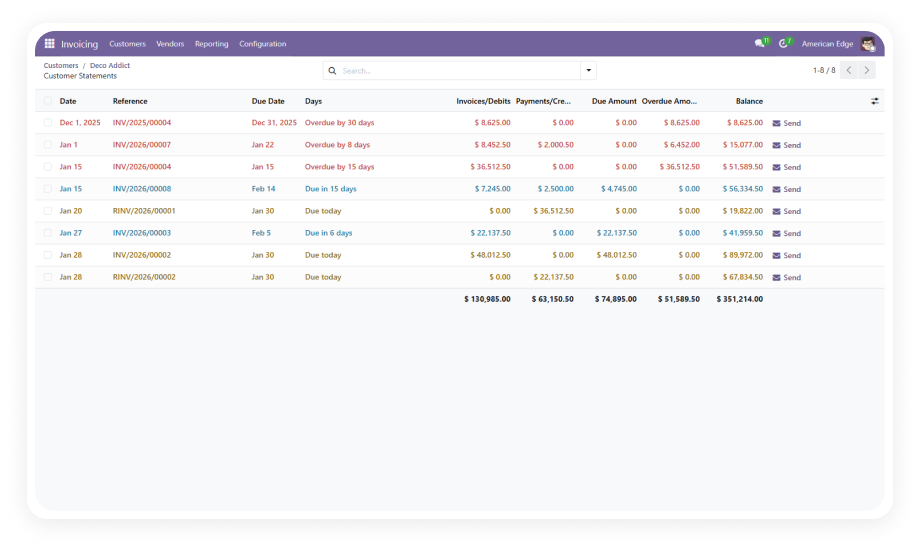
Generate consolidated overdue statements for both accounts receivable (customers) and accounts payable (vendors) without manual data compilation. The module pulls all outstanding invoices per partner and presents them in a structured statement format.

Why it matters: Finance teams no longer need to manually track which invoices are overdue across their partner base — the system does it continuously.

2

Due & Overdue Payment Tracking

Track payment status across all partner accounts in real time. The module identifies which invoices are approaching their due date and which have already passed it, categorizing them into aging buckets automatically.

Why it matters: Proactive visibility into upcoming and past-due payments enables timely action before accounts become severely delinquent.

3

Email Wizard with Preview

Compose and send overdue statements through a dedicated email wizard that includes a preview of the exact statement each partner will receive. Review formatting, amounts, and aging details before committing to a bulk send.

Why it matters: Previewing before sending eliminates the risk of delivering incorrect or poorly formatted statements to your partners.

4

Automated Scheduling via Cron Jobs

Configure recurring cron jobs that automatically generate and send overdue statements on your defined schedule — daily, weekly, monthly, or custom intervals. Once set, the system runs without manual intervention.

Why it matters: Collections communication becomes a hands-off process that runs reliably regardless of staff availability or workload.

5

Advanced Filters & Grouping

Filter and group overdue statements by partner, aging bucket, amount range, salesperson, or any relevant attribute. Quickly isolate the accounts that need immediate attention from those that are within acceptable thresholds.

Why it matters: Actionable segmentation allows finance teams to prioritize collection efforts based on risk and materiality.

6

Invoice Outstanding Reports

Generate consolidated reports showing all outstanding invoice amounts per partner in a single view. These reports aggregate open invoices, partial payments, and credit notes into a net overdue position for each account.

Why it matters: A single consolidated view per partner replaces the need to manually cross-reference multiple invoices and payments.

7

PDF & Excel Export with Aging Analysis

Export overdue statements and aging reports in PDF format for partner communication or Excel format for internal analysis. Aging analysis categorizes outstanding amounts by time buckets (current, 30 days, 60 days, 90+ days).

Why it matters: Structured exports in standard formats satisfy audit requirements, support internal reviews, and deliver professional-quality statements to partners.

8

Bulk Email & Overdue Reminders

Send overdue reminders to multiple customers or vendors simultaneously through the bulk email function. Select partners based on filters, review the batch, and send — all from within Odoo.

Why it matters: Bulk capability transforms collections from a per-customer manual task into a scalable, one-action process for the entire overdue portfolio.

9

Customer & Vendor Portal Access

Give customers and vendors direct access to their overdue statements through the Odoo portal. Partners can log in, view their current statement, review aging details, and download PDFs independently.

Why it matters: Self-service portal access reduces inbound inquiries to your accounts team and gives partners immediate visibility into their payment obligations.

Who Gets The Most Out Of This Module

Role
Primary Use Case
Key Outcome
Accounts Receivable Manager
Automate overdue statement generation and bulk delivery to customers
Faster collections cycles with minimal manual effort
CFO / Finance Director
Gain real-time visibility into the company's total overdue exposure with aging analysis
Informed cash flow decisions backed by current data
Credit Controller
Identify and prioritize high-risk overdue accounts using advanced filters and grouping
Focused collection activity on accounts that matter most
Accounts Payable Analyst
Track vendor overdue statements to manage payment obligations and avoid late fees
Controlled outgoing payments with clear vendor obligation visibility
Operations Manager
Schedule automated statement delivery so collections run without manual intervention
Consistent partner communication regardless of team workload
Business Owner (SMB)
Reduce time spent chasing payments and give customers portal access to their balances
Reclaimed hours and fewer payment-related support inquiries

Versions & Documentation

Choose your Odoo version and explore interactive documentation

Documentation coming soon for this version.

Full setup documentation included with purchase.

Native Odoo vs Zehntech Customer Overdue Statements

Capability
Zehntech Customer Overdue Statements
Native Odoo
Consolidated overdue statements per partner
Yes
Not available
Both customer and vendor statement support
Yes
Not available
Aging analysis with configurable buckets
Yes
Limited (basic follow-up levels)
PDF export of overdue statements
Yes
Not available as statements
Excel export with aging breakdown
Yes
Not available
Bulk email overdue reminders
Yes
Limited (individual follow-ups)
Email wizard with statement preview
Yes
Not available
Automated cron job scheduling
Yes
Basic follow-up reminders only
Customer portal access to statements
Yes
Not available
Vendor portal access to statements
Yes
Not available
Advanced filters and grouping on statements
Yes
Not available
Invoice outstanding consolidated reports
Yes
Partial (per-invoice only)

Get Started In Under 15 Minutes

No development environment. No custom code. Minimal configuration for standard use.

01

Install from the Odoo App Store

Search for zehntech_customer_overdue_statements in your Odoo Apps menu and click Install. Ensure the required dependencies — Invoicing, Sales, Purchase, Inventory, Discuss, and Website — are already active on your instance.

02

Configure Statement Parameters

Define your overdue statement criteria including aging bucket intervals, partner selection filters, and grouping preferences. Set the date thresholds that determine when invoices transition from "due" to "overdue."

03

Set Up Automated Email Scheduling

Configure cron jobs to automate recurring statement delivery on your preferred cadence — daily, weekly, or monthly. Use the email wizard to customize your statement template and preview the output.

04

Enable Portal Access

Activate the customer and vendor portal feature so partners can independently view and download their overdue statements. Test the portal experience from a partner login to confirm everything works correctly.

Technical Details & Compatibility

Requirement
Odoo Versions
Editions
Hosting
Dependencies
Third-Party Dependencies
Custom Dev Required
Install Time
Server Restart
Data Migration
Module Conflicts
License
Last Tested
Lines of Code
Support
Details
16.0 · 17.0 · 18.0 · 19.0
Community · Enterprise
Odoo Online · On-Premise · Odoo.sh
Discuss (mail) · Inventory (stock) · Invoicing (account) · Purchase · Sales (sale_management) · Website
None
No
Under 15 minutes
Not required
Not required
None known
OPL-1 (Odoo Proprietary License)
Odoo 19.0 — May 2026
6,052
Customer Overdue Statements — FAQ illustration

Frequently Asked Questions

Yes — the module includes automated scheduling via cron jobs. Once configured, overdue statements are generated and emailed to partners on your defined schedule — daily, weekly, or monthly. No manual trigger is required after initial setup. The system runs independently.
Yes — Customer Overdue Statements handles both accounts receivable (customer) and accounts payable (vendor) overdue statements. You can generate, track, and send statements for both sides from a unified interface. Portal access is available for both customers and vendors.
The module supports Odoo 16, 17, 18, and 19. Both Community and Enterprise editions are fully supported. It is compatible with Odoo Online, Odoo.sh, and On-Premise hosting environments.
Yes — the module provides customer and vendor portal access. Partners can log into the Odoo portal, view their current overdue statement, review aging details, and download PDFs. This eliminates back-and-forth emails and phone calls about outstanding balances.
PDF export is available for professional partner communication and audit documentation. Excel export is available for internal analysis, manipulation, and reporting. Both formats include aging analysis with categorized outstanding amounts by time buckets (current, 30 days, 60 days, 90+ days).

Ready to Automate Your Overdue Collections in Odoo?

One-Time Purchase. No Subscription. No Recurring Fees.

Your finance team is already tracking invoices in Odoo — Customer Overdue Statements adds the automation layer that turns manual collections follow-up into a scheduled, self-running process. In under 15 minutes, overdue statements are generated automatically, emailed on schedule, exported with aging analysis, and accessible to partners through the portal.

Zehntech Odoo experts ready to help


          You have successfully subscribed to the newsletter

          There was an error while trying to send your request. Please try again.

          Zehntech will use the information you provide on this form to be in touch with you and to provide updates and marketing.