Join us at GITEX 2025! Discover our solutions at Hall 4, Booth H-30 Schedule a Meeting Today.
Automate Marketing Initiatives with Salesforce Marketing Cloud Learn More
Join us at GITEX 2024! Discover our solutions at Hall 4, Booth H-30 Book your live demo today.
Free Zehntech Odoo App

Mass Price Update — Bulk Product Pricing for Odoo Done in Minutes

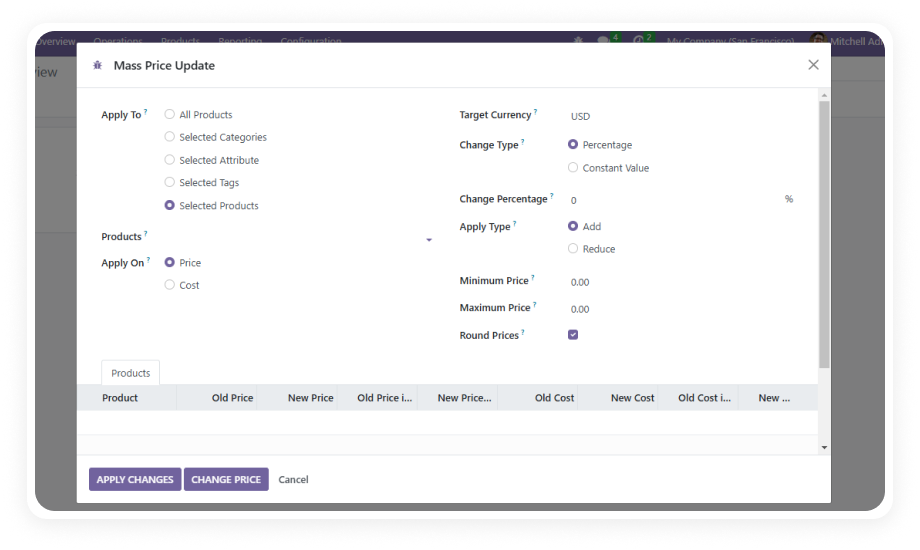
Stop editing product prices one by one. Apply percentage-based or fixed-value price changes across your entire Odoo catalog — or targeted subsets filtered by category, attributes, or tags — with simulation preview, rounding control, and full audit logging.

Compatible with Odoo 16, 17, 18 & 19
Community & Enterprise Supported
Percentage & Fixed-Value Adjustments
Simulation Mode Before Applying
Trusted by 500+ Businesses Across 12+ Countries
FREE
V19, 18, 17, 16
Mass Price Update for Odoo — Bulk pricing management interface

What is Mass Price Update?

Mass Price Update is a free Odoo module that enables bulk product price adjustments directly from the backend interface. Instead of opening hundreds of product records individually to change prices — during seasonal promotions, cost increases, or currency fluctuations — this module lets you define rules (percentage increase/decrease or fixed-value addition/subtraction), filter which products are affected, preview the impact, and apply changes across your catalog in a single action. Every modification is logged with user details and timestamps, and role-based access ensures only authorized personnel execute pricing decisions.

Percentage & fixed-value rules
Category/attribute/tag filtering
Simulation preview
Full audit trail
Multi-currency support

How Mass Price Update Solves Pricing Management Challenges

Problem
Zehntech Solution
Updating prices product by product takes hours during promotions or cost changes
Apply a single rule to hundreds or thousands of products simultaneously
No way to preview the impact of a price change before it goes live
Simulation mode shows side-by-side current vs. proposed prices
Price adjustments create inconsistent rounding (e.g., $19.97 becomes $21.3684)
Configurable rounding rules enforce clean price points automatically
No record of who changed what price, when, or why
Detailed change logs capture user identity, timestamps, and applied rules
Price changes need to respect minimum/maximum thresholds
Price limits prevent updates outside acceptable ranges
Different team members require different levels of pricing access
Role-based access control separates Administrators, Users, and Viewers
Multi-currency catalogs require manual conversion calculations
Automatic exchange rate handling across all configured currencies
Filtering products for targeted price changes requires custom reports
Built-in category, attribute, and tag filters isolate exact products

Complete Bulk Pricing Toolkit for Odoo Product Catalogs

1

Percentage-Based Price Adjustments

Increase or decrease product prices by a defined percentage across your entire catalog or a filtered subset. Set a 10% seasonal markup across all winter apparel, or apply a 5% cost-of-goods increase to a specific supplier's products — in one operation.

Why it matters: percentage rules scale naturally across diverse price points, maintaining proportional margins without manual calculation for each product.

2

Fixed-Value Price Additions and Subtractions

Add or subtract a specific dollar amount from product prices rather than a percentage. Useful when cost increases are a flat fee (e.g., +$2.50 shipping surcharge) rather than proportional.

Why it matters: fixed-value adjustments give precise control when the business requirement is a uniform amount rather than a proportional shift.

3

Category, Attribute, and Tag Filtering

Narrow the scope of any price update to specific product categories, product attributes (size, color, material), or custom tags. Apply different rules to different product segments in separate operations.

Why it matters: targeted filtering prevents blanket changes from affecting products that should be excluded — premium lines, clearance items, or partner-specific pricing.

4

Simulation Mode with Side-by-Side Preview

Before committing any changes, run the price update in simulation mode to see exactly which products will be affected and what their new prices will be.

Why it matters: a single pricing mistake across hundreds of products creates customer trust issues and margin erosion — simulation eliminates that risk.

5

Rounding Rules and Price Limit Enforcement

Define rounding behavior (round to nearest dollar, nearest .99, nearest .95, etc.) and set minimum/maximum price limits that prevent updates from pushing products outside acceptable ranges.

Why it matters: clean price points are essential for consumer psychology and brand positioning, and price floors protect margins while ceilings prevent market-rejection pricing.

6

Detailed Change Logs and Audit Trail

Every price update records who executed it, when it was applied, which products were affected, and the exact rule that was used. The complete history is searchable and exportable.

Why it matters: pricing audit trails are essential for financial compliance, internal accountability, and the ability to trace any pricing anomaly back to its source.

7

Multi-Currency Support

Apply price rules across multi-currency product catalogs with automatic exchange rate conversions. Generate reports in any configured currency.

Why it matters: businesses operating across markets need pricing adjustments that respect currency boundaries without manual conversion spreadsheets.

8

Role-Based Access Control

Three predefined user groups — Administrator (full access), User (create and apply updates), and Viewer (read-only) — ensure pricing authority is restricted to appropriate team members.

Why it matters: pricing decisions directly impact revenue and margins, making unrestricted access a business risk; role separation ensures only authorized personnel can execute changes.

9

Impact Reporting with Export

Generate post-update impact analysis tracking revenue implications, product performance changes, and pricing distribution shifts. Export reports in Excel or PDF format in your chosen currency.

Why it matters: understanding the downstream effect of pricing changes is essential for iterating on strategy — reports close the loop between "we changed the prices" and "here's what happened."

Who Benefits Most From Mass Price Update

Role
Primary Use Case
Key Outcome
Pricing Manager
Apply seasonal or strategic price adjustments across product segments
Hours of manual work reduced to minutes with full audit documentation
eCommerce Director
Execute promotional price reductions across online catalog categories
Promotions launched instantly without product-by-product editing
Operations Manager
Pass through supplier cost increases to retail prices across affected SKUs
Cost changes propagated accurately with rounding rules and limit safeguards
Finance Controller
Audit all pricing changes with user attribution and timestamp tracking
Complete compliance trail for every price modification in the system
Product Manager
Simulate pricing scenarios before committing to understand revenue impact
Data-driven pricing decisions backed by preview and post-change reporting
Regional Manager
Adjust prices across multi-currency catalogs for market-specific strategies
Currency-aware adjustments that maintain margin consistency across markets
⚠ Not the right fit for: Teams that need individual product pricing control, contract-specific pricing, or customer-tier-based rules — this module updates list prices in bulk, not per-customer price lists.

Versions & Documentation

Choose your Odoo version and explore interactive documentation

Native Odoo vs Zehntech Mass Price Update

Capability
Zehntech Mass Price Update
Native Odoo
Bulk price updates by percentage
Yes
Not available
Bulk price updates by fixed value
Yes
Not available
Product filtering by category, attributes, or tags
Yes
Not available
Simulation mode with side-by-side preview
Yes
Not available
Configurable rounding rules
Yes
Not available
Minimum and maximum price limit enforcement
Yes
Not available
Detailed change logs with user attribution
Yes
Not available
Multi-currency price adjustments
Yes
Manual conversion required
Role-based access control for pricing actions
Yes
Standard Odoo user groups only
Impact analysis reporting
Yes
Not available
Excel and PDF export of price reports
Yes
Not available
Odoo Community edition support
Yes
Prices editable only one at a time
Odoo Enterprise edition support
Yes
Prices editable only one at a time

Get Started In Minutes

No development environment. No custom code. No consultant required for standard setup.

01

Install from the Odoo App Store

Search for 'zehntech_mass_price_update' in your Odoo Apps menu and click Install. Works on Odoo 16–19, Community, Enterprise, and Odoo.sh.

02

Configure User Access Roles

Assign team members to the appropriate access group — Administrator for full control, User for creating and executing updates, or Viewer for read-only access.

03

Create Your First Price Update Rule

Define the adjustment type (percentage or fixed value), direction (increase or decrease), rounding behavior, and price limits. Use filters to target specific products.

04

Simulate, Review, and Apply

Run the rule in simulation mode to preview all affected products. Once validated, execute the update — the system applies changes and logs everything automatically.

Technical Details & Compatibility

Requirement
Odoo Versions
Editions
Hosting
Dependencies
Third-Party Dependencies
Custom Dev Required
Install Time
Server Restart
Data Migration
Module Conflicts
License
Last Tested
Lines of Code
Support
Details
16.0 · 17.0 · 18.0 · 19.0
Community · Enterprise · Odoo.sh
Odoo Online · On-Premise · Odoo.sh
Sales (sale_management) · Inventory (stock) · Invoicing (account) · Discuss (mail)
None
No
Under 10 minutes
Not required
Not required
None known
OPL-1
Odoo 19.0 — May 2026
894
Mass Price Update — FAQ illustration

Frequently Asked Questions

Yes — Mass Price Update provides a full backend interface for bulk pricing operations with no coding required. Define rules using percentage or fixed-value adjustments and filter products by category, attribute, or tag. All operations execute through the standard Odoo interface accessible to any backend user with appropriate permissions.
Yes — simulation mode generates a side-by-side comparison of current prices versus proposed new prices. Every product in the filtered set is displayed with its before and after values before you commit. No changes are written to product records until you explicitly confirm the update.
Yes — Mass Price Update handles multi-currency catalogs with automatic exchange rate conversions. You can apply a rule in one currency and the system calculates equivalent adjustments for other configured currencies. Impact reports can be generated and exported in the currency of your choice.
The module includes three role-based access groups: Administrator, User, and Viewer. Only users with appropriate permissions can create or execute price update rules. Every change is logged with user identity, timestamp, affected products, and the rule that was applied. The complete audit history is searchable and exportable.
Mass Price Update supports Odoo 16, 17, 18, and 19. Both Community and Enterprise editions are fully compatible. All hosting environments are supported: Odoo Online, Odoo.sh, and On-Premise. The module is completely free to install and use with no hidden costs or subscription fees.

Completely Free.
No Subscription.
No Hidden Costs.

Your pricing team deserves better than editing products one at a time. Includes lifetime updates and 90 days of dedicated technical support.

Zehntech Odoo experts ready to help


          You have successfully subscribed to the newsletter

          There was an error while trying to send your request. Please try again.

          Zehntech will use the information you provide on this form to be in touch with you and to provide updates and marketing.