Join us at GITEX 2025! Discover our solutions at Hall 4, Booth H-30 Schedule a Meeting Today.
Automate Marketing Initiatives with Salesforce Marketing Cloud Learn More
Join us at GITEX 2024! Discover our solutions at Hall 4, Booth H-30 Book your live demo today.
Zehntech Odoo App

Build Guided Multi-Step Forms in Odoo — No Coding Required

Break lengthy website forms into intuitive, step-by-step experiences that boost completion rates and reduce visitor abandonment. Guide visitors through a logical sequence of steps with progress indicators, conditional logic, and full visual customization.

Compatible with Odoo 16, 17 & 18
Community, Enterprise & Odoo.sh
No Custom Development Needed
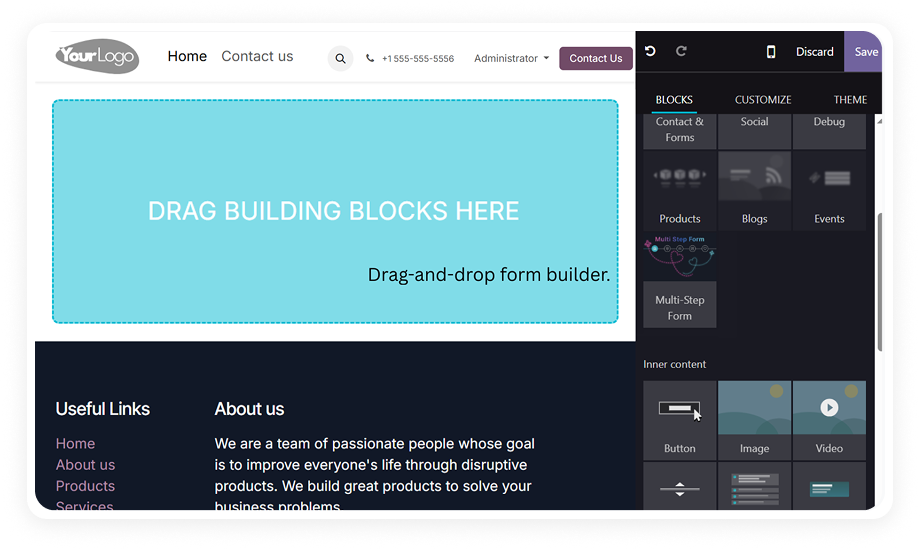
Drag-and-Drop Form Builder
Conditional Logic with AND/OR Operators
$89.60
V18
Multistep Form Snippet for Odoo — Guided multi-step form builder

What Is the Multistep Form Snippet for Odoo?

The Multistep Form Snippet is an Odoo website builder module that converts traditional single-page forms into organized, multi-step form experiences. Using drag-and-drop functionality native to Odoo's website editor, you can create sophisticated form flows that segment fields across multiple pages, apply conditional visibility rules, and track visitor progress — all without writing a single line of code.

It solves the common problem of form abandonment caused by long, intimidating forms by presenting information requests in digestible stages with clear visual progress tracking.

Multi-step form builder
Drag-and-drop in Odoo editor
Conditional field logic
Progress indicators
No coding required

The Problem: Long Forms Kill Conversions

Without Multi-Step Forms
With Multistep Form Snippet
High abandonment on lengthy forms
Step-by-step progression boosts completion rates
Visitors overwhelmed by 15+ fields
Digestible stages reduce cognitive load
No logical grouping of questions
Related fields organized across steps
Zero visibility into drop-off points
Progress tracking shows where users are
Forms look cluttered regardless of styling
Clean, professional branded experiences
Generic forms showing all fields to everyone
Conditional logic shows only relevant fields
Errors discovered only after full submission
Real-time validation at each step

Features That Make Form Building Effortless

1

Drag-and-Drop Multi-Step Builder

Place the multistep form snippet directly onto any Odoo website page from the editor sidebar. No module configuration screens, no separate form builder — everything happens inside the familiar Odoo website editor interface.

Why it matters: Your marketing team can create and modify multi-step forms independently without waiting on developers.

2

Step-Based Field Organization

Distribute form fields across multiple logical steps or pages. Group related information together — personal details on step one, preferences on step two, file uploads on step three.

Why it matters: Segmenting fields into steps reduces perceived complexity, making even 20-field forms feel manageable.

3

Dynamic Field Management

Add new fields, remove unwanted ones, or insert additional steps at any point in the form flow using one-click controls. Restructure your entire form without disrupting existing configurations.

Why it matters: Forms evolve as business requirements change. Dynamic management means you can iterate in minutes rather than rebuilding.

4

Conditional Field Logic with AND/OR Operators

Configure smart visibility rules so fields automatically appear or disappear based on answers to other fields. Combine multiple conditions using AND/OR operators for sophisticated branching.

Why it matters: Visitors only see fields relevant to their specific situation, creating a personalized experience while you collect all necessary data.

5

Visual Customization & Branding

Modify step icons, form titles, button styles, colors, and typography to match your brand guidelines. Preview changes in real-time within the website editor before publishing.

Why it matters: Forms are a direct extension of your brand. Full visual control ensures your multi-step forms look native to your website.

6

Multiple Field Type Support

Build forms using text inputs, dropdown selections, checkboxes, radio buttons, and file upload fields. Each field type includes built-in validation to ensure data quality at every step.

Why it matters: Different questions require different input methods. Having the full range of field types means you can create any form scenario.

7

Progress Indicators & Step Navigation

Display visual progress tracking so visitors always know which step they are on, how many steps remain, and can navigate between completed steps. Customizable step icons provide additional context.

Why it matters: Progress visibility is the psychological driver behind multi-step form success. Users are far more likely to continue when they see progress.

8

Real-Time Field Validation

Validate field entries at each step before allowing progression to the next. Catch errors immediately rather than after the entire form is submitted, reducing frustration and ensuring clean data.

Why it matters: Step-level validation prevents users from reaching the final step only to discover errors from step one — the fastest path to abandonment.

9

Backend Data Integration

All form submissions flow directly into Odoo's backend reporting, keeping response data accessible alongside your other business operations. No external integrations or data exports required.

Why it matters: Having form response data inside Odoo means your teams can act on submissions immediately without switching between platforms.

Who Uses Multistep Form Snippet?

Role / Industry
Primary Use Case
Key Outcome
Marketing Teams
Create lead generation forms that qualify prospects through progressive questioning. Start with basic contact information, then branch into interest areas using conditional logic to route leads appropriately.
Higher lead quality through progressive qualification and conditional routing to the right sales team
HR & Recruitment
Build structured job application forms where candidates provide personal details, upload resumes, answer role-specific questions, and complete assessments — each in its own clearly labeled step.
Complete, structured applications collected in one guided flow with no missing documents or fields
Event Organizers
Design registration forms that adapt based on attendee type: different fields for speakers vs. attendees, different session selections based on ticket tier, all within a single guided form flow.
Accurate attendee data per ticket type with no irrelevant questions shown to the wrong audience
Service Businesses
Collect detailed project requirements through consultative form experiences. Guide potential clients through scope definition, timeline preferences, budget ranges, and deliverable expectations step by step.
Complete project briefs collected upfront, eliminating back-and-forth follow-up emails
Educational Institutions
Manage enrollment applications where students progress through personal information, academic history, program selection, and document uploads without being overwhelmed by the full application at once.
Higher application completion rates with clear progress tracking through every stage
⚠ Not the right fit for: Teams that need a dedicated form automation platform with CRM integration, A/B testing, conversion analytics, or hosted form infrastructure outside Odoo.

Supported Odoo Versions & Documentation

Choose your Odoo version and explore interactive documentation

Documentation coming soon for Odoo 17
Documentation coming soon for Odoo 16

Multistep Form Snippet vs. Alternatives

Capability
Multistep Form Snippet
Without This Module
Multi-step progression
✔ Yes
No
Native Odoo integration
✔ Yes
Yes
Drag-and-drop in website editor
✔ Yes
Yes (single page)
Conditional field logic
✔ Yes (AND/OR operators)
No
Progress indicators
✔ Yes (customizable icons)
No
Visual branding controls
✔ Yes
Limited
Backend data in Odoo
✔ Yes
Yes
Step-level validation
✔ Yes
N/A
No recurring subscription
✔ One-time purchase
N/A
File upload support
✔ Yes
Limited
No coding required
✔ Yes
Partially

How to Install and Start Using Multistep Form Snippet

No development environment. No custom code. No consultant required for standard setup.

01

Purchase & Download

Purchase the module from the Odoo App Store. Download the module package compatible with your Odoo version (16, 17, or 18).

02

Install the Module

Upload to your Odoo instance's addons directory. Navigate to Apps, update the apps list, search for "Multistep Form Snippet," and click Install.

03

Drag Snippet to Page

Open the website editor, locate the Multistep Form snippet in the building blocks sidebar, and drag it onto your desired page location.

04

Configure & Publish

Add fields, organize steps, apply conditional logic, customize styling, and publish. Form submissions appear in Odoo's backend.

Technical Details & Compatibility

Specification
Odoo Versions
Editions
Hosting
Dependencies
License
Languages
Code Volume
Updates
Support
Details
16.0 · 17.0 · 18.0
Community · Enterprise · Odoo.sh
Odoo Online · On-Premise · Odoo.sh
Website (website) · Mail (mail)
OPL-1 (Odoo Proprietary License)
Multi-language support via Odoo translations
8,759 lines
Lifetime updates included with purchase
Multistep Form Snippet — FAQ illustration

Frequently Asked Questions

No coding is required at any stage of form creation. The entire process uses Odoo's native drag-and-drop website editor. Field configuration, conditional logic, and styling are all handled through visual interfaces. Your marketing or operations team can build and modify forms independently.
The module is available for Odoo v16, v17, and v18. It works across Community, Enterprise, and Odoo.sh editions. Each version receives lifetime updates as part of the one-time purchase. Installation and functionality remain consistent across supported versions.
You select a trigger field (e.g., a dropdown or checkbox), define the condition that activates visibility (equals a value, is checked, etc.), specify which fields should appear or hide when the condition is met, and combine multiple conditions using AND/OR operators for complex branching. All configuration happens through a visual interface — no formulas or scripting.
All responses are saved directly inside your Odoo database. Access submission data through Odoo's backend reporting area. No external platforms, APIs, or third-party storage involved. Data is available immediately for your sales, support, or operations teams to act on.
Yes, the snippet works on any page accessible through the Odoo website editor. Place it on landing pages, contact pages, service pages, or dedicated form pages. Multiple multi-step forms can exist across different pages on the same website. Each form operates independently with its own steps, fields, and logic.

Start Building Multi-Step
Forms Today

Transform your Odoo website forms from single-page field dumps into guided, branded experiences that visitors actually complete. One module, one purchase, permanent results.

Zehntech Odoo experts ready to help


          You have successfully subscribed to the newsletter

          There was an error while trying to send your request. Please try again.

          Zehntech will use the information you provide on this form to be in touch with you and to provide updates and marketing.