Join us at GITEX 2025! Discover our solutions at Hall 4, Booth H-30 Schedule a Meeting Today.
Automate Marketing Initiatives with Salesforce Marketing Cloud Learn More
Join us at GITEX 2024! Discover our solutions at Hall 4, Booth H-30 Book your live demo today.
Zehntech Odoo App

Odoo Gantt App Base

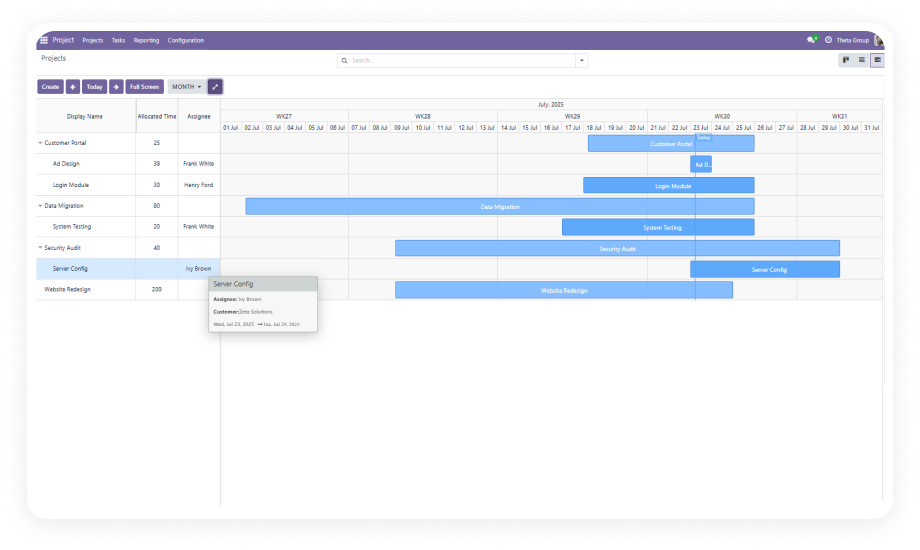
Interactive Timeline & Scheduling Views for Any Odoo Module. Transform Odoo records into interactive visual timelines for project planning, operations scheduling, HR management, and manufacturing coordination — no custom development required.

Compatible with Odoo 16, 17, 18 & 19
Community & Enterprise Supported
Works with Standard & Custom Odoo Models
No Custom Development Required
Trusted by 500+ Businesses Across 12+ Countries
$89.60
V19, 18, 17, 16
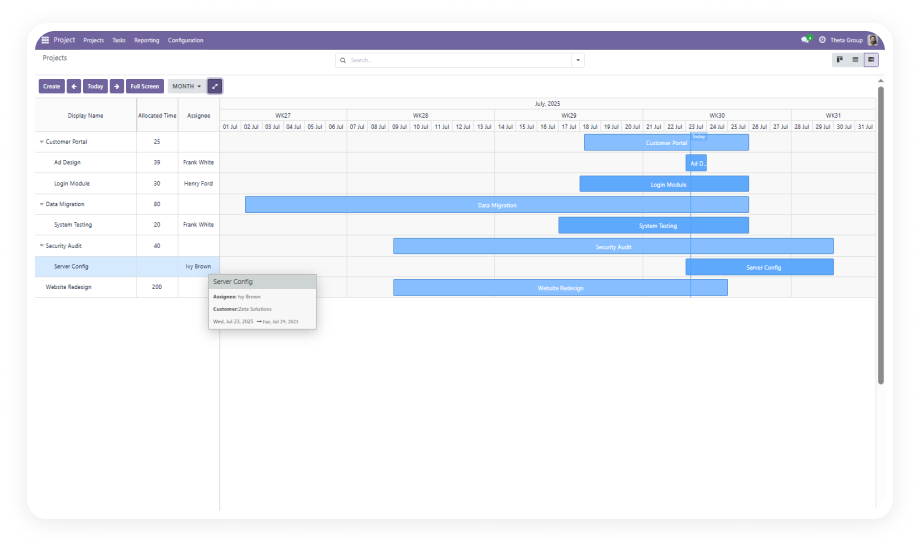
Odoo Gantt App Base — Interactive timeline scheduling view

What is the Odoo Gantt App Base?

The Odoo Gantt App Base is a configurable scheduling framework that adds interactive Gantt timeline views to any standard or custom Odoo model — no custom code required. Install it once, map your date fields, and your team plans inside Odoo instead of a spreadsheet alongside it.

Project timelines and milestone tracking
Cross-team resource planning and workload visibility
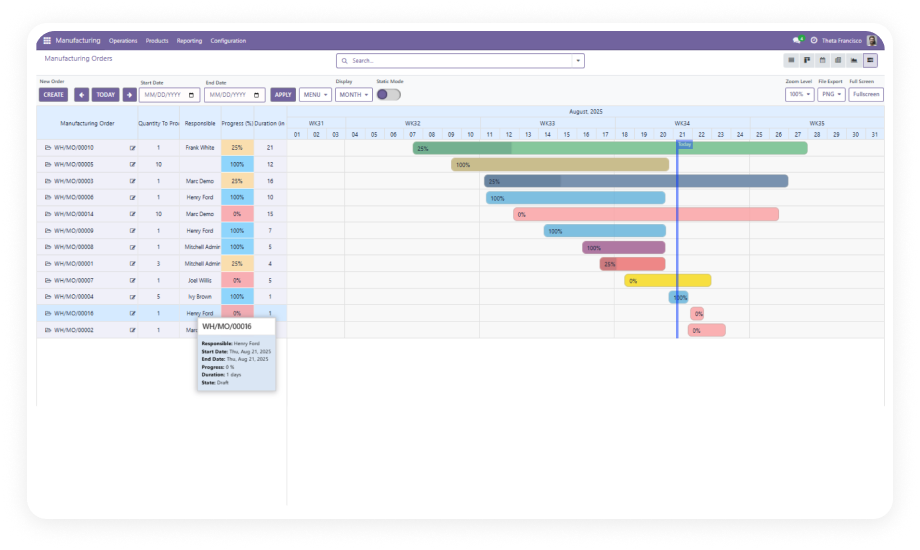
Manufacturing and operations scheduling
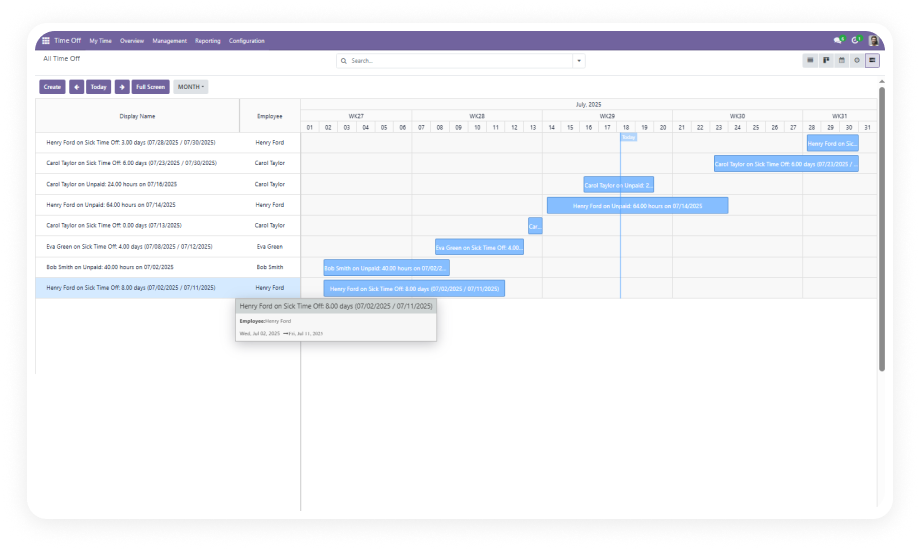
HR and time-off planning
Any custom Odoo model with a date range

How the Odoo Gantt App Base Solves Timeline Planning Challenges

Problem
Zehntech Gantt Solution
No timeline visibility
Interactive Gantt timelines for any model
No drag-and-drop
Full drag-to-reschedule and drag-to-create
Spreadsheet dependency
Centralized planning inside Odoo
Custom dev costs for visualization
Configurable framework, no code required
Fragmented cross-team view
Cross-module scheduling in one interface
No zoom control
Hour · Day · Week · Month · Year views
No workload distribution view
Multi-level grouping by team, project, stage
No inline editing from timeline
Edit records directly from the Gantt bar

Built for Visual Operational Planning

1

Configure Timeline Views for Any Odoo Model

Map the Gantt to any standard or custom model using the configuration interface — no code, no XML editing.

Why it matters: Your planning tool works on the models you actually use, not just the ones Odoo ships with.

2

Drag-to-Create and Drag-to-Reschedule

Draw new tasks by dragging across the timeline; move existing records by dragging the bar. Odoo updates the record automatically.

Why it matters: Rescheduling takes seconds instead of a sequence of form edits.

3

Multi-Level Zoom: Hour · Day · Week · Month · Year

Switch planning horizons instantly — daily ops to annual roadmap, same dataset, same module.

Why it matters: One module covers sprint planning and annual roadmap reviews without a separate tool for each.

4

Full-Screen Planning Workspace

Expand to full screen for focused scheduling sessions with large teams or complex timelines.

Why it matters: Enterprise scheduling needs visual space — full-screen delivers it without additional tooling.

5

Multi-Level Grouping, Filtering, and Favorites

Group by team, project, stage, or any Odoo field; stack levels, apply filters, save as favorites.

Why it matters: Every team lead sees the slice of the schedule that matters to them, without a separate dashboard.

6

Inline Editing from the Timeline

Click a record bar to edit fields, dates, and assignments without leaving the Gantt view.

Why it matters: Updates happen where planning happens — reducing the friction of keeping the schedule current.

7

Parent/Child Task Hierarchy with Collapsible Tree

Structure subtasks under parent tasks; collapse to summary or expand to full detail directly on the timeline.

Why it matters: Complex project plans stay readable at any level — collapse for the overview, expand for the breakdown.

8

Multi-Color Task Bars

Assign one of seven colors to categories, teams, or priorities — turns a dense timeline into a scannable view.

Why it matters: A 50-task timeline without color differentiation is a wall of bars. Color makes it readable.

9

Weekend and Holiday Shading via Company Calendar

Non-working days shade automatically from your Odoo company calendar. Schedules reflect working time, not raw calendar days.

Why it matters: Plans that ignore non-working days are wrong before they start.

10

Cross-Module Planning Support

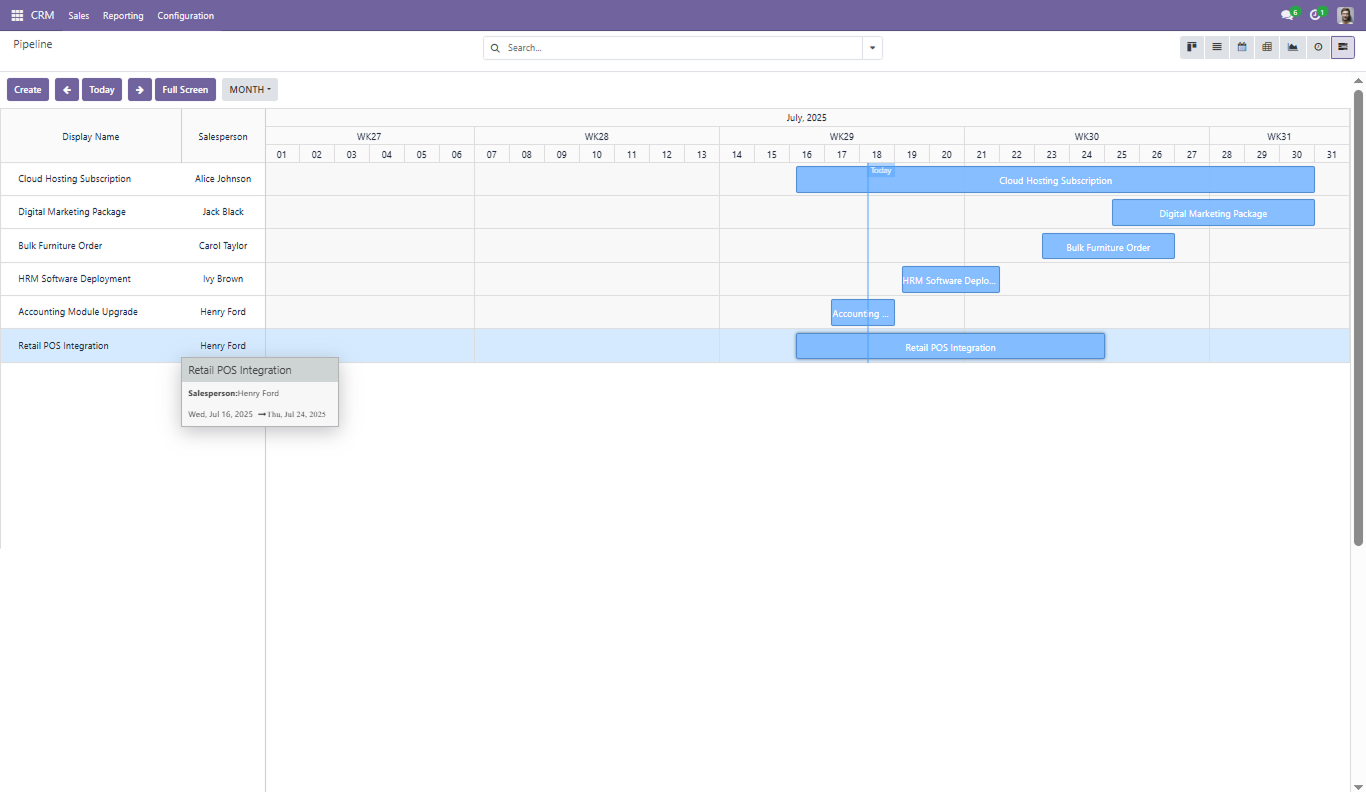
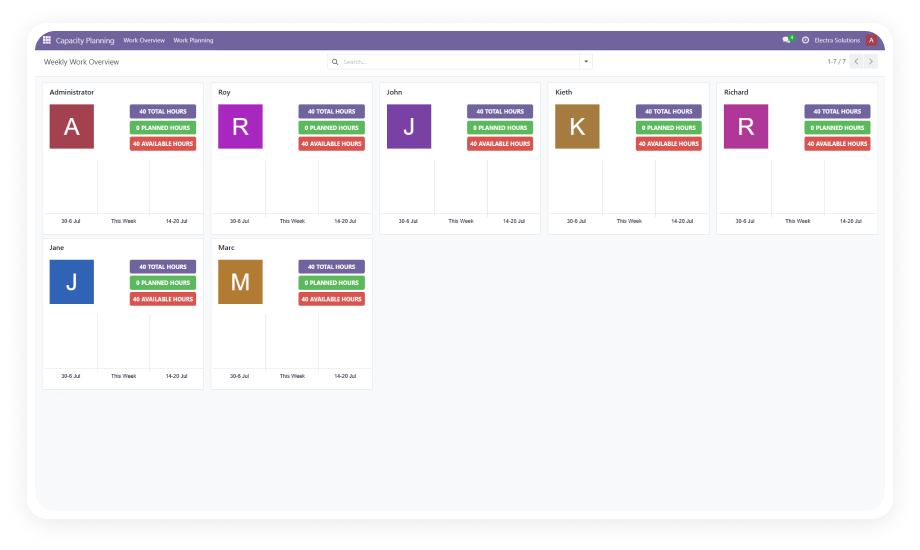
The base module powers the full Zehntech Gantt ecosystem — Project, Manufacturing, CRM, Time Off, and Capacity Planning all extend it.

Why it matters: One base module powers your entire visual planning stack across every department.

Designed for Teams That Need Operational Visibility

Role
Primary Use Case
Key Outcome
Project Manager
Timeline scheduling, milestone tracking, dependency management
Rescheduling time drops from 2+ hours/week to under 15 minutes
Operations Lead
Cross-project resource visibility
Spot conflicts and bottlenecks before they become incidents
Manufacturing Team
Production schedule with shift and resource grouping
Coordinated floor scheduling without spreadsheet hand-offs
HR Team
Time-off planning across departments
Leave conflicts identified at a glance, not after approval
Odoo Administrator
Single install adds Gantt across all modules
No custom dev, works across all supported Odoo versions
Engineering / Delivery Lead
Workload visibility before assigning tasks
No overloaded team members found only after deadlines slip
CTO / Business Owner
Project visibility without adding another tool
Accurate project status inside the existing Odoo environment
⚠  Not the right fit for: Teams that only need a task list or Kanban board with no requirement for timeline scheduling, dependencies, or resource visibility.

Versions & Documentation

Choose your Odoo version and explore interactive documentation

Admin Documentation

User Documentation

Native Odoo vs Zehntech Gantt App Base

Capability
Zehntech Gantt
Native Odoo
Timeline Visualization
✔ Full interactive Gantt timeline
Not available
Drag-and-Drop Scheduling
✔ Drag-to-create and drag-to-reschedule
Not available
Multi-Zoom Planning
✔ Hour · Day · Week · Month · Year
Not available
Custom Model Support
✔ Any standard or custom Odoo model
Not available
Cross-Module Planning
✔ Full cross-module support
Not available
Full-Screen Planning Mode
✔ Available
Not available
Parent/Child Task Hierarchy
✔ Collapsible tree in timeline
Basic (list only)
Inline Record Editing
✔ Direct from timeline bar
Form view only
Multi-Level Grouping
✔ Multi-level, saveable as favorites
Basic
Color-Coded Task Bars
✔ 7-color palette
Not available
Holiday & Weekend Shading
✔ Auto from company calendar
Not available
No Custom Dev Required
✔ Yes — configuration interface only
N/A

Get Started In Minutes

No development environment. No custom code. No consultant required for standard setup.

01

Install and activate

Purchase from the Odoo Apps Store and install. Works on Odoo 16–19, Community, Enterprise, and Odoo.sh. No server restart needed.

02

Enable developer mode and select your model

Turn on developer mode in Odoo settings, then choose the model — standard (e.g. Project Task) or custom — you want on a timeline.

03

Map fields and set grouping

Configure the start date, end date, name, progress, and assignee fields. Define grouping logic by team, project, stage, or any Odoo field. Save as a favorite view.

04

Launch and plan

Open the Gantt view. Drag to reschedule, click to edit, filter to focus. The schedule is now inside Odoo.

Technical Details & Compatibility

Requirement
Odoo Versions
Editions
Hosting
Dependencies
Third-Party Dependencies
Custom Dev Required
Install Time
Server Restart
Data Migration
Module Conflicts
License
Last Tested
Support
Details
16.0 · 17.0 · 18.0 · 19.0
Community · Enterprise · Odoo.sh
Odoo Online · On-Premise · Odoo.sh
web · resource (standard addons)
None
No
Under 5 minutes
Not required
Not required
None known
OPL-1
Odoo 19.0 — May 2026
Odoo Gantt App — FAQ illustration

Frequently Asked Questions

Yes. The module supports any standard or custom Odoo model with a start and end date field. No custom development is required — the configuration interface handles field mapping.
No — it extends it. The Zehntech Gantt adds drag-to-create, drag-to-reschedule, multi-zoom, full-screen, multi-level grouping, color coding, and holiday shading that the native view does not include.
Not for standard configurations. Select the model, map the fields, set grouping, and the timeline is live. Advanced custom model configurations are supported by the Zehntech team.
Yes. It works on Community, Enterprise, and Odoo.sh across Odoo 16, 17, 18, and 19. Each version is a separate purchase — buy the one that matches your installation.
Yes. Configure separate Gantt views for each team's model — project, manufacturing, HR, or custom. All views run from the same base module.

One-Time Purchase.
No Subscription.
No Recurring Fees.

Includes lifetime updates and 90 days of dedicated technical support.

Zehntech Odoo experts ready to help


          You have successfully subscribed to the newsletter

          There was an error while trying to send your request. Please try again.

          Zehntech will use the information you provide on this form to be in touch with you and to provide updates and marketing.