Join us at GITEX 2025! Discover our solutions at Hall 4, Booth H-30 Schedule a Meeting Today.
Automate Marketing Initiatives with Salesforce Marketing Cloud Learn More
Join us at GITEX 2024! Discover our solutions at Hall 4, Booth H-30 Book your live demo today.
Zehntech Odoo App

Odoo Advanced Gantt App for Manufacturing

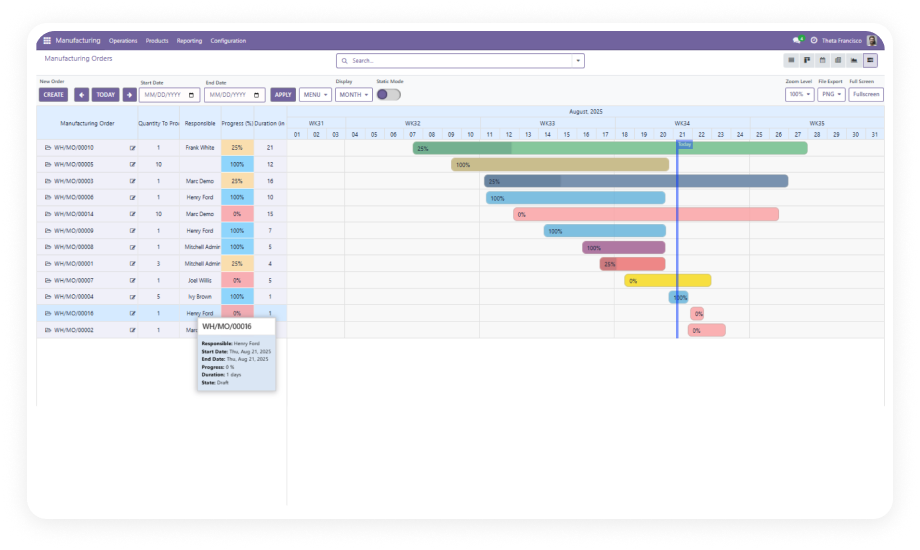
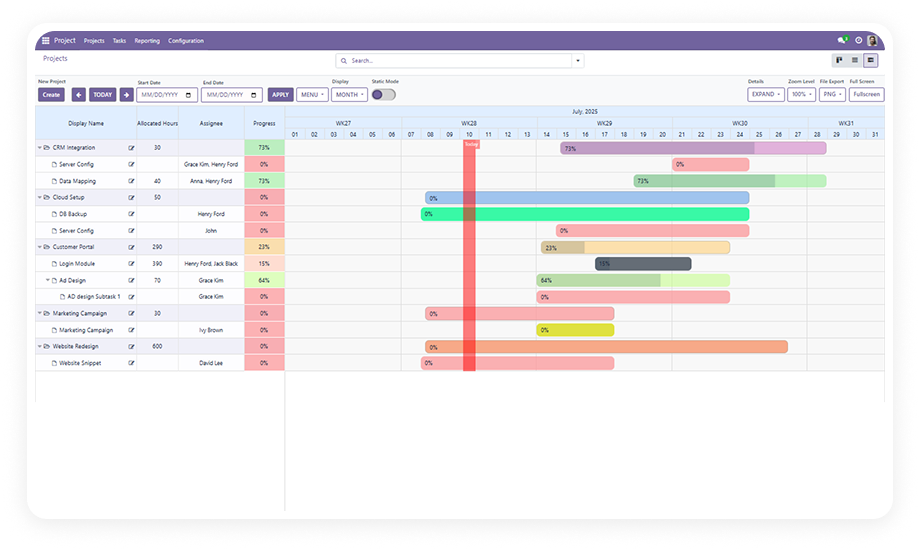
Take full command of your manufacturing schedule with advanced Gantt capabilities built directly into Odoo. Beyond basic timeline viewing, this module delivers drag-and-drop resource allocation, exportable reports in PDF/PNG/Excel, color-coded progress tracking, adjustable zoom, customizable tooltips, and a read-only mode for stakeholder visibility — all synchronized in real time with your manufacturing orders.

Full Drag-and-Drop Resource Allocation
PDF, PNG & Excel Export
Color-Coded Progress Monitoring
Adjustable Zoom 0-100%
Compatible with Odoo 16, 17, 18 & 19
Community & Enterprise Supported
$198.12
V19, 18, 17, 16
Odoo Advanced Gantt App for Manufacturing — Production scheduling timeline

What is Odoo Advanced Gantt App for Manufacturing Module?

The Odoo Advanced Gantt App for Manufacturing is a comprehensive production scheduling interface that extends the native Odoo Manufacturing module with a full-featured interactive Gantt chart. It goes well beyond basic timeline visualization — adding resource allocation via drag-and-drop, multi-format export (PDF, PNG, Excel), color-coded progress indicators, zoom controls ranging from 0% to 100%, customizable hover tooltips, validation-enforced scheduling, and a static read-only mode for non-editing stakeholders.

Real-time order management
Dynamic resource allocation
Multi-format export
Color themes by status or priority
Instant tooltip insights
Read-only mode for viewers

How the Advanced Gantt Solves Manufacturing Planning Challenges

Problem
Advanced Gantt Solution
Production managers cannot share schedules with stakeholders who lack Odoo access
Export the full Gantt schedule as PDF, PNG, or Excel for offline distribution
Resource assignment requires opening individual order records
Drag-and-drop resource allocation assigns and reassigns directly on the timeline
No visibility into order progress from the scheduling view
Color-coded progress indicators show completion status at a glance
Viewing large schedules means constant scrolling without detail control
Adjustable zoom (0-100%) lets planners scale the timeline from overview to detail
Stakeholders accidentally modify the schedule when they only need to review
Static read-only mode provides full visibility without edit permissions
No immediate context when hovering over a manufacturing order bar
Customizable tooltips display key order details on hover
All orders look the same on the timeline — no visual differentiation
Color themes assignable by status, priority, or category
Scheduling changes are accepted without validation — leading to conflicts
Validation rules enforce scheduling constraints before changes commit

Twelve Advanced Capabilities for Manufacturing Scheduling

1

Real-Time Order Management

Create, edit, and delete manufacturing orders directly within the Gantt interface. Every action synchronizes immediately across your Odoo system.

Why it matters: production teams work from a single source of truth, and schedule changes propagate instantly.

2

Custom Views and Timeline Navigation

Switch between day, week, month, and year timeframes with a single click. Adjust zoom level continuously from 0% to 100%.

Why it matters: a daily floor supervisor and a quarterly capacity planner use the same tool at their own zoom.

3

Organized Visualization with Expand/Collapse

Group manufacturing orders by product, responsible person, work center, status, or any custom field. Expand or collapse groups for summary-level or detail views.

Why it matters: production environments with hundreds of active orders stay navigable.

4

Export and Progress Monitoring

Generate shareable reports in PDF, PNG, or Excel format directly from the Gantt view. Color-coded progress indicators on each order bar.

Why it matters: production reporting moves from manual screenshot workflows to one-click export.

5

Dynamic Resource Allocation

Assign resources to manufacturing orders using drag-and-drop directly on the Gantt timeline. Reassign by dragging an order from one resource row to another.

Why it matters: capacity balancing and workload distribution happen visually and immediately.

6

Flexible Scheduling with Validation

Reschedule manufacturing orders by dragging timeline bars to new dates. The system enforces validation rules during the move.

Why it matters: production planners make rapid adjustments with confidence that constraints are respected.

7

Full-Screen and Static Modes

Enter full-screen mode for maximum timeline workspace during planning sessions. Switch to static (read-only) mode to share the schedule with stakeholders.

Why it matters: a single interface serves both active planners and passive reviewers.

8

Data Filtering and Refinement

Filter the Gantt view by order status, priority level, date range, or any combination of criteria. Applied filters persist within the session.

Why it matters: production teams isolate exactly what needs attention without scrolling through irrelevant data.

9

Visual Color Customization

Assign color themes to manufacturing orders based on status, priority, or category. Orders automatically render in their assigned color on the timeline.

Why it matters: a production manager scanning 200+ orders can instantly distinguish urgent items by color alone.

10

Instant Order Insights via Tooltips

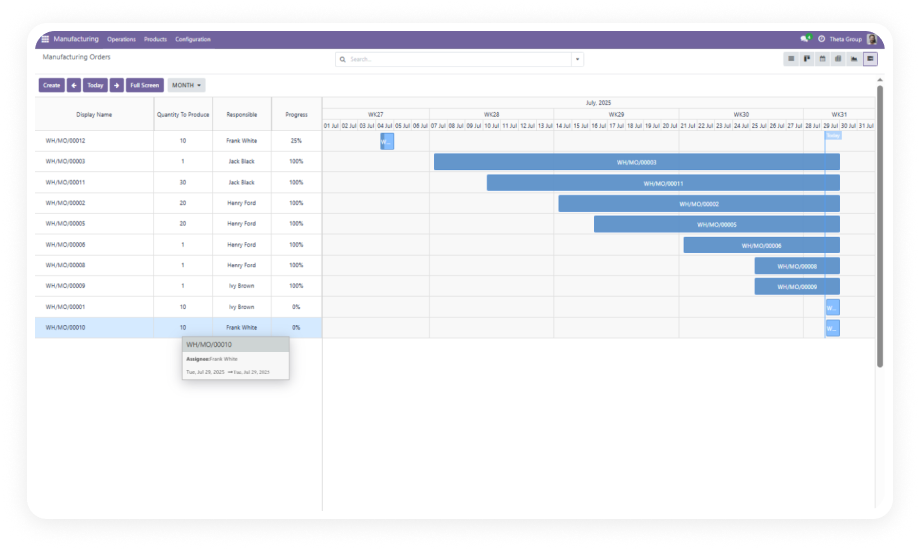
Hover over any order bar on the Gantt timeline to see a customizable tooltip displaying key order details — product, quantity, responsible person, dates, and status.

Why it matters: quick context checks happen without opening records, keeping planners in the timeline flow.

11

Planning with Filters and Labels

Apply date-range filters to focus the timeline on specific production windows. Customize timeline labels to display shift labels, week numbers, or custom date formats.

Why it matters: the timeline adapts to how your production team thinks about time.

12

Quick Entry Management

Streamlined controls for creating, editing, and deleting manufacturing orders. Dedicated action buttons reduce the steps between identifying a scheduling need and executing it.

Why it matters: in high-velocity production environments, every eliminated click compounds into meaningful time savings.

Who Gets The Most From Advanced Manufacturing Gantt

Role
Primary Use Case
Key Outcome
Production Manager
Allocate resources across manufacturing orders visually and track progress via color-coded indicators
Faster resource balancing; real-time production progress visibility
Manufacturing Planner
Build weekly schedules with drag-and-drop, enforce validation rules, and export plans for shift handoffs
Reliable schedules distributed in PDF/Excel; fewer invalid conflicts
Operations Director
Review production capacity at monthly/yearly zoom levels and share timeline exports with leadership
Executive-ready reporting without manual compilation
Plant Supervisor
Open full-screen Gantt at shift start to see daily orders, hover for details via tooltips
Immediate shift context in seconds; no navigation through multiple screens
Quality Manager
Filter by status to isolate blocked or held orders; use static mode for audit review
Clear visibility into production bottlenecks; read-only access for compliance
ERP Administrator
Deploy advanced production scheduling without custom development; maintain via standard Odoo updates
Zero technical debt; reduced implementation cost; standard upgrade path

Not the right fit if you

  • Need Gantt views for Projects, HR, or CRM — this module covers Manufacturing orders only
  • Require automated capacity leveling or AI-driven production scheduling
  • Want a module that is pre-bundled with Odoo Enterprise without a separate purchase

Versions & Documentation

Choose your Odoo version and explore interactive documentation

Guide 1

Guide 2

Native Odoo vs Zehntech Advanced Gantt for Manufacturing

Capability
Zehntech Advanced Gantt
Native Odoo Manufacturing
Manufacturing order timeline view
✔ Full interactive Gantt with 12 advanced features
Not available — list and kanban only
Resource allocation via drag-and-drop
✔ Drag orders between resource rows
Not available — manual form edits
Export schedule as PDF, PNG, or Excel
✔ One-click export in all three formats
Not available
Color-coded progress indicators
✔ Visual completion tracking on every order bar
Not available
Adjustable zoom (0-100%)
✔ Continuous zoom control
No timeline view
Customizable hover tooltips
✔ Configure fields displayed on hover
Not available
Static read-only mode
✔ One-click toggle for stakeholder viewing
No equivalent
Validation-enforced scheduling
✔ Rules prevent invalid schedule changes
Not applicable
Color themes by status/priority
✔ Automatic visual coding
Not available
Day/week/month/year view options
✔ All four timeframes with navigation
Not applicable
Full-screen planning workspace
✔ Available
Not available
Custom development required
✔ None — install and configure
N/A

Get Started In Minutes

No development environment. No custom code. No consultant required for standard setup.

01

Purchase & Download

Purchase the Odoo Advanced Gantt App for Manufacturing from the Odoo App Store at a one-time price of $198.12. Download the module package immediately.

02

Install Module

Upload the module to your Odoo instance via the Apps menu. Search for zehntech_advanced_gantt_app_manufacturing and click Install. Dependencies resolve automatically.

03

Configure & Customize

Navigate to the Manufacturing module. The advanced Gantt icon appears in the view switcher. Configure color themes, set tooltip fields, and define validation rules.

04

Go Live

Your manufacturing schedule is now on a fully interactive advanced Gantt timeline. Allocate resources, monitor progress, and export schedules for distribution.

Technical Details & Compatibility

Requirement
Odoo Versions
Editions
Hosting
Dependencies
Third-Party Dependencies
Custom Dev Required
Install Time
Server Restart
Data Migration
Module Conflicts
License
Last Tested
Support
Details
16.0 · 17.0 · 18.0 · 19.0
Community · Enterprise · Odoo.sh
Odoo Online · On-Premise · Odoo.sh
Manufacturing (mrp), Inventory (stock), Discuss (mail)
None
No
Under 5 minutes
Not required
Not required
None known
OPL-1
Odoo 19.0 — May 2026
Odoo Advanced Gantt for Manufacturing — FAQ illustration

Frequently Asked Questions

The Advanced version includes 12 features beyond basic Gantt scheduling: drag-and-drop resource allocation, PDF/PNG/Excel export, adjustable zoom (0-100%), color-coded progress indicators, customizable hover tooltips, static read-only mode for stakeholders, visual color themes by status or priority, and validation-enforced scheduling. It is built for teams that need production-grade planning tools directly inside Odoo.
Yes. The module supports one-click export to three formats: PDF, PNG, and Excel. PDF and PNG exports produce visual snapshots of the current Gantt view — ideal for shift handoff documents or printed floor schedules. Excel exports provide structured data for further analysis or spreadsheet-based planning workflows.
Yes. The static (read-only) mode allows stakeholders to view the complete manufacturing timeline without any ability to create, edit, move, or delete orders. This is useful for executives reviewing production capacity, quality managers conducting audits, or client-facing teams checking delivery timelines.
When the Gantt is grouped by resource (work center, responsible person, or any resource field), manufacturing orders appear in resource-specific rows. To reassign a resource, drag the order bar from its current row to a different resource row. The assignment updates immediately in the underlying record.
The module supports Odoo 16.0, 17.0, 18.0, and 19.0 — all versions are actively maintained. It works on Odoo Community, Enterprise, and Odoo.sh editions with no feature restrictions. Deployment is supported on Odoo Online, On-Premise, and Odoo.sh hosting environments.

One-Time Purchase.
No Subscription.
No Recurring Fees.

Includes lifetime updates and 90 days of dedicated technical support.

Zehntech Odoo experts ready to help


          You have successfully subscribed to the newsletter

          There was an error while trying to send your request. Please try again.

          Zehntech will use the information you provide on this form to be in touch with you and to provide updates and marketing.