Join us at GITEX 2025! Discover our solutions at Hall 4, Booth H-30 Schedule a Meeting Today.
Automate Marketing Initiatives with Salesforce Marketing Cloud Learn More
Join us at GITEX 2024! Discover our solutions at Hall 4, Booth H-30 Book your live demo today.
Zehntech Odoo App

Odoo Advanced Gantt App for Project Module

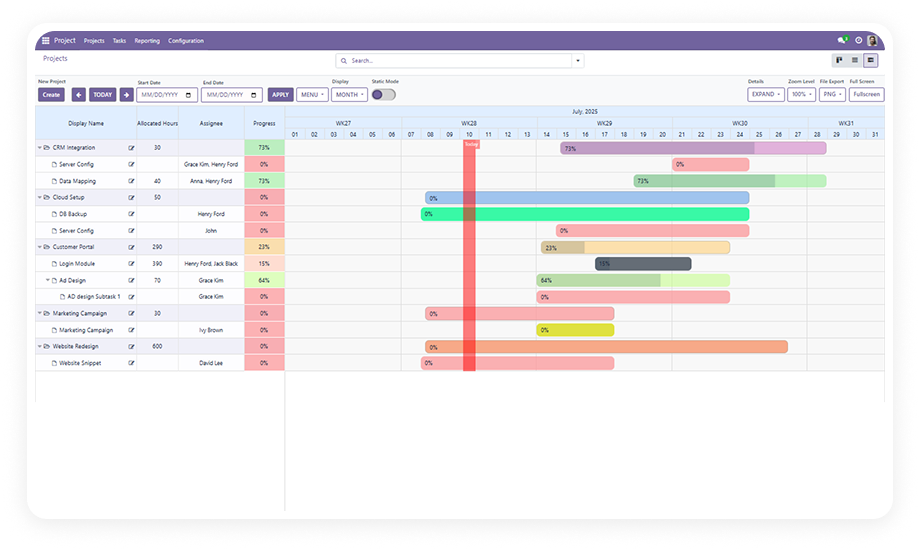
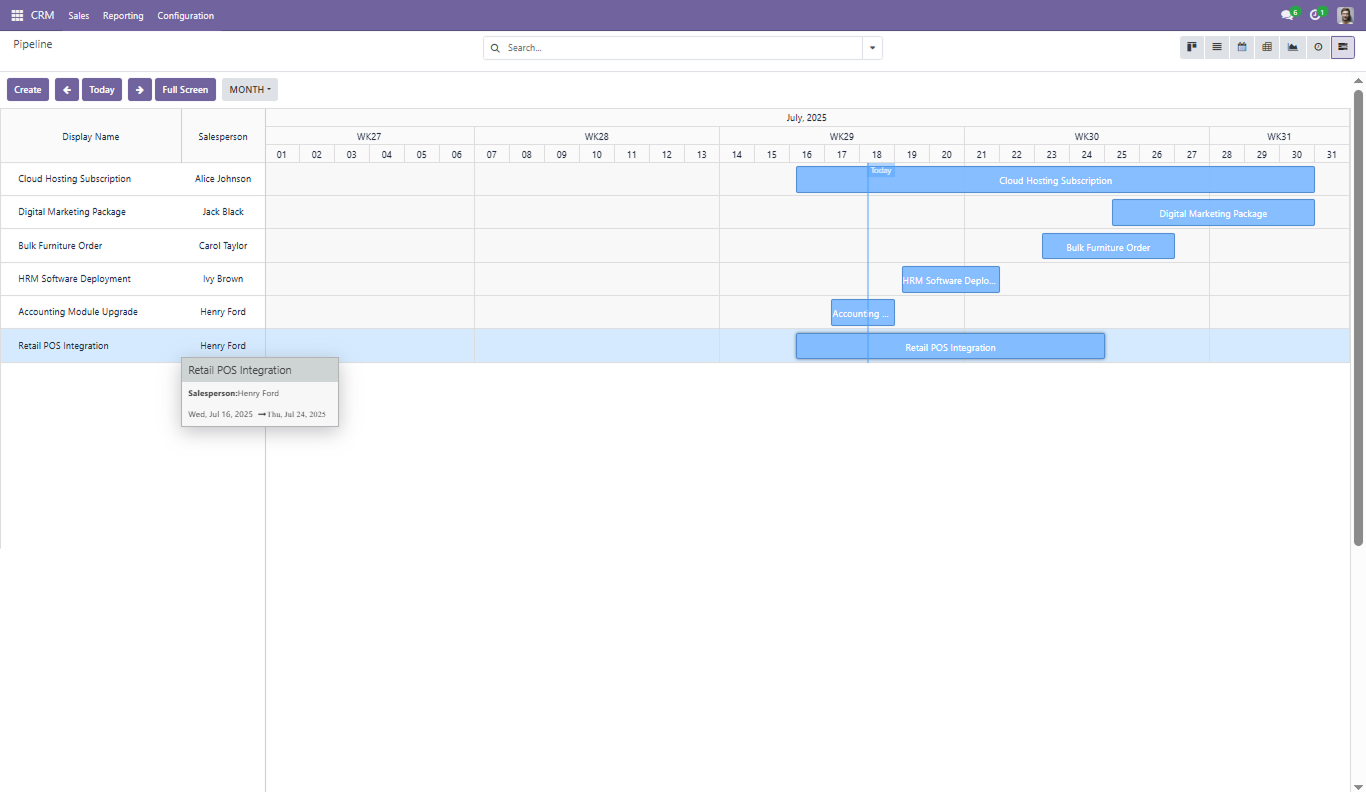
A dynamic Gantt chart interface for Odoo Project that gives teams real-time task management, drag-and-drop resource allocation, exportable timelines, and granular filtering — all inside a customizable, full-screen planning workspace.

Compatible with Odoo 16, 17 & 18
Community & Enterprise Supported
PDF, PNG & Excel Export Built-In
No Custom Development Required
Trusted by 500+ Businesses Across 12+ Countries
$198.12
V18, 17, 16
Odoo Advanced Gantt App for Project Module — Visual project planning

What is the Odoo Advanced Gantt App for Project Module?

The Odoo Advanced Gantt App for Project Module by Zehntech Technologies delivers a comprehensive visual planning interface that goes beyond basic timeline charting. It provides project managers with real-time task creation, drag-and-drop scheduling, multi-format export, zoom-controlled timeframes, theme customization, and advanced facet-based filtering — all integrated directly into the Odoo Project module.

Real-time task creation and editing
Drag-and-drop resource allocation
Export to PDF, PNG, and Excel
0-100% zoom control
Theme and color customization
Full-screen planning workspace

How the Advanced Gantt App Solves Project Planning Challenges

Problem
Advanced Gantt Solution
No exportable project timeline exists in native Odoo
PDF, PNG, and Excel export built directly into the Gantt view
Zoom and timeframe control is limited or absent
0-100% continuous zoom with day, week, month, and year switching
Task creation requires navigating away from the timeline
Create, edit, and delete tasks in real-time directly on the Gantt chart
Resource allocation lacks visual drag-and-drop
Drag-and-drop assignment of resources and schedule adjustments
No visual progress tracking on the timeline
Progress percentage displayed directly on task bars
Filtering is too basic for complex project portfolios
Advanced filtering by dates, progress, assignees, status, priority
Timeline appearance cannot be customized
Theme and color customization for brand-aligned views
Stakeholders without Odoo access cannot see project timelines
Export and share charts without granting system access
Dense timelines become unreadable without context
Hover tooltips and custom date markers provide at-a-glance context
Existing Gantt views lack a read-only mode for presentations
Static read-only mode prevents accidental edits during reviews

All 13 Capabilities of the Advanced Gantt App for Project

1

Real-Time Task Creation, Editing & Deletion

Create new project tasks directly on the Gantt chart, modify existing tasks inline, or remove them — all with automatic timeline updates.

Why it matters: project plans that require form navigation for every change slow down planning sessions.

2

Customizable Timeframes with Zoom Control

Switch between day, week, month, and year views while adjusting zoom from 0% to 100% for precise timeline granularity.

Why it matters: a sprint-level daily view and a quarterly roadmap view live in the same interface.

3

Expandable & Collapsible Records

Expand records to see full task detail or collapse them for a summary view. Works alongside grouping to control information density.

Why it matters: a 100-task project is manageable when you can collapse completed phases.

4

PDF, PNG & Excel Export

Export the current Gantt view — including progress bars, grouping, and date range — as a PDF document, PNG image, or Excel spreadsheet.

Why it matters: stakeholder reporting and board presentations no longer require screenshots.

5

Drag-and-Drop Resource Allocation

Assign and reassign team members to tasks by dragging resources directly on the timeline. Schedule adjustments update automatically.

Why it matters: during planning sessions, resource rebalancing happens visually in seconds.

6

Schedule Adjustments with Built-In Validation

Move tasks to new dates with drag-and-drop while the system validates the change against project constraints.

Why it matters: accidental scheduling errors are caught at the point of change.

7

Full-Screen & Static Read-Only Modes

Expand to a distraction-free full-screen workspace for active planning, or switch to static read-only mode for presentations.

Why it matters: the same view serves both planning sessions and review meetings.

8

Advanced Filtering by Dates, Progress, Assignees

Filter the Gantt view using multiple criteria simultaneously — narrow by date range, completion percentage, assigned team member, status, or priority.

Why it matters: large project portfolios become navigable.

9

Theme & Color Customization

Apply custom themes and color schemes to the Gantt chart to match organizational branding, differentiate project categories, or highlight priorities.

Why it matters: visually distinct timelines reduce confusion in multi-project environments.

10

Hover Tooltips with Task Labels & Date Markers

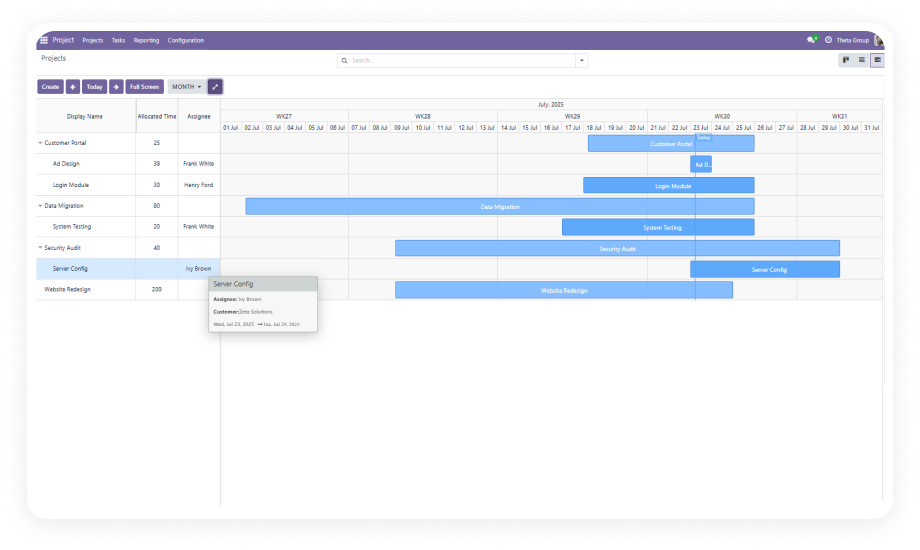
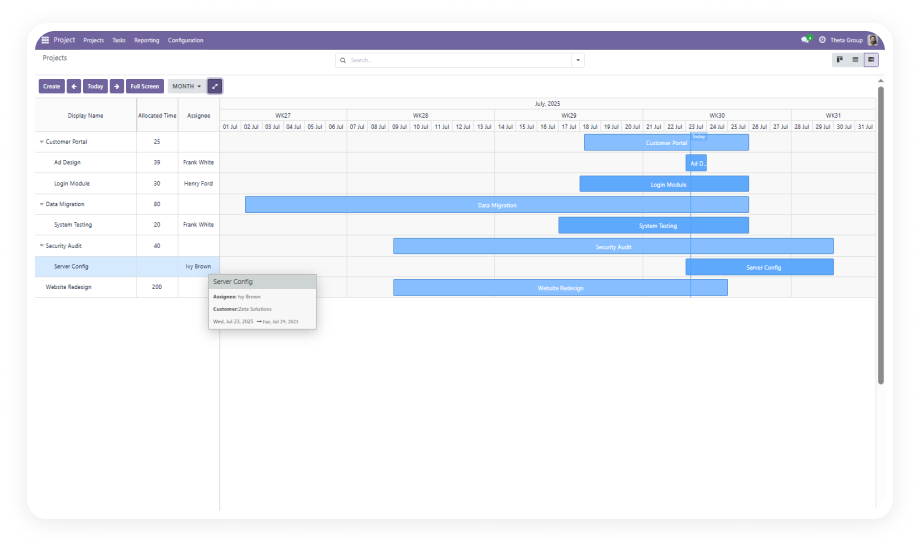
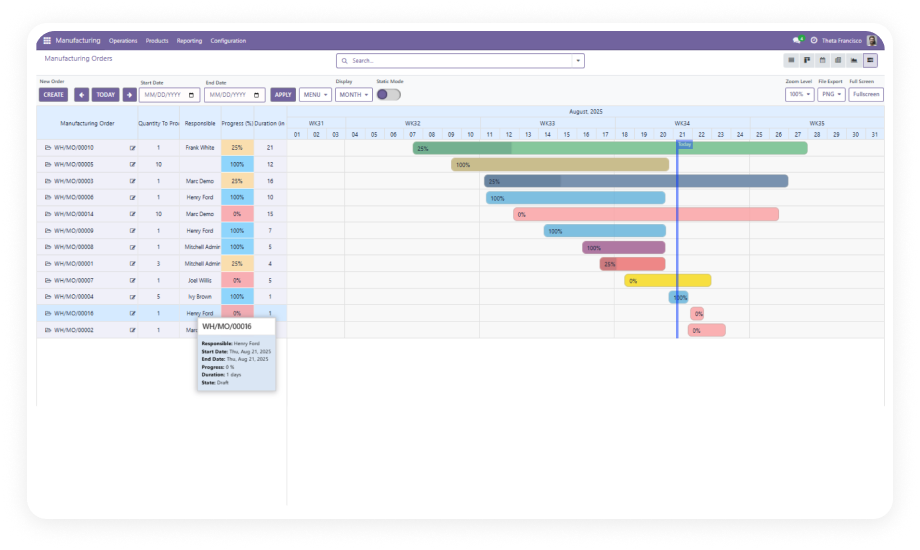
Hovering over any task bar displays a tooltip with task details, labels, and key dates. Custom date markers highlight milestones on the timeline axis.

Why it matters: dense timelines remain readable without expanding every record.

11

Custom Date Range Filtering

Define specific start and end dates to filter the Gantt view to an exact window — useful for milestone reviews, sprint boundaries, or reporting periods.

Why it matters: quarterly reviews and sprint retrospectives require viewing a precise date window.

12

Double-Click Editing with Modification Buttons

Double-click any task bar to open an inline editor with dedicated modification buttons for dates, assignments, and task details.

Why it matters: inline editing from the timeline eliminates round-trips to full task forms.

13

Facet-Based Filtering

Apply multiple filter facets simultaneously to build complex views — combine assignee, status, date range, and priority filters into a single focused timeline display.

Why it matters: project managers running cross-functional teams need compound filters.

Who Gets The Most Out Of This Module

Role
Primary Use Case
Key Outcome
Project Manager
Real-time task scheduling, progress tracking, and timeline adjustments
Rescheduling and resource rebalancing happen in the moment
PMO Director
Multi-project portfolio oversight with export for executive reporting
Stakeholder reports generated directly from the Gantt view
Operations Lead
Cross-team resource allocation and workload distribution
Visual drag-and-drop makes overallocation visible and correctable
Delivery Manager
Milestone tracking with custom date markers and deadline visibility
Critical dates surface on the timeline axis
Odoo Administrator
Installing advanced project visualization without custom development
Full-featured Gantt planning deployed in under 10 minutes
Team Lead
Filtering and grouping tasks by team member, sprint, or priority
Each team lead sees exactly their scope
Business Owner
Visual project status for client presentations and board reporting
PDF and PNG export produces shareable timelines

Versions & Documentation

Choose your Odoo version and explore interactive documentation

Native Odoo vs Zehntech Advanced Gantt App for Project

Capability
Zehntech Advanced Gantt
Native Odoo
Interactive Gantt chart in Project module
✔ Full advanced Gantt with real-time updates
Not available
PDF / PNG / Excel export
✔ All three formats with progress tracking
Not available
Zoom control (0-100%)
✔ Continuous zoom across all timeframes
Not available
Day / week / month / year switching
✔ All four time scales with navigation
Not available
Drag-and-drop resource allocation
✔ Assign and reassign visually
Not available
Schedule validation on drag
✔ Built-in constraint checking
Not available
Full-screen planning mode
✔ Distraction-free workspace
Not available
Static read-only mode
✔ Prevents accidental edits during reviews
Not available
Theme and color customization
✔ Custom colors and themes per project
Not available
Hover tooltips and date markers
✔ Contextual information on hover
Not available
Facet-based advanced filtering
✔ Multi-facet compound filters
Basic filtering only
Custom date range filtering
✔ Exact start/end date window
Not available
Double-click inline editing
✔ Edit without leaving the timeline
Form view only
Custom development required
✔ No
N/A — features do not exist

Get Started In Minutes

No development environment. No custom code. No consultant required for standard setup.

01

Purchase & Download

Purchase the Odoo Advanced Gantt App for Project Module from the Odoo App Store. A one-time payment of $198.12 gives you lifetime access.

02

Install Module

Navigate to your Odoo backend, open the Apps menu, and upload the module. Click Install — Odoo will automatically resolve dependencies including Project, Discuss, and Employees modules.

03

Configure & Activate

Open the Project module and locate the Advanced Gantt view. Configure your preferred timeframe defaults, theme colors, grouping logic, and filtering settings.

04

Go Live

Your project team can immediately begin using the Advanced Gantt view for planning, scheduling, resource allocation, and stakeholder reporting.

Technical Details & Compatibility

Requirement
Odoo Versions
Editions
Hosting
Dependencies
Third-Party Dependencies
Custom Dev Required
Install Time
Server Restart
Data Migration
Module Conflicts
License
Last Tested
Support
Details
16.0 · 17.0 · 18.0
Community · Enterprise · Odoo.sh
Odoo Online · On-Premise · Odoo.sh
Project (project), Discuss (mail), Employees (hr)
None
No
Under 10 minutes
Not required
Not required
None known
OPL-1
Odoo 18.0 — May 2026
Odoo Advanced Gantt App for Project — FAQ illustration

Frequently Asked Questions

The Advanced version includes capabilities beyond basic timeline visualization: PDF/PNG/Excel export, 0-100% continuous zoom control, theme and color customization, facet-based filtering, custom date markers, hover tooltips, static read-only mode, and built-in schedule validation. It is designed for project teams that need granular control over planning, reporting, and visual presentation.
Yes. The Advanced Gantt App supports export to PDF, PNG, and Excel formats directly from the timeline view. Exported charts include progress bars, grouping structure, and the currently visible date range — what you see is what gets exported.
Yes. The module is fully compatible with Odoo Community, Enterprise, and Odoo.sh editions. All 13 features — including drag-and-drop scheduling, export, advanced filtering, theme customization, and read-only mode — are available regardless of edition. The module supports Odoo v16, v17, and v18.
No. The module installs directly from the Odoo App Store without any code changes, server modifications, or developer mode workarounds. Standard configuration and activation are completed in under 10 minutes. Zehntech provides 90 days of dedicated technical support.
Yes. The static read-only mode prevents any accidental edits to the Gantt chart during presentations, reviews, or screen-sharing sessions. It displays the full timeline with all grouping, colors, and progress bars intact — but disables drag-and-drop, double-click editing, and modification buttons.

One-Time Purchase.
No Subscription.
No Recurring Fees.

Includes lifetime updates and 90 days of dedicated technical support.

Zehntech Odoo experts ready to help


          You have successfully subscribed to the newsletter

          There was an error while trying to send your request. Please try again.

          Zehntech will use the information you provide on this form to be in touch with you and to provide updates and marketing.