Join us at GITEX 2025! Discover our solutions at Hall 4, Booth H-30 Schedule a Meeting Today.
Automate Marketing Initiatives with Salesforce Marketing Cloud Learn More
Join us at GITEX 2024! Discover our solutions at Hall 4, Booth H-30 Book your live demo today.
Zehntech Odoo App

Odoo Gantt App for CRM — Full Pipeline Visibility in One View

See every sales opportunity, stage, and timeline in a single interactive Gantt chart inside Odoo CRM. Built for sales teams that need real-time pipeline clarity without switching tools or building custom reports.

Compatible with Odoo 16, 17, 18 & 19
Community & Enterprise Supported
Complete CRM Pipeline Timeline Visibility
No Custom Development Required
Trusted by 500+ Businesses Across 12+ Countries
$99.56
V19, 18, 17, 16
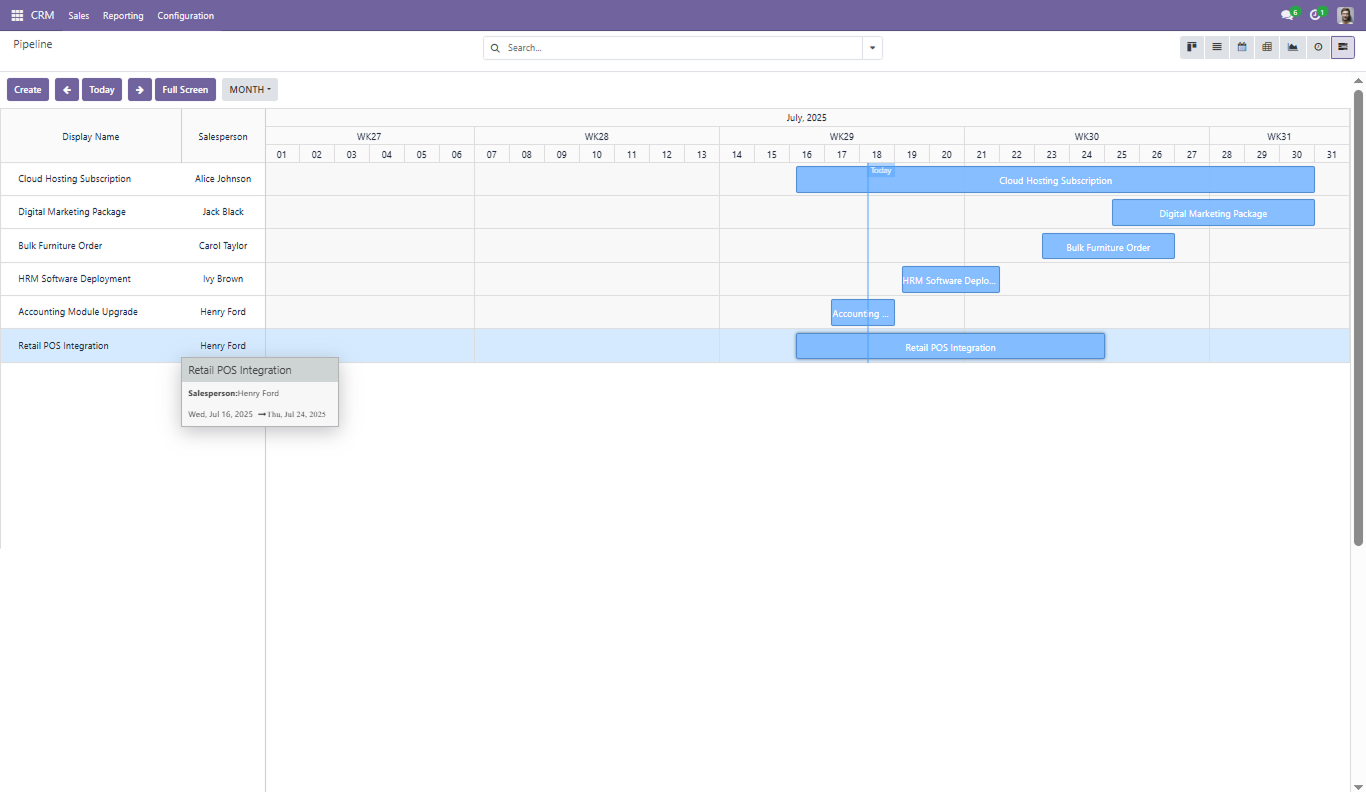
Odoo Gantt App for CRM — Interactive CRM pipeline timeline view

What is Odoo Gantt App for CRM Module?

Native Odoo CRM gives you kanban and list views — but neither shows you how your opportunities are distributed across time. The Odoo Gantt App for CRM by Zehntech Technologies adds a fully interactive Gantt chart directly inside your CRM module, letting sales managers and operations leads track every opportunity by stage, timeline, and owner in one place. It replaces manual spreadsheet timelines, disconnected project boards, and the guesswork that comes with pipeline reviews that lack temporal context.

Interactive Gantt inside Odoo CRM
Drag-and-drop timeline updates
Day, week, month, year views
Group, filter, and save favorites
Full-screen pipeline visualization

One module. Complete CRM timeline visibility. No spreadsheets required.

How the Odoo Gantt App for CRM Solves Sales Pipeline Visibility

Problem
Zehntech Odoo Gantt App for CRM Solution
No timeline view exists natively in Odoo CRM
Adds a full Gantt chart view directly inside the CRM module
Managers cannot see how opportunities are distributed over time
Day, week, month, and year views show the full temporal spread of your pipeline
Updating opportunity dates requires opening each record individually
Drag existing entries to new dates directly on the timeline
Creating pipeline records is slow and requires context-switching
Create new records with a single drag on empty timeline space or via the Create button
Full-screen pipeline reviews are impossible inside native Odoo
Toggle to distraction-free full-screen mode with one click
Grouping and filtering are limited in kanban and list views
Gantt view supports the same grouping, filtering, and favorites as all other Odoo views
Pipeline bottlenecks are invisible until deals are lost
Visual timeline immediately surfaces stage concentration and scheduling gaps
Editing opportunity details requires navigating away from the pipeline
Double-click any Gantt bar to edit details, adjust dates, and save without leaving the view

All 8 Features of the Odoo Gantt App for CRM Module

1

Access Gantt View

The Gantt view is accessible directly within the Odoo CRM module via a dedicated Gantt icon in the view switcher — no navigation away from CRM required.

Why it matters: your sales team gets a unified pipeline management interface without adopting a new tool or workflow.

2

Efficient Pipeline Creation

A dedicated Create button within the Gantt view allows users to input opportunity details and save new pipeline records without leaving the timeline context.

Why it matters: reducing context-switching during pipeline management keeps sales reps focused on selling, not navigating.

3

Full Screen Mode

With a single click, the Gantt view expands to full screen, eliminating sidebars, navigation rails, and interface noise.

Why it matters: distraction-free pipeline reviews lead to faster, more accurate decisions during sales stand-ups and leadership meetings.

4

View Options

Switch between day, week, month, and year views to match the zoom level your team needs. Previous, Next, and Today navigation buttons make it simple to move across the timeline.

Why it matters: different sales cycles demand different time horizons — a module that adapts to your cadence is more useful than one that forces a fixed view.

5

Editing and Deleting Pipelines

Double-clicking any entry on the timeline opens an edit panel where users can modify opportunity details, adjust start and end dates, and save or delete the record.

Why it matters: inline editing from the Gantt view eliminates the round-trip of opening individual records, saving time across high-volume pipelines.

6

Grouping, Filtering, and Favorites

The Gantt view supports the same grouping, filtering, and saved favorites available in Odoo's list and kanban views. Group by salesperson, stage, team, or any CRM field.

Why it matters: consistent filtering behavior across views means your team doesn't need to relearn how to find data just because the view changed.

7

Creating New Pipelines by Drag

Click and drag on any empty space in the timeline to generate a new pipeline record instantly. The start and end dates are set automatically based on the drag range.

Why it matters: this interaction pattern dramatically accelerates pipeline data entry during planning sessions where multiple records are created in sequence.

8

Updating Pipelines by Drag

Drag any existing Gantt bar to a new date range to update the opportunity's timeline. No form required — the change saves directly.

Why it matters: agile sales scheduling becomes practical when timeline adjustments take seconds rather than minutes of form-filling.

Who Gets The Most Out Of This Module

Role
Primary Use Case
Key Outcome
Sales Manager
Reviewing pipeline distribution across weeks and months
Identifies bottlenecks and timeline gaps before deals are at risk
CRM Administrator
Configuring views, filters, and groupings for sales teams
Delivers a standardized pipeline view that scales across multiple teams
Business Owner
High-level pipeline overview during quarterly reviews
Sees the full sales calendar in one screen without manual reporting
Operations Manager
Cross-team pipeline coordination and scheduling
Aligns sales timelines with delivery and capacity constraints
Sales Representative
Creating and updating personal pipeline records quickly
Spends less time on data entry, more time on selling
CTO / VP Engineering
Evaluating tool fit without custom development overhead
Validates capability and compatibility before approving purchase

Versions & Documentation

Choose your Odoo version and explore interactive documentation

Documentation coming soon for this version.

Native Odoo vs Zehntech Odoo Gantt App for CRM

Capability
Zehntech Odoo Gantt App for CRM
Native Odoo
Gantt / timeline view in CRM module
Full interactive Gantt chart
Not available
Drag-and-drop timeline updates
Drag to reschedule instantly
Not available
Create records directly on timeline
Drag to create or use Create button
Not available
Edit records inline from timeline
Double-click to edit and save
Not available — must open full record form
Full-screen pipeline view
One-click toggle
Not available
Day / week / month / year view switching
All four time scales
Not available
Timeline navigation (Prev / Next / Today)
Built-in navigation controls
Not available
Grouping in timeline view
Same as list and kanban
Not available
Filtering and saved favorites
Full filter and favorites support
Not available
Compatibility with Community edition
Community and Enterprise
CRM available — Gantt view not
Custom development required
No
N/A — feature does not exist
One-time purchase
No subscription
N/A

Get Started In Minutes

No development environment. No custom code. No consultant required for standard setup.

01

Purchase & Download

Purchase the Odoo Gantt App for CRM directly from the Odoo App Store. A one-time payment of $99.56 gives you lifetime access to the module for your chosen Odoo version.

02

Install Module

Navigate to your Odoo backend, open the Apps menu, and upload the downloaded module file. Click Install — Odoo will automatically resolve and activate all required dependencies.

03

Configure & Activate

Open the CRM module and locate the Gantt view icon in the top-right view switcher. Apply your preferred grouping and filtering settings and save them as a favorite.

04

Go Live

Your entire team can now access the CRM Gantt view immediately. No system restart required, no data migration needed. The Gantt view works alongside your existing views.

Technical Details & Compatibility

Requirement
Odoo Versions
Editions
Hosting
Dependencies
Third-Party Dependencies
Custom Dev Required
Install Time
Server Restart
Data Migration
Module Conflicts
License
Last Tested
Lines of Code
Support
Details
16.0 · 17.0 · 18.0 · 19.0
Community · Enterprise · Odoo.sh
Odoo Online · On-Premise · Odoo.sh
CRM (crm), Calendar (calendar), Contacts (contacts), Discuss (mail), Odoo Gantt App Base (zt_gantt_app_base)
None
No
Under 5 minutes
Not required
Not required
None known
OPL-1
Odoo 19.0 — May 2026
12,968
Odoo Gantt App for CRM — FAQ illustration

Frequently Asked Questions

Yes. The module installs directly through Odoo's standard app manager — no code changes, no developer mode workarounds. All configuration happens through the Odoo UI after installation. Standard setup is complete in under 5 minutes. Zehntech provides 90 days of dedicated technical support if any environment-specific issues arise during or after installation.
Yes. The Odoo Gantt App for CRM is fully compatible with both Community and Enterprise editions of Odoo. All eight features — including Gantt view access, drag-and-drop creation and updates, full-screen mode, grouping, and filtering — are available on Community. The module also supports Odoo.sh hosting in addition to Odoo Online and On-Premise deployments.
You can create a new pipeline record by clicking the Create button within the Gantt view and entering the required details. Alternatively, click and drag on any empty space in the timeline — the start and end dates are set automatically based on your drag range. Both methods create the record directly in your CRM pipeline and are immediately visible in all other Odoo CRM views.
The module supports Odoo 16.0, 17.0, 18.0, and 19.0. Each version is maintained as a separate release to ensure full compatibility with that version's native CRM module structure. The latest certified release is Odoo 19.0, tested in May 2026.
Yes. The Gantt view supports the same grouping and filtering options available in Odoo's list and kanban views — group by salesperson, stage, sales team, or any standard CRM field. Standard Odoo filters and custom domain filters apply directly to the Gantt view, and you can save any configuration as a favorite for quick access. Saved favorites persist across sessions, making it easy to standardize views for different teams or reporting needs.

Ready to Take Full Control of Your CRM Pipeline?

One-Time Purchase. No Subscription. No Recurring Fees. Your team already runs sales in Odoo CRM — the Gantt app adds the one layer that's been missing: a live, interactive timeline that shows every opportunity, every stage, and every schedule across your entire pipeline. Includes lifetime updates and 90 days of dedicated technical support.

Zehntech Odoo experts ready to help


          You have successfully subscribed to the newsletter

          There was an error while trying to send your request. Please try again.

          Zehntech will use the information you provide on this form to be in touch with you and to provide updates and marketing.