Join us at GITEX 2025! Discover our solutions at Hall 4, Booth H-30 Schedule a Meeting Today.
Automate Marketing Initiatives with Salesforce Marketing Cloud Learn More
Join us at GITEX 2024! Discover our solutions at Hall 4, Booth H-30 Book your live demo today.
Zehntech Odoo App

Return Merchandise Authorization (RMA)

End-to-End Product Returns in Odoo. Stop managing returns through email threads and spreadsheets. This module gives your customers a self-service return portal and your team a structured backend workflow — handling refunds, replacements, and repairs from one centralized system inside Odoo.

Compatible with Odoo 16, 17, 18 & 19
Customer Portal for Self-Service Returns
Automated Refunds, Replacements & Repairs
Community & Enterprise Supported
No Custom Development Required
$119.46
V19, 18
Return Merchandise Authorization (RMA) — End-to-end product return management in Odoo

What is Return Merchandise Authorization (RMA)?

Return Merchandise Authorization (RMA) is an Odoo module that enables ecommerce and retail businesses to manage product returns end-to-end — from customer-initiated requests through final resolution. It replaces disconnected email-based return handling with a structured workflow that includes a website customer portal, configurable backend stages, automated email notifications, and integrated financial processing for refunds, replacements, and repairs. Designed for operations, customer service, and finance teams managing return volumes across sales channels.

Customer Self-Service Portal
Configurable Workflow Stages
Refunds & Credit Notes
Replacements & Repairs
Analytics Dashboard

How Return Merchandise Authorization (RMA) Solves Return Management Challenges

Problem
Zehntech RMA Solution
Customers email or call to initiate returns — requests get lost or delayed
Customer portal enables self-service return submissions with type, quantity, reason, remarks, and image attachments
Return status is invisible to customers, generating repeated follow-up inquiries
Real-time status tracking in the customer portal keeps buyers informed at every stage
Returns tracked in spreadsheets or email threads with no centralized visibility
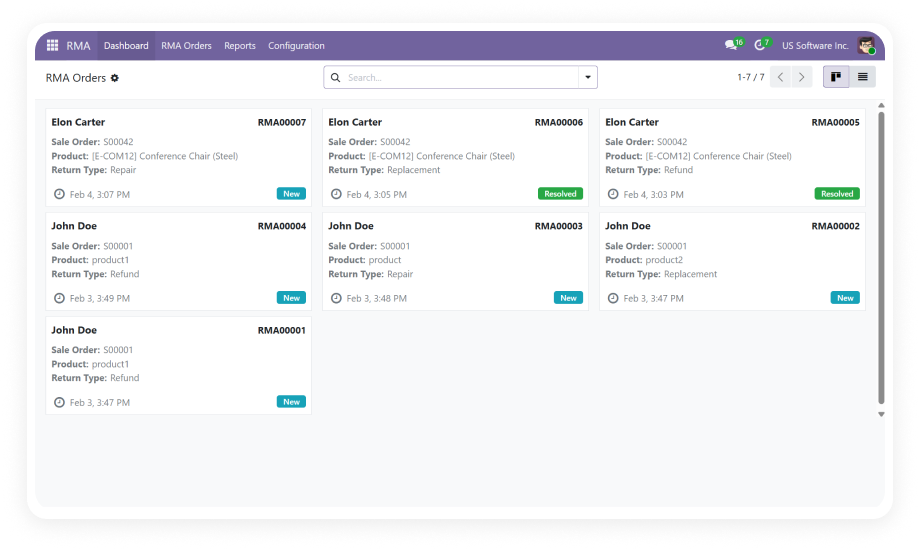
All RMA orders accessible via centralized menu with List and Kanban views
Different return types require separate manual processes across multiple modules
Unified workflow handles refunds, replacements, and repairs — all from one RMA record
No defined approval workflow — returns processed inconsistently or without authorization
Configurable stages (New, Approved, Processing, Resolved) enforce structured progression
No access control — sensitive financial actions exposed to all users
Role-based access with RMA Manager and RMA User roles ensures proper permissions
Teams miss critical return deadlines — no automated alerts
Automated email notifications trigger on stage transitions for all stakeholders
No analytics on return patterns — impossible to identify recurring product issues
Analytics dashboard provides return metrics, stage distribution, and product trends

Complete Return Lifecycle. One Unified System. Total Visibility.

1

Customer Portal for Self-Service Returns

Customers initiate return requests directly through their website account section. The portal captures return type, product quantity, reason for return, additional remarks, and image attachments.

Why it matters: Self-service submission eliminates email back-and-forth, reduces support ticket volume, and gives customers the transparency they expect from modern commerce.

2

Centralized RMA Order Management

All return orders are accessible from a dedicated RMA Orders menu with both List and Kanban view options. Teams can filter, search, and sort returns by stage, product, customer, or date.

Why it matters: Operations teams gain immediate visibility into every active return, enabling faster approval decisions and preventing requests from falling through the cracks.

3

Configurable Workflow Stages

Teams define custom workflow stages aligned with their operational requirements. Default stages include New, Approved, Processing, and Resolved — stages can be created, renamed, reordered, or removed.

Why it matters: Different businesses have different return processes, and the module adapts to your workflow rather than forcing a rigid sequence.

4

Role-Based Access Control

The module implements two security roles — RMA Manager with full privileges and RMA User with limited access for day-to-day return handling. Sensitive operations like refund generation are restricted to authorized personnel.

Why it matters: Proper access control prevents unauthorized refund processing, protects financial integrity, and ensures accountability across the team.

5

Financial Processing — Credit Notes & Refunds

When a return qualifies for a refund, the module generates credit notes directly within Odoo's invoicing system. Financial records stay synchronized with the original sale, maintaining accounting accuracy.

Why it matters: Finance teams process refunds through native Odoo accounting tools with full traceability back to the original order and RMA request.

6

Repairs & Replacements Within RMA Workflow

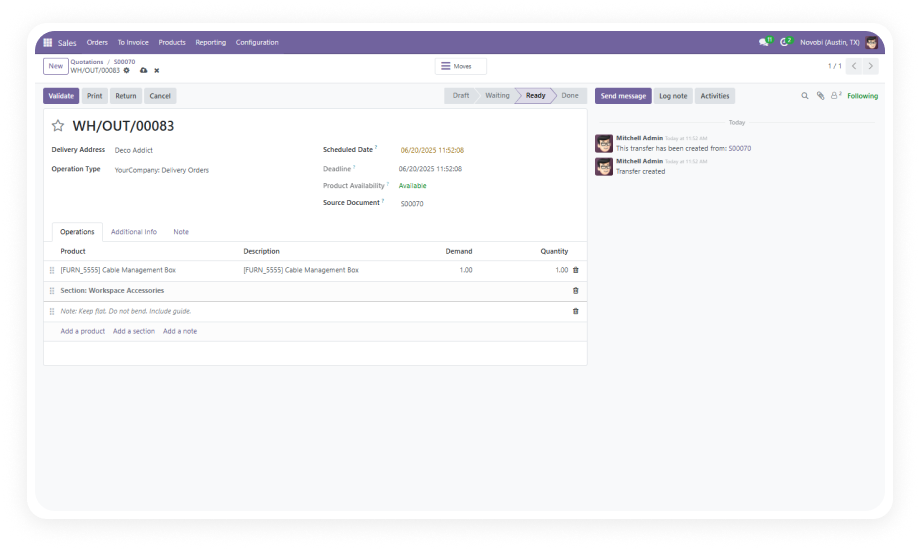
Returns requiring repair are routed to Odoo's Repair module with repair orders created directly from the RMA record. Replacement requests generate outgoing delivery orders automatically.

Why it matters: Teams handle all resolution types from one screen without switching between modules or manually creating linked records.

7

Automated Email Notifications

The module sends email alerts to customers and administrators during stage transitions and status changes. Notifications are triggered automatically as RMA orders move through workflow stages.

Why it matters: Customers receive timely updates without contacting support, and internal teams never miss a return that requires their attention at the next stage.

8

Integration with Sales, Inventory, Purchase & Repair

RMA synchronizes with Sales (order references), Inventory/Stock (incoming and outgoing shipments), Purchase (vendor returns), and Repair modules. Smart buttons on the RMA form provide direct access to linked records.

Why it matters: Return operations do not exist in isolation — the module ensures every return action is reflected across relevant Odoo modules without duplicate data entry.

9

Analytics Dashboard

Visual reporting provides return metrics including volume trends, stage distribution, product-level return rates, and processing efficiency. Teams can identify which products generate the most returns and where bottlenecks occur.

Why it matters: Data-driven insights enable teams to address root causes of returns, optimize workflow stages, and measure service level performance over time.

Who Gets The Most Out Of This Module

Role
Primary Use Case
Key Outcome
eCommerce Operations Manager
Manage high-volume product returns from online sales with structured approval workflows
Reduced return processing time with clear stage progression and centralized visibility
Customer Service Manager
Provide customers with self-service return portal and real-time status tracking
Lower support ticket volume and higher customer satisfaction through transparency
Finance Manager
Process refunds via credit notes with full traceability to original sales orders
Accurate financial records with automated credit note generation and no manual journal entries
Warehouse Manager
Coordinate incoming returned goods and outgoing replacement shipments
Synchronized stock movements with smart button links to delivery orders from RMA records
Repair Team Lead
Receive repair requests from RMA workflow and track repair order completion
Streamlined repair intake with automatic repair order creation from approved RMA requests
Quality Assurance Manager
Analyze return patterns to identify recurring product defects and supplier issues
Data-driven quality improvement using analytics dashboard with product-level return trends
Odoo Administrator
Configure RMA workflow stages, user roles, notification rules, and system settings
Fully customized return process aligned with business operations and security requirements
⚠  Not the right fit for: Businesses that do not handle product returns, do not have customer-facing eCommerce operations, or have no requirement for structured return approval workflows.

Versions & Documentation

Choose your Odoo version and explore interactive documentation

Documentation coming soon for this version.

Documentation coming soon for this version.

Interactive Documentation

Interactive Documentation

Native Odoo vs Zehntech Return Merchandise Authorization (RMA)

Capability
Zehntech RMA
Native Odoo
Dedicated customer portal for return submissions
✔ Available
Not available
Structured return form with type, quantity, reason & image uploads
✔ Available
Not available
Real-time return status tracking for customers
✔ Available
Not available
Centralized RMA Orders menu with List & Kanban views
✔ Available
Not available
Configurable workflow stages (create, rename, reorder)
✔ Fully configurable
Not available
Role-based access (RMA Manager & RMA User)
✔ Two dedicated roles
Basic (standard user groups only)
Credit note generation from RMA record
✔ Direct generation
Manual (requires separate invoicing workflow)
Replacement delivery order creation from RMA
✔ Automatic creation
Not available
Repair order creation integrated with Repair module
✔ Direct integration
Manual (requires separate repair creation)
Automated email notifications on stage transitions
✔ Automatic triggers
Not available
Return analytics dashboard with product trends
✔ Full dashboard
Not available
Configurable product return windows
✔ Available
Not available
Terms & Conditions management for returns
✔ Configurable
Not available

Get Started In Minutes

No development environment. No custom code. No consultant required for standard setup.

01

Install the Module

Purchase Return Merchandise Authorization (RMA) from the Odoo App Store and install it through the standard Odoo Apps interface. Compatible with Odoo 16, 17, 18, and 19 across Community, Enterprise, and Odoo.sh editions. Dependencies are resolved automatically.

02

Configure RMA Settings & Stages

Navigate to the RMA Settings panel to activate repair module integration, set product return windows, customize email notifications, configure Terms and Conditions, and define workflow stages with customer visibility settings.

03

Assign User Roles

Assign team members to RMA Manager or RMA User roles based on their responsibilities. RMA Managers receive full privileges for approval and financial processing. RMA Users handle day-to-day return processing with appropriate access restrictions.

04

Begin Processing Returns

Returns flow in through the customer portal or are created manually in the backend. Review incoming requests in the RMA Orders menu, advance them through your configured workflow stages, and resolve via refund, replacement, or repair.

Technical Compatibility & Requirements

Requirement
Odoo Versions
Editions
Hosting
Dependencies
Technical Name
Code Size
Custom Dev Required
License
Pricing
Support
Publisher
Details
16.0 · 17.0 · 18.0 · 19.0
Community · Enterprise · Odoo.sh
Odoo Online · On-Premise · Odoo.sh
Mail, Stock, Purchase, Repair, Website Sale, Account, Sale Management, Website
zehntech_return_merchandise_authorization
6,394 lines
No
OPL-1
One-time purchase — $119.46
odoo-support@zehntech.com (90 days included)
Zehntech Technologies Inc.
FAQ

Frequently Asked Questions

Yes. The module includes a dedicated customer portal accessible through the website account section where customers submit return requests with all required details — return type, product quantity, reason, remarks, and image attachments. Customers can also track the real-time status of their submitted returns directly through the same portal interface.
All three resolution types are handled within the unified RMA workflow. Refunds generate credit notes through Odoo's invoicing system, replacements create outgoing delivery orders, and repairs integrate with the Repair module. Each RMA record displays smart buttons linking directly to associated deliveries, credit notes, and repair orders for quick access.
The module depends on Mail, Stock, Purchase, Repair, Website Sale, Account, Sale Management, and Website modules — all resolved automatically during installation. These integrations enable synchronized operations across order references, stock movements, financial documents, repair tracking, and customer portal functionality.
Workflow stages are fully configurable. Default stages include New, Approved, Processing, and Resolved, but teams can create additional stages, rename existing ones, reorder the sequence, or remove stages that do not apply. Each stage includes a customer visibility setting that controls what status information is exposed in the customer portal.
Yes. Return Merchandise Authorization (RMA) supports both Odoo Community and Enterprise editions for versions 16, 17, 18, and 19. It can be deployed on Odoo Online, Odoo.sh, and On-Premise installations without any edition-specific limitations. The full feature set is available across all supported editions.

One-Time Purchase.
No Subscription.
No Recurring Fees.

$119.46 — includes 90 days of technical support from the Zehntech team.

Zehntech Odoo experts


          You have successfully subscribed to the newsletter

          There was an error while trying to send your request. Please try again.

          Zehntech will use the information you provide on this form to be in touch with you and to provide updates and marketing.