Join us at GITEX 2025! Discover our solutions at Hall 4, Booth H-30 Schedule a Meeting Today.
Automate Marketing Initiatives with Salesforce Marketing Cloud Learn More
Join us at GITEX 2024! Discover our solutions at Hall 4, Booth H-30 Book your live demo today.
Zehntech Odoo App

Sale Discount On Total Amount

Apply Fixed or Percentage Discounts on Total Sale Order Amount in Odoo. Manage discounts effortlessly across quotations, sales orders, and invoices with configurable approval workflows and role-based access control.

Compatible with Odoo 16, 17, 18 & 19
Community & Enterprise Supported
Configurable Approval Workflows
Multi-Language Support
No Custom Development Required
FREE
V19, 18, 17, 16
Sale Discount On Total Amount — Fixed and percentage discounts for Odoo sales orders

What This Module Delivers at a Glance

Sale Discount On Total Amount introduces a structured discount system directly within the Odoo sales workflow. Apply fixed-amount or percentage-based discounts on the total order value, set configurable limits that trigger automatic approval requests, and maintain full visibility through dedicated reporting and PDF enhancements.

Fixed & percentage discount on total sale order amount
Configurable discount approval limits
Automatic approval workflow for high-value discounts
Discount visibility on PDF reports and invoices
Real-time discount summary reports and analytics

How Sale Discount On Total Amount Solves Discount Management Challenges

Problem
Zehntech Solution
Uncontrolled discounting erodes profit margins when any salesperson can apply arbitrary discounts
Configurable global discount limits with automatic approval workflow for high-value discounts
No audit trail showing who approved what discount and why
Complete audit trail with dedicated "Waiting for Discount Approval" state and manager notifications
Finance discovers unexpected discount amounts only at invoicing stage
Real-time discount summary reports and analytics for proactive monitoring
Manual calculation errors waste time recalculating and verifying figures
Automated fixed or percentage discount calculations applied directly to order totals
High-value discounts bypass management review
Role-based access with dedicated Discount Approval Manager role for authorization control
Discount details unclear on customer-facing documents
Full discount visibility on PDF reports showing original amount, discount, and final total
Processing individual discount approvals takes too long
Bulk discount operations and batch approvals for high-volume efficiency
International teams struggle with language barriers
Multi-language support for German, French, Spanish, and Japanese

Key Features

1

Flexible Discount Types — Fixed or Percentage

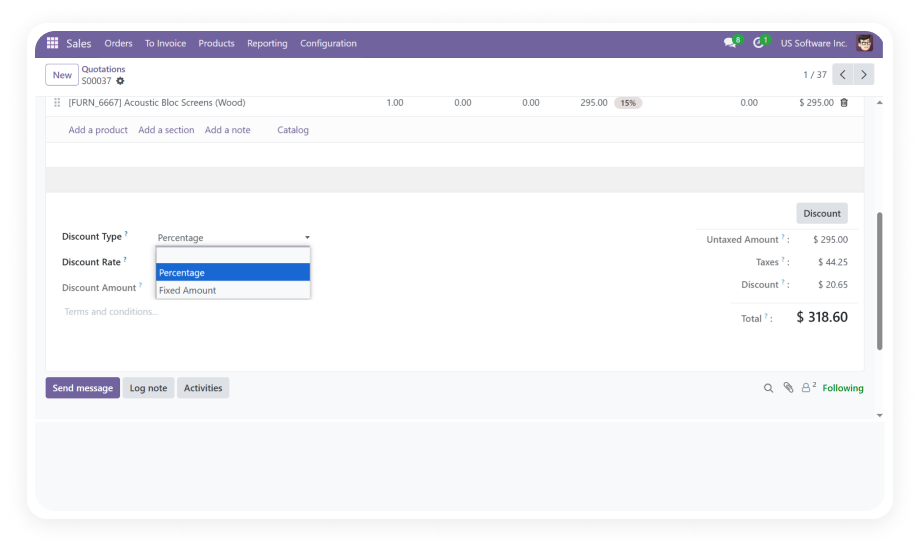
Apply discounts as a fixed monetary amount or as a percentage of the total sale order value. Choose the discount method that best fits each transaction scenario directly from the quotation or sales order form.

Why it matters: Sales teams gain flexibility to structure deals using the discount format that makes the most sense for each customer negotiation.

2

Configurable Global Discount Limit

Set a maximum discount threshold at the system level. When a salesperson attempts to apply a discount exceeding this configured limit, the order automatically transitions to a "Waiting for Discount Approval" state.

Why it matters: Management retains financial control by ensuring high-value discounts never bypass review, protecting profit margins while empowering sales teams.

3

Approval Workflow with Dedicated State

Orders requiring discount approval enter a distinct "Waiting for Discount Approval" status. Designated discount approval managers receive notifications and can approve or reject requests directly within the system.

Why it matters: The structured workflow eliminates back-channel discount approvals, creating a complete audit trail and faster response times for the sales team.

4

Bulk Discount Operations and Batch Approvals

Apply discounts to multiple order lines simultaneously and process batch approvals for pending discount requests. Filter orders by discount approval status to efficiently manage the approval queue.

Why it matters: High-volume sales operations save significant time by processing discount requests in bulk rather than handling each order individually.

5

Discount Visibility on PDF Reports

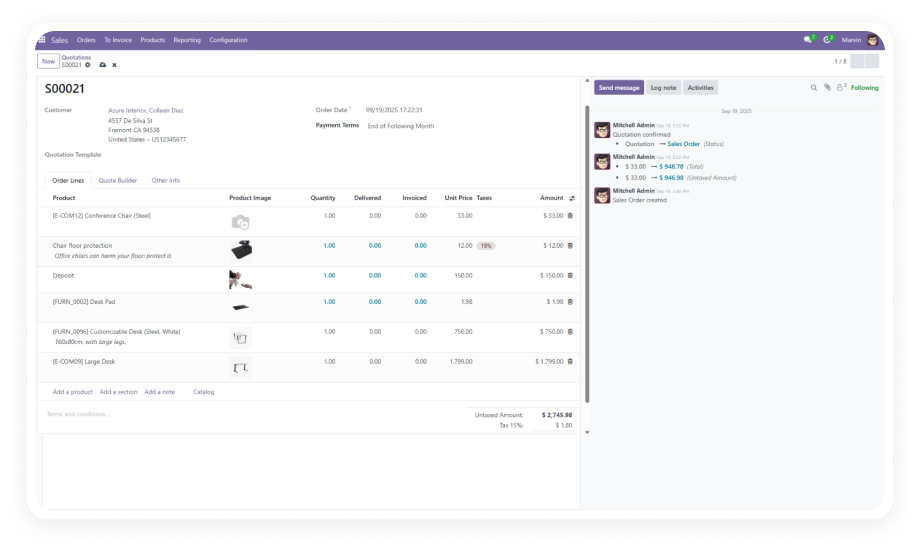
Discount details appear clearly on printed quotations, sales orders, and invoices — showing the original amount, applied discount, and final total.

Why it matters: Customers receive professional, transparent documentation that clearly communicates the value they are receiving, building trust and reducing billing disputes.

6

Real-Time Discount Summary Reports

Access comprehensive discount reporting with metrics showing total discounts given, user-wise breakdowns, and analytical summaries. Monitor discount patterns and identify trends across the sales organization.

Why it matters: Finance and sales leadership gain data-driven insights into discounting behavior, enabling better policy decisions and more accurate revenue forecasting.

7

Role-Based Access Control for Discount Approvals

Assign the Discount Approval Manager role to specific users who are authorized to approve discount requests exceeding the configured limit. Standard sales users can apply discounts within their authorized range.

Why it matters: Segregation of duties ensures discount governance aligns with organizational hierarchies, preventing unauthorized margin erosion while maintaining operational efficiency.

8

Multi-Language Support

The module includes translations for German, French, Spanish, and Japanese, ensuring international teams can work with discount workflows in their preferred language.

Why it matters: Global organizations deploy a single discount management solution across all regional offices without language barriers impeding adoption or accuracy.

Who Benefits from This Module

Role
Primary Use Case
Key Outcome
Sales Representative
Apply quick fixed or percentage discounts on quotations within authorized limits
Faster deal closure without waiting for approvals on standard discounts
Sales Manager
Review and approve/reject discount requests exceeding the configured threshold
Controlled margin protection with streamlined approval process
Finance Controller
Monitor discount summary reports and analyze discount trends
Data-driven oversight of discounting impact on revenue
Operations Manager
Configure global discount limits and assign approval roles
Enforce consistent discount policies across the sales team
Customer Service Agent
Apply post-sale adjustments with proper discount documentation
Professional, transparent communication on adjusted invoices
Regional Director
Manage multi-language teams using localized discount workflows
Unified discount governance across international offices
⚠  Not the right fit for: Organizations that do not need discount approval controls or only use line-level discounts without total order discount requirements.

Versions & Documentation

Choose your Odoo version and explore interactive documentation

Interactive Documentation

Interactive Documentation

Interactive Documentation

Interactive Documentation

Why Choose Sale Discount On Total Amount

Capability
Zehntech Module
Manual / Native Odoo
Discount on total order amount
✔ Fixed or percentage on total
Line-level only
Approval workflow
✔ Automatic trigger on threshold
Not available
Configurable discount limits
✔ Global limit configuration
Not available
Discount approval state
✔ Dedicated "Waiting for Approval" state
Not available
Bulk discount operations
✔ Batch apply and approve
Not available
Discount on PDF reports
✔ Full breakdown with original, discount, final
Basic line discount
Discount summary reporting
✔ Real-time analytics and user-wise reports
Not available
Role-based approval access
✔ Dedicated Discount Approval Manager role
Not available
Multi-language discount UI
✔ German, French, Spanish, Japanese included
Depends on base translations

Get Started In Minutes

No development environment. No custom code. No consultant required for standard setup.

01

Install the Module

Download from the Odoo App Store and install zehntech_sale_discount_on_total_amount on your Odoo instance. The module requires Sales, Invoicing, and Discuss modules as dependencies — ensure these are already active.

02

Configure Discount Limits

Navigate to the Sales configuration settings and set the global discount limit threshold. This defines the maximum discount percentage or amount that sales users can apply without requiring management approval.

03

Assign Approval Roles

Designate users as Discount Approval Managers through the access rights configuration. These authorized users will receive notifications and have the ability to approve or reject discount requests that exceed the configured limit.

04

Apply Discounts on Sales Orders

Sales team members can now apply fixed or percentage discounts on the total amount of any quotation or sales order. Discounts within the limit are applied instantly; those exceeding the limit automatically enter the approval workflow.

Technical Specifications

Requirement
Technical Name
License
Odoo Versions
Dependencies
Deployment
Lines of Code
Languages
Custom Dev Required
Pricing
Support
Publisher
Details
zehntech_sale_discount_on_total_amount
OPL-1
16.0 · 17.0 · 18.0 · 19.0
Sales (sale_management), Invoicing (account), Discuss (mail)
Odoo Online · Odoo.sh · On-Premise
918
English, German, French, Spanish, Japanese
No
FREE — Lifetime updates included
Zehntech Technologies Inc.
Sale Discount On Total Amount — FAQ illustration

Frequently Asked Questions

You can apply either a fixed monetary amount discount or a percentage-based discount on the total sale order value. Both discount types work on quotations, sales orders, and are reflected on the corresponding invoices. The discount is applied to the overall order total, not limited to individual order lines.
When a salesperson applies a discount exceeding the configured global limit, the order automatically moves to a "Waiting for Discount Approval" state. Designated Discount Approval Managers receive a notification and can approve or reject the request within the system. Once approved, the order proceeds normally; if rejected, the salesperson is notified and can adjust the discount amount.
Yes, the module includes a dedicated Discount Approval Manager role that you assign to specific users. Only users with this role can approve or reject discount requests that exceed the configured threshold. Standard sales users retain the ability to apply discounts within the permitted limit without any approval requirement.
Yes, all PDF quotations, sales orders, and invoices display the discount details clearly. The printed documents show the original amount, the applied discount value, and the final total after discount. This provides transparent documentation for customers and internal records.
The module supports multi-language environments with built-in translations for German, French, Spanish, and Japanese. It is compatible with Odoo Online, Odoo.sh, and On-Premise deployments across versions 16 through 19. Discount limits and approval roles can be configured per your organizational requirements.

One-Time Download.
No Subscription.
No Recurring Fees.

Free module with lifetime updates. Take control of your sales discount process with automated approval workflows, configurable limits, and full reporting visibility.

Zehntech Odoo experts ready to help


          You have successfully subscribed to the newsletter

          There was an error while trying to send your request. Please try again.

          Zehntech will use the information you provide on this form to be in touch with you and to provide updates and marketing.