Join us at GITEX 2025! Discover our solutions at Hall 4, Booth H-30 Schedule a Meeting Today.
Automate Marketing Initiatives with Salesforce Marketing Cloud Learn More
Join us at GITEX 2024! Discover our solutions at Hall 4, Booth H-30 Book your live demo today.
Zehntech Odoo App

User Warehouse Restriction

Restrict Warehouse Access by User in Odoo — Free Module for Secure Inventory Control. Control which users can access specific warehouses in Odoo and prevent unauthorized operations across your multi-warehouse environment.

Compatible with Odoo 16, 17, 18 & 19
Community & Enterprise Supported
User-Level & Group-Based Warehouse Access Control
Comprehensive Audit Log for Compliance
100% Free — No License Fee
FREE
V19, 18, 17, 16
User Warehouse Restriction — Role-based warehouse access control in Odoo

What Is the User Warehouse Restriction Module for Odoo?

The User Warehouse Restriction module for Odoo allows administrators to assign specific warehouses to individual users or user groups, ensuring that each team member can only access and operate within their designated warehouses. When a user attempts to access an unauthorized warehouse, the system displays a clear error notification — maintaining strict data security and operational control without disrupting workflows.

Multi-warehouse businesses with segmented inventory teams
Regulated industries requiring documented access controls
Franchise operations isolating location data per branch
Organizations onboarding or offboarding warehouse staff
Any Odoo setup needing role-based inventory access

Why Multi-Warehouse Businesses Need User-Level Access Control

Problem
User Warehouse Restriction Solution
All users see all warehouses
Users see only their assigned warehouses
No restriction on operations
System blocks unauthorized access with clear notifications
Accidental cross-warehouse errors
Enforced restrictions across all inventory operations
No audit trail for compliance
Full log with timestamps, user details, and action records
Per-user manual configuration in code
Admin UI with group-based assignment in minutes
Custom code breaks at scale
Optimized for 1,000+ users and warehouses
Manual documentation for regulators
Built-in audit log ready for ISO and regulatory review
No temporary access management
Real-time grant and revoke — changes take effect instantly

Key Features of User Warehouse Restriction

1

User-Level Warehouse Assignment

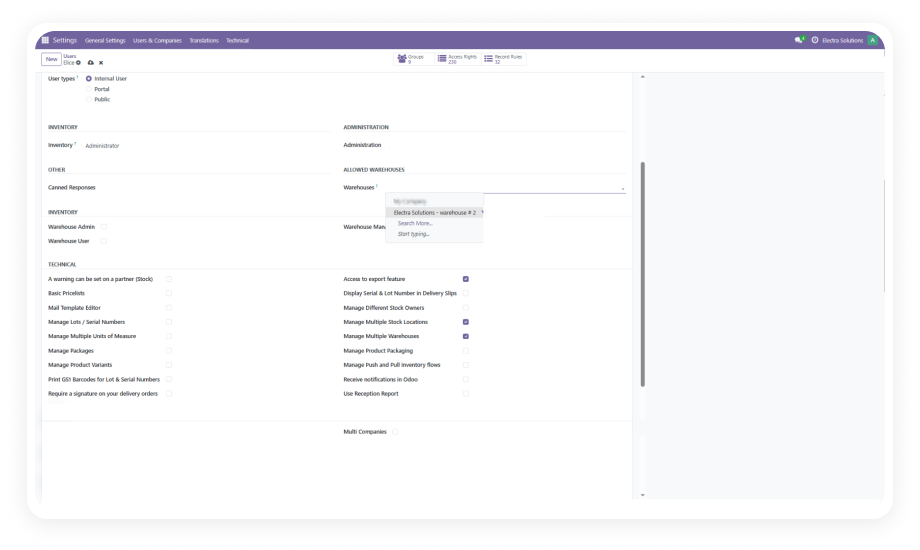
Assign one or multiple specific warehouses to each Odoo user directly from their user profile. Only assigned warehouses appear in dropdown selections and inventory views.

Why it matters: Eliminates accidental access to unauthorized warehouse data and ensures users only see operations relevant to their assigned facilities.

2

Group-Based Warehouse Permissions

Define warehouse access at the user group level, enabling administrators to manage permissions for entire departments or teams simultaneously rather than configuring each user individually.

Why it matters: Reduces administrative overhead during onboarding or team restructuring — assign a group and permissions cascade automatically.

3

Real-Time Dynamic Configuration

Modify, add, or revoke warehouse permissions instantly through a user-friendly interface. Changes take effect immediately without requiring system restarts or cache clearing.

Why it matters: Supports agile operations where temporary access for seasonal workers, cross-training, or emergency coverage must be granted and revoked quickly.

4

Unauthorized Access Error Handling

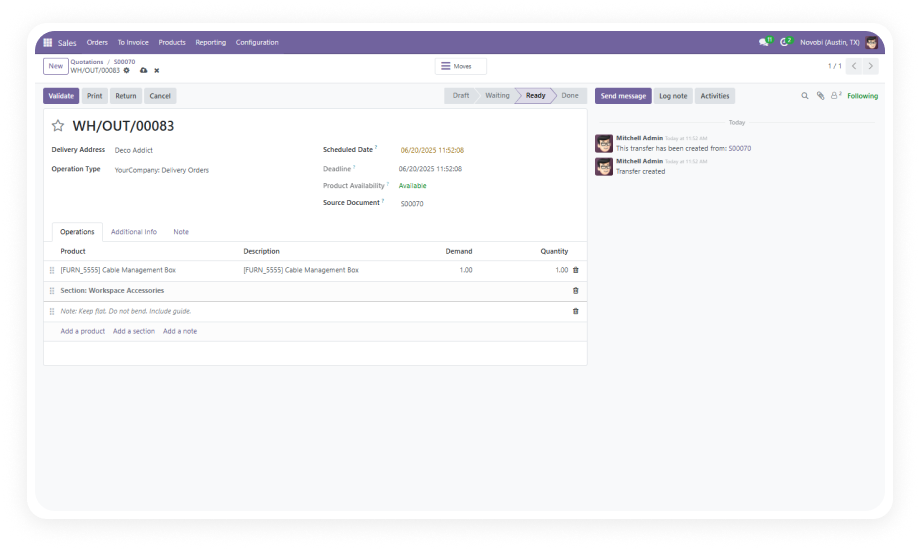
When users attempt to access a restricted warehouse, the system displays a clear, informative error notification explaining the restriction — rather than silently hiding data or crashing.

Why it matters: Provides transparency about access boundaries, reducing support tickets and confusion while maintaining security enforcement.

5

Comprehensive Audit Log

Every modification to warehouse permissions — assignments, revocations, and changes — is recorded with timestamps, user details, and action descriptions for full traceability.

Why it matters: Meets compliance and audit requirements with documented proof of access control changes, essential for regulated industries and ISO certifications.

6

Performance-Optimized for Scale

Engineered to handle large-scale operations with up to 1,000 users and warehouses without degrading system performance or introducing latency in inventory operations.

Why it matters: Enterprise organizations with complex multi-warehouse networks can implement access controls without sacrificing Odoo's responsiveness.

Who Benefits from User Warehouse Restriction?

Role
Primary Use Case
Key Outcome
Warehouse Manager
Restrict staff to their assigned physical facility
Prevent cross-warehouse errors in picking and shipping
IT Administrator
Enforce role-based access policies across inventory
Centralized permission management with audit trails
Operations Director
Segment regional warehouse data by team
Clean reporting and accountability per location
Compliance Officer
Document warehouse access controls for audits
Ready-made audit logs for ISO and regulatory reviews
HR Manager
Automate warehouse access during onboarding/offboarding
Group-based permissions sync with employee lifecycle
Franchise Owner
Isolate franchise location data from other branches
Each franchise sees only their own inventory and operations
âš   Not the right fit for: Single-warehouse businesses where all staff should access the same inventory, or organizations where no differentiation in warehouse visibility is needed.

Versions & Documentation

Choose your Odoo version and explore interactive documentation

Without This Module vs. With User Warehouse Restriction

Capability
With User Warehouse Restriction
Without This Module
Warehouse Visibility
✔ Users see only assigned warehouses
All users see all warehouses
Access Enforcement
✔ System blocks unauthorized access
No restriction on operations
Permission Management
✔ Admin UI with group-based assignment
Manual per-user configuration in code
Error Feedback
✔ Clear notification messages
Silent failures or system errors
Audit Trail
✔ Full log with timestamps and user details
No access change records
Scalability
✔ Optimized for 1,000+ users/warehouses
Custom code breaks at scale
Time to Configure
✔ Minutes through Odoo interface
Hours of developer work
Compliance Readiness
✔ Built-in audit log for regulators
Manual documentation required
Temporary Access Grants
✔ Real-time, instant effect
Not possible without developer involvement

How to Install and Configure User Warehouse Restriction

No custom development. No system restart. Enforces warehouse access control in minutes.

01

Install the Module

Download from the Odoo App Store or install directly from your Odoo instance. Search for "User Warehouse Restriction" and click Install. Dependencies (Inventory and Discuss) auto-install if not already active.

02

Assign Warehouses to Users

Go to Settings > Users & Companies > Users. Open a user profile, locate the warehouse restriction field, select one or more warehouses, and save the configuration.

03

Configure Group-Based Permissions

For bulk management, navigate to user groups and assign warehouse permissions at the group level. All users within the group inherit access automatically — ideal for department-wide assignment.

04

Verify and Monitor

Log in as a restricted user to confirm only assigned warehouses are visible. Review the audit log under module settings to verify all permission changes are recorded correctly.

Technical Details & Compatibility

Requirement
Technical Name
Odoo Versions
Editions
Hosting
Dependencies
Third-Party Dependencies
Custom Dev Required
Lines of Code
Install Time
Server Restart
Data Migration
License
Support
Updates
Details
zehntech_user_warehouse_restriction
16.0 · 17.0 · 18.0 · 19.0
Community · Enterprise · Odoo.sh
Odoo Online · On-Premise · Odoo.sh
Inventory (stock) · Discuss (mail)
None
No
329
Under 5 minutes
Not required
Not required
OPL-1
Lifetime updates included
User Warehouse Restriction — FAQ illustration

Frequently Asked Questions

Yes, you can assign one or multiple warehouses to each user. Users will have access to all their assigned warehouses simultaneously. There is no upper limit on the number of warehouses assigned per user.
The system displays a clear error notification explaining the restriction. The user is prevented from completing any operation in that warehouse, and the access attempt is logged for administrator review.
Yes. The module is compatible with Odoo's multi-company architecture. Warehouse restrictions operate independently within each company context, and administrators can manage permissions per company as needed.
No. The module does not alter existing stock moves, transfers, or inventory data. Once configured, restrictions apply only to future operations and views. Users without warehouse assignments need to be configured before restrictions take effect.
Yes. Administrators can add or remove warehouse access in real-time. Changes take effect immediately without requiring system restarts. The audit log records all permission changes for accountability, including temporary grants and revocations.

Secure Your Odoo Warehouses.
Get User Warehouse Restriction Free.

Take control of who accesses what in your multi-warehouse Odoo environment. Install today and enforce role-based warehouse security in minutes. Includes lifetime updates and dedicated technical support.

Zehntech Odoo experts ready to help


          You have successfully subscribed to the newsletter

          There was an error while trying to send your request. Please try again.

          Zehntech will use the information you provide on this form to be in touch with you and to provide updates and marketing.